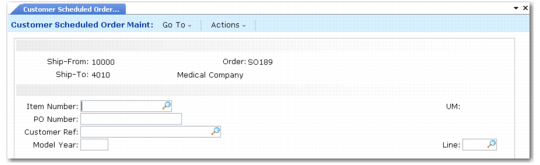
Order Line Item Identification Frame
Use the following frame to identify items in the scheduled order.
Customer Scheduled Order Maintenance, Order Line Item Identification Frame
The following four fields uniquely identify a scheduled order detail record:
Item Number
Enter the item code for this order line. Inventory item codes must be defined previously in Item Master Maintenance (1.4.1). If you specify a customer item, the system accesses the corresponding internal item number and displays it in the Item Number field.
PO Number
Enter the customer purchase order for this line item record. You can leave this field blank.
Note: You cannot specify the same item and PO number on a scheduled order for the same ship-from site and ship-to customer.
Customer Ref
The value you enter in this field depends on the value of Customer Ref is Customer Item in the scheduled order header.
If Customer Ref is Customer Item is Yes, you must provide a valid customer item number. When a customer item defaults, it corresponds to the internal item number entered in Item. Alternatively, if you enter a customer item in Item, then that customer item defaults here. Any value you enter here is validated against existing customer item numbers.
If Customer Ref is Customer Item is No, optionally enter any customer reference. This value is not validated.
Model Year
Optionally enter a model year for the scheduled order line item.
UM
Enter the unit of measure for the item. For inventory items, this defaults from the item master record.
Line
Enter the line number that uniquely identifies a scheduled sales order line item. The system assigns line item numbers automatically when you add new line items. Use this number to access and modify an existing line item.