Creating a Schedule Release
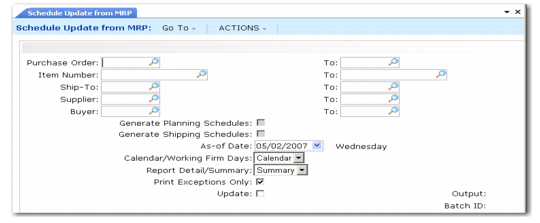
Use Schedule Update from MRP (5.5.3.1) to create releases of supplier schedules. A release is a set of item quantities and requirement dates identified by a release ID number, which is then sent to your supplier.
Schedule Update from MRP generates releases based on the following:
• Planned purchase orders generated by MRP based on item requirements and due dates
• Item planning data, such as safety days
• Scheduled order percentages defined for items and ship-to sites in Scheduled Order MRP % Maint (5.5.1.17) or Subcontract Order MRP Maint (5.5.1.21)
• Scheduled order data from Supplier Scheduled Order Maintenance (5.5.1.13)
• Supplier calendars, defined in Supplier Calendar Maintenance (5.5.1.1)
Note: MRP planned orders for a co-product/by-product or a base process item cannot be used to update supplier schedules.
You can run Schedule Update from MRP for combinations of items, suppliers, scheduled orders, receiving sites, or buyers.
Because you are sending order quantities and planning data to your supplier, you define requirements as either firm or planned quantities. You can send all firm, all planned, or some of both. The Firm Days field on the scheduled order line item determines the order status.
You can also export the firm or planned portions of schedules (or both parts) to an external application using Schedule Update from MRP. Or you can use Export MRP Demand (5.5.3.2) to export planned and firm schedules directly from Schedule Update from MRP.
Note: This export is not the same as the export done using functions on the EDI eCommerce menu. Export MRP Demand creates business object documents (BODs). See User Guide: QAD EDI eCommerce.
Schedule Update from MRP (5.5.3.1)
Effect of Firm Days
The schedule update process automatically applies firm status to any requirements within the time fence set by the Firm Days field. All planned orders outside this period are approved, but maintained as planned requirements. This means that they are not seen by MRP as sources of supply and can be replanned.
Any unreceived firm requirements from one release are automatically carried forward to the next release during schedule update. These quantities are maintained as a prior cumulative requirement.
When you run MRP again, it plans or replans orders for scheduled requirements that are now within its planning horizon. Executing Schedule Update from MRP adds the planned orders, firming any that now fall within the Firm Days period.
If requirements change, you may need to manually adjust the firm quantities in Schedule Maintenance (5.5.3.3).
• If increased demands create additional requirements within the Firm Days period, MRP creates planned orders in that period. When you regenerate the schedule, the system does not select any planned orders falling within the firm period covered by a schedule. The warning message Order not selected displays.
• If requirements decrease due to decreased demands, MRP sees the supply as excessive and produces action messages.
You can avoid rescheduling problems due to fluctuations in short-term MRP data by setting Firm Days to zero on scheduled order lines. When Firm Days is zero:
• Firm requirements are not generated or carried forward from one release to the next.
• The system sets Prior Cum Req equal to Prior Cum Received.
• Each schedule release is based on the most recent MRP planned-order data available.
Use a positive number in the field if you have an agreement with this supplier that requirements will not change within a specified time period.
Important: To avoid schedule discrepancies between printed bucketed schedules and the actual required schedule, firm days should never exceed the number of days specified in the Schedule Days field.
Schedule Adjustment for Work Days
On receipt of your scheduled release, the supplier is responsible for recalculating its own plans. If, as a customer, you do not set up a supplier calendar, or if you use a ship/delivery pattern that permits shipments on any day of the week, your schedule update process may create requirements on days when you or the supplier are closed.
The supplier would then reschedule the quantity requirement to the next earlier date when the supplier is open and you are open to receive it.
Quantity and Date Calculations
Schedule Update from MRP performs the following calculations:
1 Back-schedule for safety days from planned order due dates.
2 Back-schedule for Ship/Delivery Pattern from safety day schedule.
3 Back-schedule for Supplier Calendar from ship/delivery schedule.
4 Allocate planned order quantities by percentage to this supplier (from Scheduled Order MRP% Maintenance) to create new quantities by planned order.
5 Revise quantities to Standard Pack Quantity multiple.
6 Display any unfulfilled prior cumulative requirements.
7 Create release, assigning a Release ID, and determine whether quantities are firm (within the Firm Days time fence) or planned. See
Generate Date Based Release ID.
8 Display fabrication and raw authorization quantities and start and end dates.
With the Report Detail/Summary field set to Detail, an audit report of the entire calculation is printed. Execute the function with Update set to No to preview the results.
When Update is Yes, selected planned orders are automatically approved and a release is created. This can then be edited in Schedule Maintenance or sent to your supplier.