Supplier Schedules
Supplier schedules supports generation of supplier releases, incorporating a set of scheduled receipt dates and quantities.
Introduction to Supplier SchedulesDefines supplier schedules and explains their characteristics.
Setting Up Supplier SchedulesExplains what data and which parameters are necessary to use supplier schedules.
Processing Supplier SchedulesDescribes the three steps necessary to process a supplier schedule.
Receiving Scheduled OrdersIllustrates how receipts and documents are used to deal with scheduled order processing.
Deleting Supplier Scheduled OrdersDescribes how to delete and archive scheduled orders using Closed PO Delete/Archive.
Introduction to Supplier Schedules
Supplier schedules are cumulative, schedule-driven purchase orders with multiple line items from which releases of requirements and due dates are issued. They are typically used by companies with long-term supplier contracts that require regular weekly or daily deliveries. The schedules specify, for the near term, dates and even hours of deliveries. But they also inform MRP and the supplier about long-term plans.
The header and trailer of a supplier schedule resemble those of a normal purchase order for a single line item with multiple delivery dates. However, the line-item section of a supplier schedule combines information for:
• Short-term shipping schedule with exact quantities and delivery instructions
• Long-term planning schedule that shows upcoming orders and authorizes the supplier to buy raw materials or make subassemblies
Note: If you have the optional Supplier Shipping Schedules module you can generate separate supplier planning and shipping schedules, rather than one schedule that combines both. For details, see
Supplier Shipping Schedules.
As with a regular purchase order, the items listed in a supplier schedule are seen by the system as supply. You can also receive items against a supplier schedule.
Supplier schedules are used for multiple deliveries from a supplier who needs to adjust production to accommodate your orders.
Example: A manufacturer of circuit boards needs blank boards supplied each week. The manufacturer knows exact needs for the next few weeks and approximate needs for the next 12 months. The supplier of these circuit board blanks needs this information to place orders for raw materials and plan production. Supplier schedules are needed to set up delivery.
The Supplier Schedules Menu (5.5) includes the following:
• Supplier Schedule Setup Menu (5.5.1)
• Supplier Schedule Processing Menu (5.5.3)
• Supplier Receipts Processing Menu (5.5.5)
• Supplier Shipping Schedules (5.5.7)
See User Guide: QAD Purchasing for a discussion of Purchasing.
Schedule Order Characteristics
Summary of Purchase Order Characteristics contrasts the characteristics of scheduled orders with other kinds of purchase orders.
Summary of Purchase Order Characteristics
|
|
Supplier Schedules
|
Purchase Orders
|
Blanket Orders
|
|
Delivery Dates
|
Multiple
|
Single for order/item
|
Multiple
|
|
Seen by MRP
|
Yes
|
Yes
|
No
|
|
Receipts
|
Yes
|
Yes
|
No
|
|
Duration
|
Medium/long-term
|
One time
|
Short/medium
|
|
Elements
|
Header
Planning schedule
Shipping schedule
Trailer
|
Header
Line Items
Trailer
|
Header
Line Items
Trailer
POs
|
Effective Dates
The system considers effective dates when it processes schedules. It determines whether a scheduled order line is active before assigning demands to the schedule release that it creates for the order or supplier.
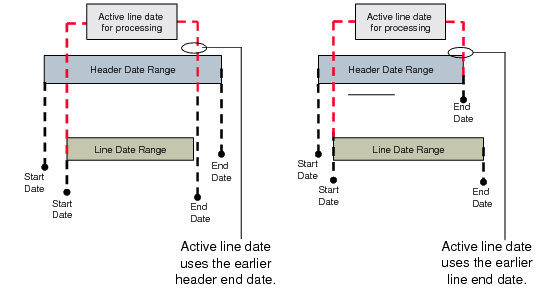
Scheduled orders have both header start and end effective dates and line start and end effective dates. The header start effective date determines when the order is active, while the header end effective date determines when the order is inactive. The system uses the line start date and the earlier of the header or line end date as the active line date range when processing line items. This is illustrated in
Active Line Dates.
Active Line Dates
The system prohibits the following if the line item is inactive:
• MRP % allocation
• Schedule processing
• Shipper creation
• Receipt processing, including ASNs
The system also prohibits you from deleting or archiving scheduled orders if they are active.
You can return items for inactive lines. To make a line active again to continue processing, change the scheduled order header end date to a later date in Supplier Scheduled Order Maintenance (5.5.1.13).
Two reports let you display scheduled order data based on effective date ranges:
• Scheduled Order Report (5.5.1.15)
• 5.5.1.12
• Order End Effective Report (5.5.1.16)
Use Scheduled Order Report to display scheduled order lines that are active during a specified time period. The system displays scheduled order lines that have an active date range that falls within the date range you specify or overlaps the date range you specify.
Use Order End Effective Report to display scheduled orders and lines that close during a specified time.
Zero Schedules
When there is no demand for an item, you can create a zero-quantity schedule as a way of informing suppliers that an item is not needed. Zero schedules have a single-line order with a quantity of zero to indicate the item is no longer required from the supplier. You can create a zero-quantity schedule when:
• The prior schedule has zero net requirements.
• A record exists in Scheduled Order MRP % Maintenance (5.5.1.17) or Subcontract Order MRP % Maintenance (5.5.1.21).
• The number of zero schedules sent by the system does not equal the number specified in Supplier Scheduled Order Maintenance (5.5.1.13).
Note: The system count of zero schedules does not include zero schedules you manually create in schedule maintenance programs.
You set the number of zero schedules the system generates for a supplier when an order is active but no demand exists in Supplier Schedule Control (5.5.1.24). This value defaults to the same-named field in Supplier Scheduled Order Maintenance (5.5.1.13).