Resetting Cumulative Quantities
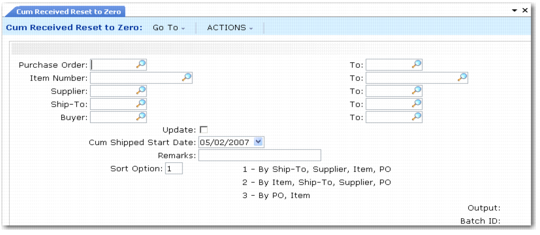
Use Cum Received Reset to Zero (5.5.5.14) to reset the cumulative totals for scheduled orders and generate a report showing which orders were reset. You can reset one or a range of scheduled orders. Select scheduled orders for reset using order number, item number, supplier, ship-to, or buyer.
Cum Received Reset to Zero (5.5.5.14)
You can run the cumulative reset function without actually resetting a scheduled order’s cumulative totals. This gives you an opportunity to review the scheduled orders being reset before actually changing the database. Do this by setting Update to No. When Update is Yes, the cumulative totals are reset. This action cannot be undone.
When you reset the totals, you can also enter a new cum shipped start date. This new date replaces the order’s current cum start date specified in Supplier Scheduled Order Maintenance (5.5.1.13).
Typically, you reset cumulative orders to zero when the contract related to the order is renegotiated. Scheduled order pricing is usually based on an agreed-upon total cumulative order quantity. When you renegotiate the price, you normally renegotiate a new total for the cumulative order quantity.