Defining Scheduled Order Defaults for Specific Suppliers
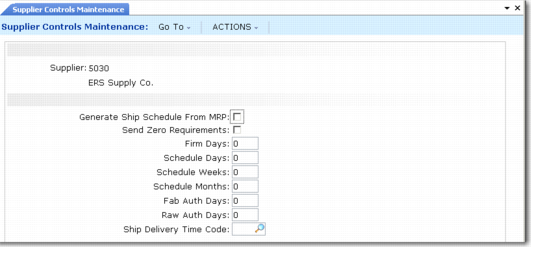
Use Supplier Controls Maintenance (5.5.7.4) to define scheduled order defaults for individual suppliers. Most of the values you enter here default to fields in the order line data frame of Supplier Scheduled Order Maintenance (5.5.1.13).
You should define scheduled order defaults to avoid repetitive entry of the same supplier shipping and authorization information when creating scheduled orders. However, you only need to define supplier-specific control records for suppliers with special processing requirements. When you create a scheduled order for a supplier that does not have an associated set of defaults in Supplier Controls Maintenance, the system uses the default values defined in Supplier Schedule Control (5.5.7.24).
The Send Zero Requirements does not default to scheduled orders. This value indicates whether schedule detail lines with quantities of zero are included in schedules sent to the associated supplier.
Most of the field values in this program initially default from Supplier Shipping Schedule Control.
.
Supplier Controls Maintenance (5.5.7.4)
Generate Ship Schedule From MRP
This value indicates whether you typically generate shipping schedules for this supplier based on item requirement data from MRP. It sets the default for the corresponding field on scheduled orders created for this supplier.
Firm Days, Schedule Days, Schedule Weeks, Schedule Months, Fab Auth Days, Raw Auth Days, Ship Delivery Time Code
These fields set the default values for their corresponding fields in Supplier Scheduled Order Maintenance (5.5.1.13) when a scheduled order is created for this supplier.