Exporting Supplier Schedules
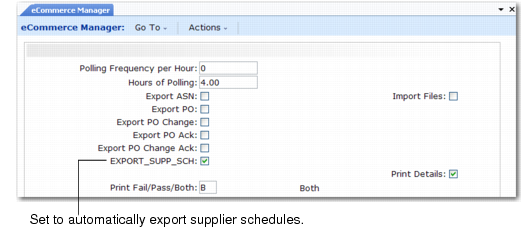
You run eCommerce Manager (35.5 and 35.22.13) to automatically export queued system-created supplier schedules to trade sales suppliers.
eCommerce Manager (35.5 and 35.22.13) shows you the option to specify for trade sales schedule processing.
eCommerce Manager (35.5 and 35.22.13)
Export Supplier Schedules
Indicate Yes or No to export supplier planning or shipping schedules automatically.
No (the default): Do not export supplier shipping or planning schedules.
Note: You can manually export trade sales supplier schedules using Supplier Shipping Schedule (35.4.8).
Yes: Export queued supplier shipping or planning schedules.
Note: You queue trade sales supplier planning or shipping schedules for export by setting Queue TS Schedules to Yes in Trading Partner Parameter Maint. See User Guide: QAD EDI eCommerce.
Export Message Type
When you queue a trade sales supplier schedule for export, the system generates a record in the trq_mstr database table to indicate that the supplier schedule is queued for export. When you run eCommerce Manager (35.5 and 35.22.13), the system scans the trq_mstr table for records.
When you set an export field to Yes in eCommerce Manager, the system looks for a specific message type among existing trq_mstr records. Several message types can be present in the trq_mstr table at the same time.
Use of Export Transmission Records lists the kinds of message types stored in trq_mstr records. The system searches for sequences in a logical order designed to minimize potential conflicts in processing. The Seq column indicates the order in which data is exported. Trade sales supplier schedules are number 7 in the sequence.
See User Guide: QAD EDI eCommerce.
Use of Export Transmission Records
Seq | Type | Message |
1 | ORDRSP-I | PO Acknowledgment |
2 | ORDRSP-C | PO Change Acknowledgment (customer initiated) |
3 | ORDRSP-S | PO Change Acknowledgment (supplier initiated) |
4 | ORDERS | Initial PO |
5 | ORDCHG | PO Change |
6 | ASN | Advance Ship Notice |
7 | SCHREL | Supplier Schedule |
Automating the Trade Sales Process
To completely automate the trade sales process, including importing and exporting ASNs, use the following procedure:
1 In eCommerce Manager (35.5), set these fields:
• Export ASN to Yes
• Import Files to Yes
• Export Supplier Schedules to Yes
• All other fields to No
2 Specify the number of hours you want EDI eCommerce to run.
3 Specify the intervals at which EDI eCommerce checks for documents that require exporting or importing.