Cumulative Orders
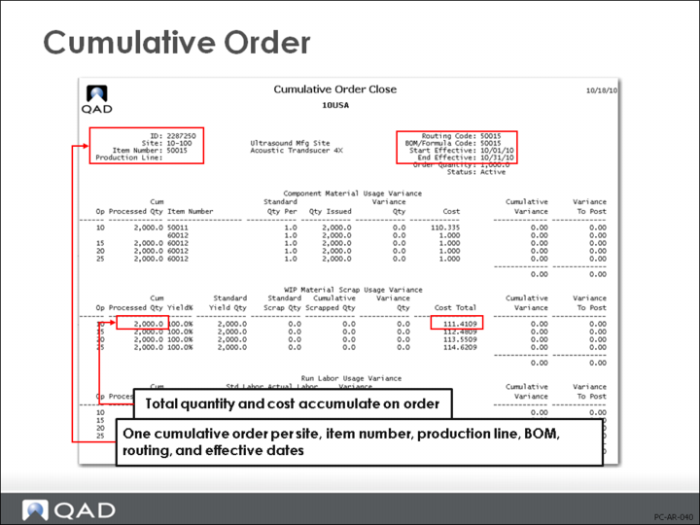
Total quantity and cost are accumulated on a cumulative order.
• In the example above, a quantity of 500 units are completed per day for five days; therefore the cumulative order shows 2,500 units processed
There is one cumulative order per site, item number, production line, BOM, routing, and effective dates. For example, two production lines running the same item in parallel will each have a separate cumulative order. A family of three similar items running on the same production line will each have its own cumulative order.
Advanced Repetitive functions are normally used in high-volume manufacturing environments, where you don’t need detailed costs for each individual production order. Instead you need to know the costs over a period of time. This period can be as short as a single production run, but normally is much longer (many companies accumulate and report costs in aggregate by GL period). To allow for this, Advanced Repetitive functions accumulate costs on a special type of work order—a Cumulative Order—one for each item, site, and production line. These are created automatically when you first report labor for an item, site, and production line.
When the Cumulative Order is created, this initiates a cost roll-up that generates a set of independent rolled up cumulative order costs using the BOM, routing, work center, and material rates effective at the start effective date of the order
Milestone Operations
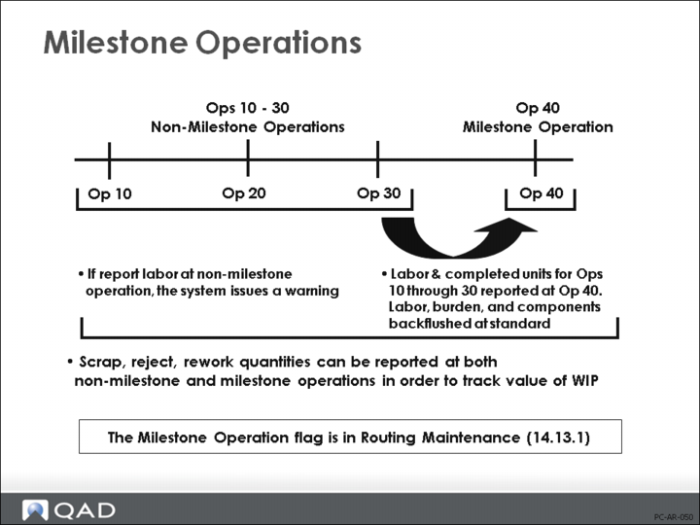
The Milestone Operation field is in Routing Maintenance (14.13.1) or (14.13.2).
Another difference between Advanced Repetitive and Shop Floor labor reporting is in the use of milestone operations. In Shop Floor Control, when you report labor at an operation, you can specify “complete previous operations.” This automatically closes all previous operations and reports labor at standard (for any unreported operations).
Advanced Repetitive has similar, but much more sophisticated, functionality. You can set up certain operations as milestone operations and labor reporting is done at these operations. When a milestone operation is reported, that operation and all previous non-milestone operations are backflushed as long as a valid operation number is entered in the Op field in Product Structure Maintenance (13.5); otherwise no backflushing of components will take place. Labor is automatically reported at standard for those operations and any components associated with those operations are issued.
Certain rules govern milestone reporting:
• You can report setup, down time, reject, and scrap against milestone or non-milestone operations. In this case, you create WIP balances at non-milestones. This allows for more accurate tracking of WIP costs and quantities.
• Although the system lets you report labor against a non-milestone operation, a warning is issued.
• If you report scrap or rejects at non-milestones operations, it will backflush components associated with that operation.
• If WIP Lot Trace is enabled addition rules for reporting operations are invoked.Refer to WIP Lot Trace documentation for details.
To report all operations at standard, set up a final “receiving” operation as the only milestone operation. The last operation is always considered a milestone.