Advanced Repetitive Variances: Summary
• Material, labor, burden and subcontract rate variances are generated at the time of the transaction
• Material, labor, burden and subcontract usage variances are accumulated and are updated whenever either Post Accumulated Usage Variances (18.22.9) or Cumulative Order Close (18.22.10) is run with Update set to Yes
• Method variances are normally taken at the time of the transaction. When you use a work center that has labor and/or burden rates different than the those defined in the route, a method variance occurs. Alternative Routes can be set up if you routinely use alternative work centers/production lines. The alternative route does not prevent the method variance but rather explains the variance.
• GL scrap entries are not made until you run either Post Accumulated Usage Variances (18.22.9) or Cumulative Order Close (18.22.10)
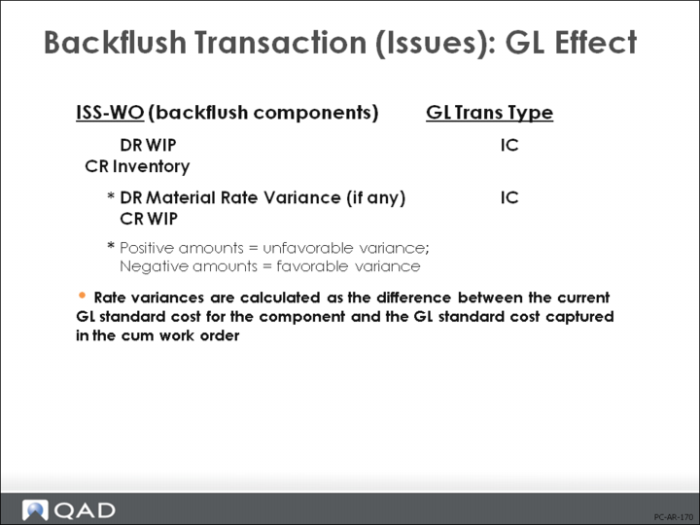
Backflush Transaction (Issues) - GL Effect
The material transactions are the same as those created by the Work Order Component Issue (16.10) and Work Order Receipt (16.11) or Work Order Receipt Backflush (16.12) functions. In fact, the GL transaction type is the same (IC) and the inventory transaction type is ISS-WO (Work Order Issue) or RCT-WO (Work Order Receipt).
• For component issues, the standard quantity per (in Product Structure Maintenance (13.5)) is multiplied by the backflush quantity to determine the quantity to issue. Rejected quantities also backflush.
By setting Modify Backflush to Yes, it is possible for you to backflush components using a different quantity than that specified by the BOM, change the backflush issue location, or backflush additional items
• The cumulative order frozen cost of the components issued is removed from Inventory (credit) and added to WIP (debit)
If the cumulative order frozen cost is different than standard, a material rate variance is generated
The frozen costs and rates captured on the cumulative order can be reviewed using the Cumulative Order Cost Report (18.22.4.10)
Generally, components are issued from the same site, but if you manually override the backflush to issue from a different site, the appropriate intersite transfer will take place
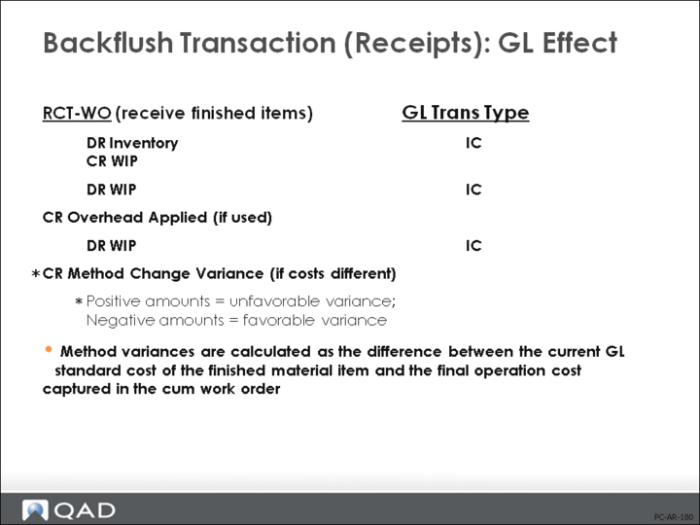
Backflush Transaction (Receipts) - GL Effect
Once the backflush is processed, you can enter the quantity to receive into stock. As with all receipts, this increases Inventory (debit), decreases WIP (credit), and applies any Overhead amount (credit).
• Method variances are calculated as the difference between the GL standard cost of the finished material item and the final operation cost captured in the cum work order
• The Rework Transaction (18.22.17) GL effects for work order issues and receipts are the same as those for the Backflush Transaction
• The Move Transaction (18.22.19) GL effects for receipt of finished goods are the same as those for the Backflush Transaction
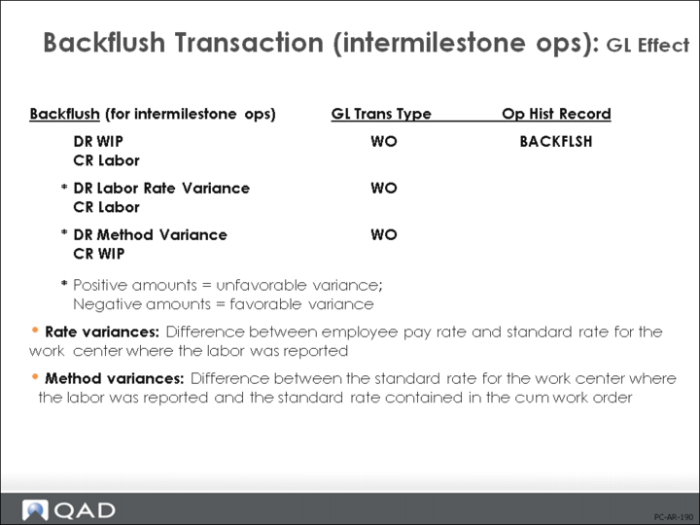
Backflush Transaction (intermilestone ops) - GL Effect
For intermilestone operations, rate variances are calculated as the difference between employee pay rate and standard rate for the work center where the labor was reported.
Note: When a backflush is initiated from a single “end of line” or “receive” operation, it is only possible to enter one employee number to cover all operations backflushed. To avoid rate variances where Auto Labor is set to Yes, ensure that no employee rate of pay is entered in Actual Pay Rate Maintenance (14.13.21).
Method variances are calculated for intermilestone operations as the difference between the standard rate for the work center where the labor was reported and the standard rate contained in the cum work order
Note: The Labor Transaction (18.22.14), Setup Labor Transaction (18.22.15), and Rework Transaction (18.22.17) produce the same labor and burden GL effects as the Backflush Transaction.