Setting Up Scheduled Orders
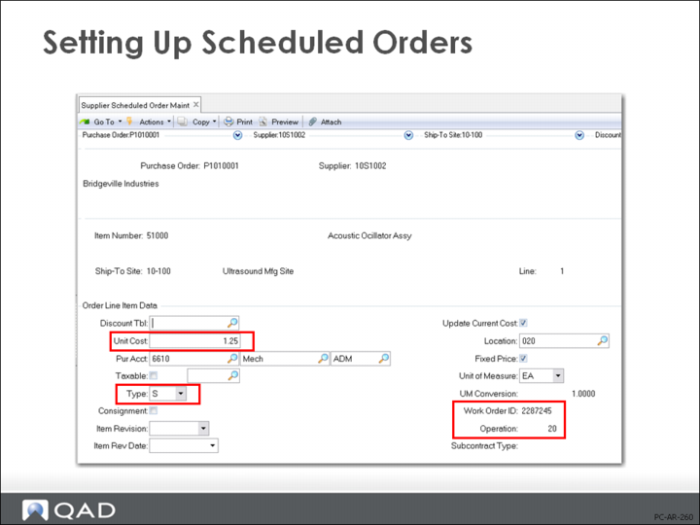
You can handle the purchasing side of a subcontract operation through a supplier schedule. Create supplier-scheduled purchase orders using Scheduled Order Maintenance (5.5.1.13).
Set the Ship-To site to the repetitive schedule site and create a line for the subcontract item with a line type of S (Subcontract). In the Work Order ID field, enter the cumulative order ID associated with the subcontract items. You can create cumulative orders manually in Cumulative Order Maintenance (18.22.6) or automatically in Backflush Transaction (18.22.13).
Set the item number on the scheduled order line to one of the following:
• The end-item number from the repetitive schedule
• The WIP item specified in the routing operation
Use WIP item to represent services being purchased; for example, heat-treat-service. Using WIP items helps ensure consistent pricing for subcontract services. Set up WIP items in the item master before entering them on the supplier schedules.
Shipping Subcontract Items
You can use the functions on the Subcontract Shipping menu (18.22.5) to record shipments to subcontractors. These programs create shippers in the same way as the container and shipper maintenance programs associated with sales orders and customer schedules. The major difference is in the Contents (Items) frame. Work Order ID, Operation, and Item replace Item, PO, Order, and Line. The Work Order ID and Operation fields identify a subcontract operation record on a cumulative order. The Item field identifies any component items used at the operation. If Item is blank, it represents the WIP material input at that operation.
Receiving Completed Subcontract Items
Receive shipments from subcontractors using the functions on the Receipts Processing Menu (5.5.5) or Purchase Order Receipts (5.13.1). Any components associated with the subcontract operation are automatically backflushed.
For scheduled orders, create a shipper in PO Shipper Maintenance (5.5.5.5). Reference the item that is on the supplier schedule. Confirm the shipper using PO Shipper Receipt (5.5.5.11). This moves the WIP to the input queue of the next operation (if Move Next Op is yes in the cumulative order routing) backflushes the components associated with that operation, and closes out the subcontract operation for that quantity. The appropriate GL transactions, transaction history records, and operation history records are generated.
Alternatively, receive the purchase order using Purchase Order Receipts (5.13.1). This creates the same GL transactions and backflushes the components. With this approach, the purchase order does not need to be a scheduled order. You can create it using Purchase Order Maintenance (5.7) and use a line type of S (Subcontract) for each subcontract line. This is the method used in the Advanced Repetitive Subcontracting exercise.
Note: These programs do not post subcontract usage variances. That is posted by Post Accumulated Usage Variances.
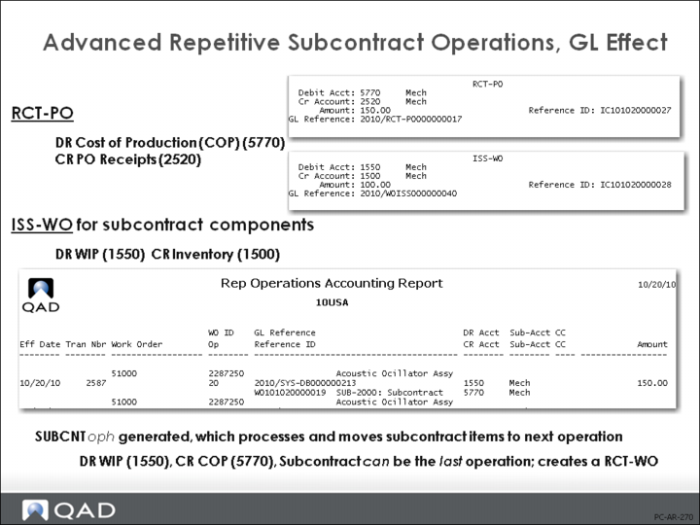
Advanced Repetitive Subcontract Operations - GL Effect
The GL effects for Advanced Repetitive subcontract operations are shown above.
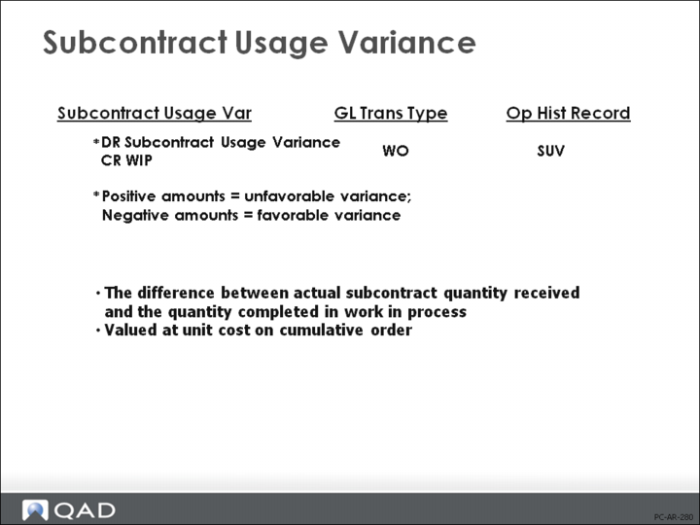
Subcontract Usage Variance
Subcontract usage variances are posted by Post Accumulated Usage Variances, discussed in the next section.
In the case of high volume repetitive manufacturing with subcontract operations where items are being shipped to, and received from, your subcontractor on a daily or even hourly basis, it is possible for the subcontractor to occasionally get units from one shipment mixed up with units from another. This allows you to perhaps receive more of less of an item than you shipped. This will result in a usage variance if left unresolved.