Average Costs for Purchased Items
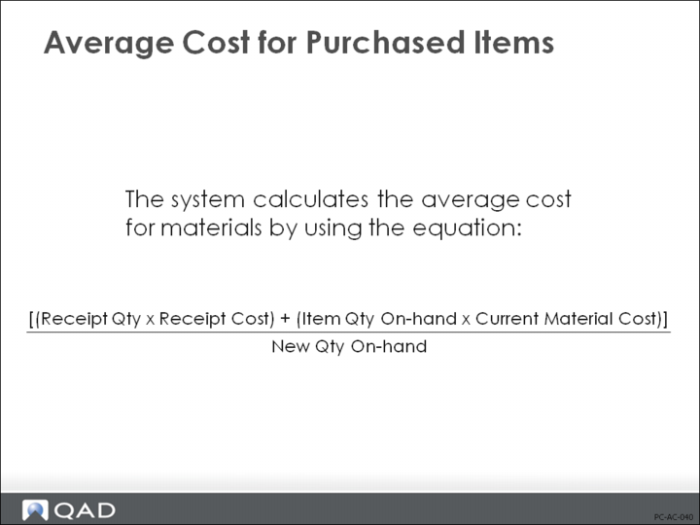
For purchased items, the quantity received is multiplied by the purchase order price and added to the quantity on-hand multiplied by the current average material cost. This sum is divided by the new quantity on-hand to determine the new average material cost. The value of inventory is adjusted to reflect this new average cost.
To calculate average costs for materials, the following equation is used:
[(Receipt Qty ∗ Receipt Cost) + (Item Qty On-hand ∗ Current Material Cost)] / New Qty On-hand
Average Costs for Manufactured Items
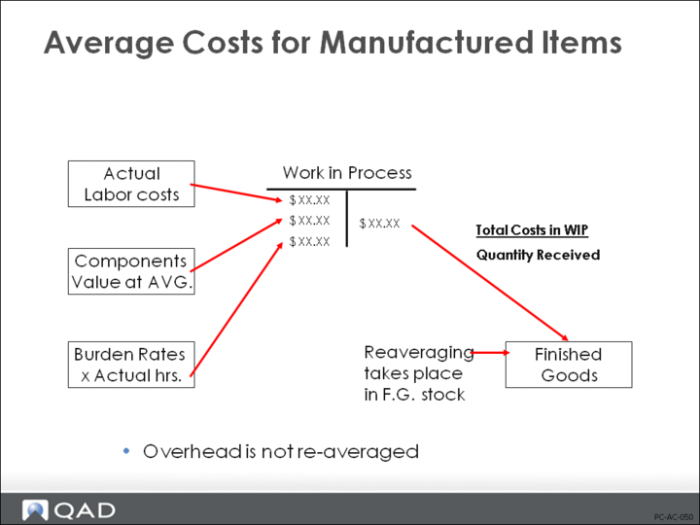
For manufactured items, the averaging process is more complex. When finished items are received, the average cost is calculated for the work order using the actual amounts that have been recorded in WIP. This average work order cost is used to calculate a new average cost for the item.
Average Cost Calculation
Average work order cost is calculated for material, labor, burden, and subcontract. Overhead is not included in the average cost calculation; it is considered a fixed cost.
To calculate average costs for manufactured items, the following equation is used:
(Item Qty Received / Cumulative Qty Completed at the Operation) ∗ Operation’s Cumulative WIP Cost
Example: Assembly A has three components: Comp1, Comp2, and Comp3.
1 A quantity of 20 is received for an Assembly A work order. First, the labor, burden, and subcontract cost categories are calculated. The table below uses Labor as an example.
Operation | Cum Qty Completed | Cum WIP Labor Cost, $ | WO Receipt Cost Calculation, $ |
10 | 100 | 100 | 20 / 100 ∗ 100 = 20 |
20 | 75 | 150 | 20 / 75 ∗ 150 = 40 |
30 | 50 | 20 | 20 / 50 ∗ 20 = 8 |
40 | 40 | 50 | 20 / 40 ∗ 50 = 25 |
Total labor cost for 20 units: | | 93 |
2 Next material cost is calculated for the three components used as shown below.
Qty Per Component Assembly | Qty Per Assembly | Unit Cost | WO Receipt Cost Calculation, $ |
Comp1 | 1 | 5 | (20 × 1) ∗ 5 = 100 |
Comp2 | 1 | 1 | (20 × 1) ∗ 1 = 20 |
Comp3 | 2 | 1 | (20 × 2) ∗ 1 = 40 |
Total material cost for 20 units: | 160 |
3 Finally, the work order receipt is re-averaged. There are 10 units in stock at an average unit cost of $12 each.
Cost for 20 units received = ($93 + 160) / 20 = $12.65
New average cost will be:
(10 ∗ $12) + (20 ∗ $12.65) / (10 + 20) = $12.43
PO Receipts: Standard vs. Average Costing
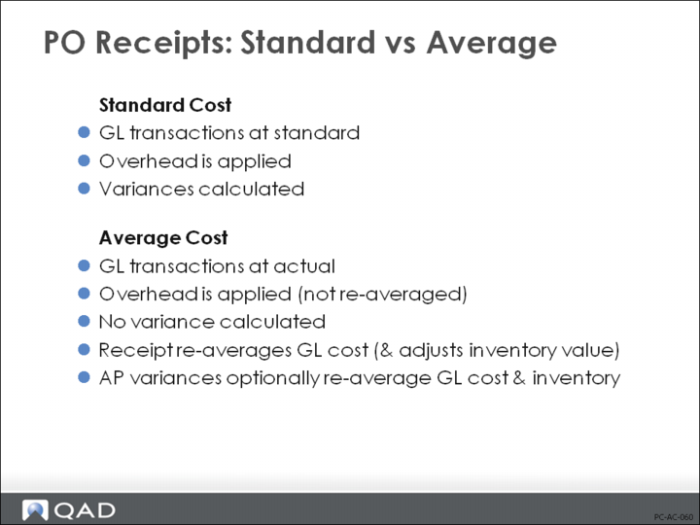
Earlier, we saw how Purchasing and Accounts Payable functions operate in a standard costing environment: All amounts are posted to the GL at standard and any difference between actual and standard costs are posted as variances. In an average costing environment, this is not the case. All amounts are posted to the GL at the actual cost. If the PO cost is different than the GL cost, the GL cost is simply re-averaged.
Example: An item has a GL Material cost of $20 and a GL Overhead cost of $3. With a beginning inventory of zero, you receive one unit at a PO cost of $25. The result is that the GL cost is re-averaged; now the GL Material cost will be $25. (GL Overhead cost is unchanged.)
The following equation is used (which calculates average costs for materials):
[(Receipt Qty ´ Receipt Cost) + (Item Qty On-hand ´ Current Material Cost)] / New Qty On-hand
[(1 * $25) + (0 * $20)] / 1 = $25
The PO receipt created the following GL transactions:
DR | Inventory | $25 | CR | PO Receipts | $25 |
DR | Inventory | $3 | CR | Applied Ovh | $3 |
As with any other inventory type transaction, the GL transaction type is IC, but the transaction description is RCT-AVG po #. This indicates that this receipt caused the cost to be re-averaged.
Note: Reaveraging only happens if the PO specifies Update Avg/Last = Yes. If set to No, the standard costing algorithms apply, even if the GL costs are Average. PO returns are considered issues, not receipts and do not re-average cost.
If this PO is vouchered at a cost of $30 at the time of entry, you have the option of posting the extra $5 to a variance account or to inventory. If you choose variance, the $5 is posted to the AP Rate Variance account. If you choose Inventory, the $5 is posted to Inventory and the cost is re-averaged (from $25 to $30).
Work Order Receipts: Standard vs. Average Cost
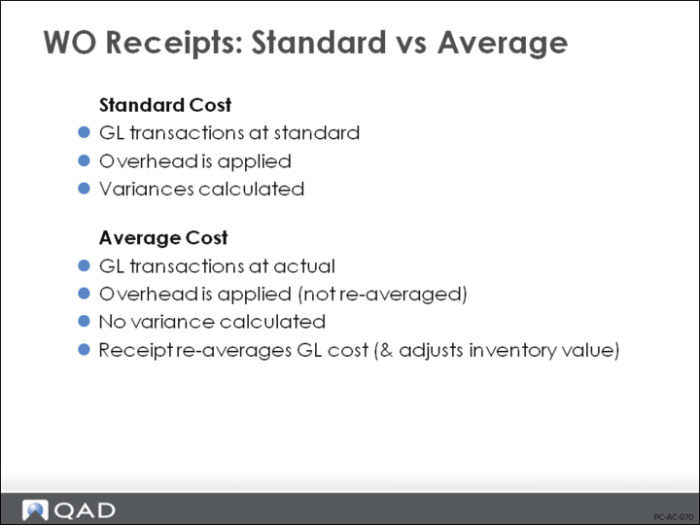
In a standard costing environment, all amounts are posted at standard and variances track differences between actual and standard. In an average costing environment, this is not the case. Everything posts at actual costs. If these are different than the GL cost, the cost is re-averaged. This ensures that all work order costs are reflected in inventory.
GL and current cost is re-averaged by the Work Order Receipt function by the following rules:
• Only Lower-Level Material cost is re-averaged. This-Level Material cost is not.
• Overhead is considered fixed. It is not re-averaged.
• Costs are always recalculated on a category-by-category basis, even when the totals are the same, in order to cover the situation when items that are usually purchased are made in-house (or when items that are usually made in-house are purchased).
• Subcontract cost for an item is normally not re-averaged until Work Order Receipt. However, if the PO receipt does not specify a valid work order and operation, subcontract cost for the item will be re-averaged at that time.
• Average cost calculations include only costs that have been reported before the work order receipt is processed. Costs posted after the receipt are included in the averaging calculation done by the next receipt.
• The Operation Completion transaction will post operation costs at standard if none are reported. Be sure to run this before you process receipts. Unlike under standard costing, the accounting close does not complete unreported operations at standard.
Average Cost Calculations
We will first look at a simple example, followed by more complicated situations.
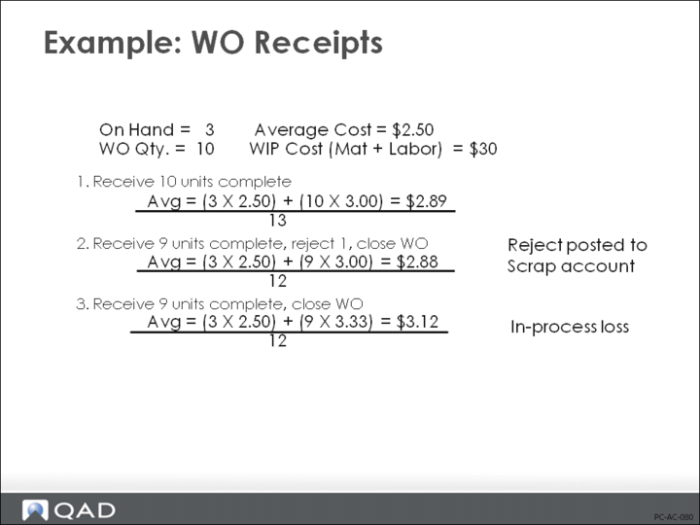
Example: There are three units in stock with a total GL cost of $2.50 each. We have a work order for 10 units: $10 of material is issued to this work order and $20 of labor. A work order receipt is processed for all 10 units.
The new average cost is calculated as follows:
The unit cost of the items in WIP = $30 / 10 units = $3
The new average cost = [(3 units ∗ $2.50) + (10 units ∗ $3)] / 13 units = $2.89
Rejects
How do rejects get factored into average costs? As in a standard costing environment, it depends upon how you report them; as rejects or as in-process losses.
• Rejects are reported on the Work Order Receipt. For example, if we received 9 units, rejected 1 unit, and closed the work order, the result would be:
The unit cost of the items in WIP = $30 / 10 units = $3
The new average cost = [(3 units ∗ $2.50) + (9 units ∗ $3)] / 12 units = $2.88
• In-process losses are not reported as rejects. On the work order receipt, you would receive 9 units and close the work order. The result:
The unit cost of the items in WIP = $30 / 9 units = $3.33
The new average cost = [(3 units ∗ $2.50) + (9 units ∗ $3.33)] / 12 units = $3.12
Partial WO Receipts
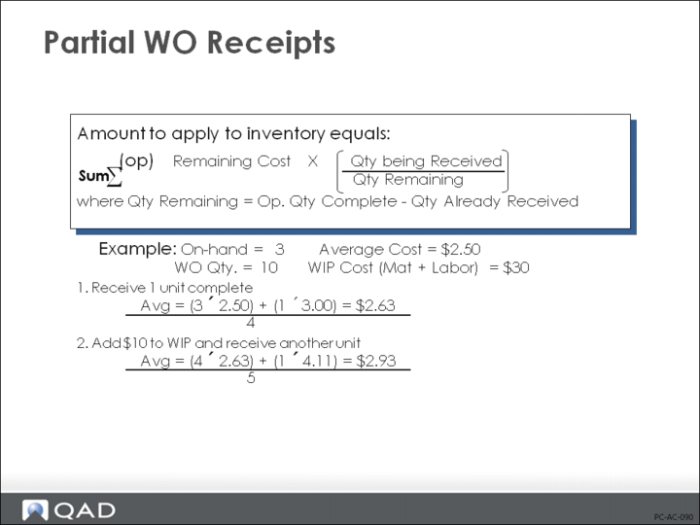
Because QAD Enterprise Applications allows partial receipts, average cost calculations use a modified process costing algorithm. In a process cost system, costs are not identified with specific units; instead, all costs are accumulated and divided by the total number of units produced to arrive at an average cost. Because partial receipts might have included some of the cost, the amount to apply to inventory equals the sum of:
[remaining cost ∗ (qty being received / remaining qty)] at each operation
1 We will use the same example of the work order for 10 units. The WIP cost of $30 represents work at a single operation for all 10 units. No receipts have been processed. Now, process a receipt for one finished unit. Because we received only one of the 10 items manufactured at that operation, it seems logical that only one-tenth of the WIP cost will be used to re-average the cost.
The unit cost of the items in WIP = $30 / 10 units = $3
The new average cost = [(3 units ∗ $2.50) + (1 unit × $3)] / 4 units = $2.63
2 Now add another $10 of Labor to WIP. Total WIP cost is $40. But some of this has already been averaged into inventory. When you receive additional units on this work order, this must be factored in before you can re-average cost.
WIP cost remaining to be averaged = $10 + [(9 / 10) ∗ $30] = $37
The unit cost of items in WIP = $37 / 9 units = $4.11
The new average cost = [(4 units ∗ $2.63) + (1 unit ∗ $4.11)] / 5 units = $2.93
Note: Because work order quantity can be changed, it is not used in these calculations. The system uses only quantity completed at each operation and work order receipt quantity.
Work Order Accounting Close
Generally, when a work order has been fully received, all work order costs are posted to inventory. However, this cannot happen if:
1 More units have been completed at an operation than have been received
2 More materials have been issued than needed for the quantity received
3 Additional labor is reported or material issued after work order has been fully received
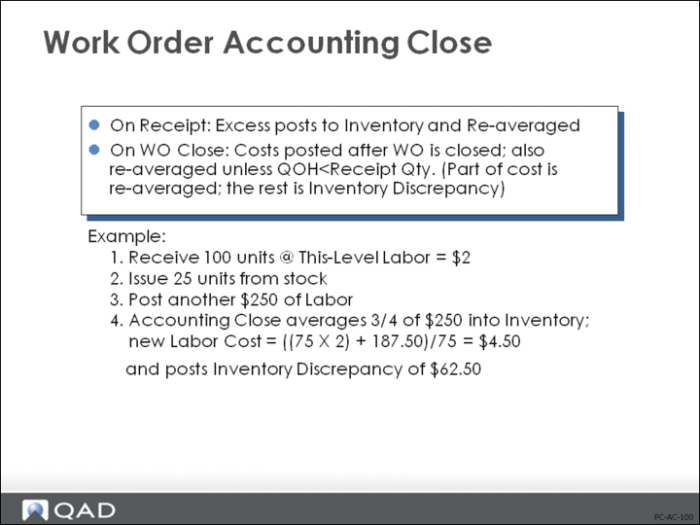
If you show the work order as closed when processing the final Work Order Receipt, excess labor and material costs are simply averaged into Inventory.
If you close the work order by setting the status to [C]losed in Work Order Maintenance or if additional labor and material are reported after work order receipt, then the resulting balance in WIP at accounting close is handled as follows:
1 If quantity on-hand at work order site is not less than work order quantity received, then excess is added to Inventory and the average cost recalculated.
2 If the quantity on-hand at the work order site is less than the work order quantity, then only part of the work order quantity can be averaged into Inventory. The remainder is posted as an Inventory Discrepancy.
Example: You receive 100 units into stock. You post another $250 of labor cost against this order. If there are only 75 units left in stock when you process the Work Order Accounting Close, only 75/100 of the $250 can be averaged into inventory ($187.50). If the This-Level Labor was $2, the new This-Level Labor cost would be: [(75 units ∗ $2) + 187.50] / 75 Units = $4.50. The remaining $62.50 ($250 - $187.50) would be posted to Inventory Discrepancy.
Information Sources
Average Cost Accounting Report (3.21.17)
Reports physical inventory transactions (receipts) that impact average GL costs. Selected according to user-specified parameters. Quantity, unit cost, and inventory value data is shown for the beginning balance data, the change data, and the ending balance data for each item number in sequence. The report also shows Site ID, Type of transaction, Transaction number, GL reference ID, and Credit account number.
Multi-Site Transfers: Standard to Average
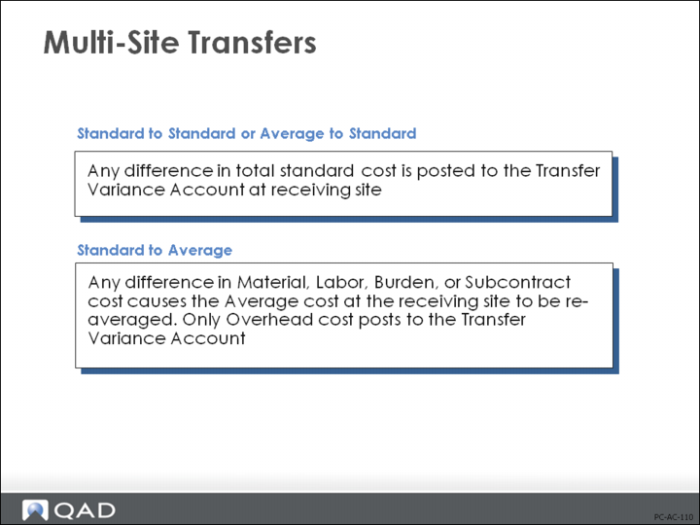
Accounting for inventory transfers that take place between two sites using different costing methods looks the same from a GL perspective. The same debits and credits are created, for the same accounts. The only difference is the amounts and how they are determined.
For example, we have two sites, A and B. Both have a beginning on-hand quantity of 10 units. Site A is a standard cost site. The standard cost for Material is $5 and Overhead $2 (total standard cost = $7). Site B is an average cost site. At this time the average material cost is $10. There is no overhead cost.
If we transfer all 10 units from site A to site B, we will get the following GL transactions:
1 Issue the units from inventory at site A
DR | Inventory | $70 | CR | Inventory | $70 |
2 Transfer the units to site B
DR | Transfer Variance | $70 | CR | Intercompany | $70 |
3 Process the receipt at site B. First, average cost is re-averaged:
Cost Re-average = [(10 units ∗ $10) + (10 units ∗ $5)] / 20 units = $7.50
Note: Average cost calculations do not include Overhead amounts. Overhead is assumed to be fixed and is not re-averaged.
4 Update inventory to reflect the items received
After the receipt of 10 units, the new value of inventory will be $150 (20 units at $7.50 each). Right now the inventory value is only $100 (10 units at $10 each). In order to bring inventory up to the correct value, the system creates the following GL transaction:
DR | Inventory | $50 | CR | Transfer Variance | $50 |
The result of this process is a new average cost of $7.50, an inventory value of $150, and a transfer variance of $50. Because the difference in material costs was simply absorbed into inventory, the transfer variance reflects only the Overhead amount. If there had been no Overhead cost, you would have seen only one GL transaction at the receiving site.
DR | Inventory | $50 | CR | Intercompany | $50 |
Exercise 1: Setting up Average Costing
In this exercise you will create a new cost set and implement it as the GL (general ledger) cost set for average costing.
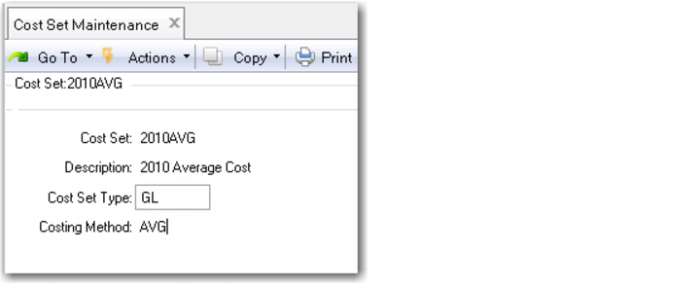
1 Use Cost Set Maintenance (30.1) to create a new cost set. The cost set name or code is not important, nor is the description, but ensure the Cost Set Type is GL and the Costing method is AVG.
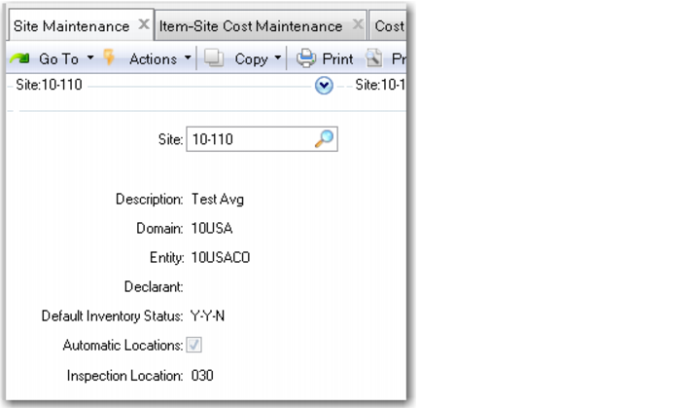
2 Create a new site 10-110 using Site Maintenance (1.1.13). Set the default inventory status to Y-Y-N to prevent over-issues. You cannot change the costing method of a site that has open work orders.
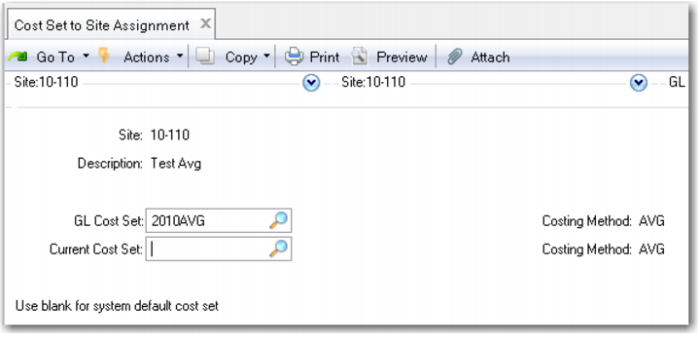
3 Use Cost Set to Site Assignment (30.9) to assign the new cost set to the new site. Leave the current cost set field blank for the system default set.
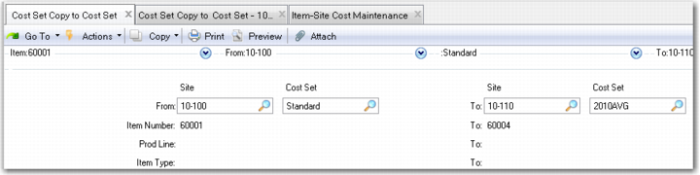
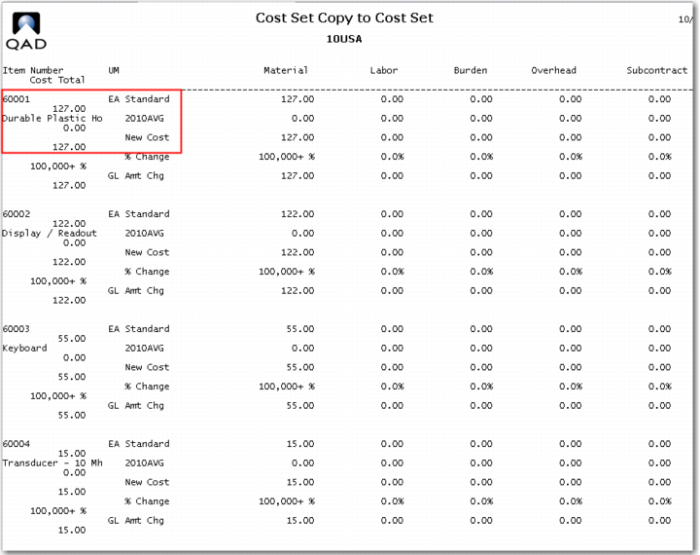
4 Use Cost Set Copy to Cost Set, (30.3) to copy some data into the new cost set. You will use a limited number of items from the training database for this exercise.
Copy from site 10-100 - standard to site 10-110 - 2010AVG, use items 6001 - 60004.
Review the report the copy function generates.
This report shows the GL cost of the items copied. The item was in a standard cost site, it is now in an average cost site.
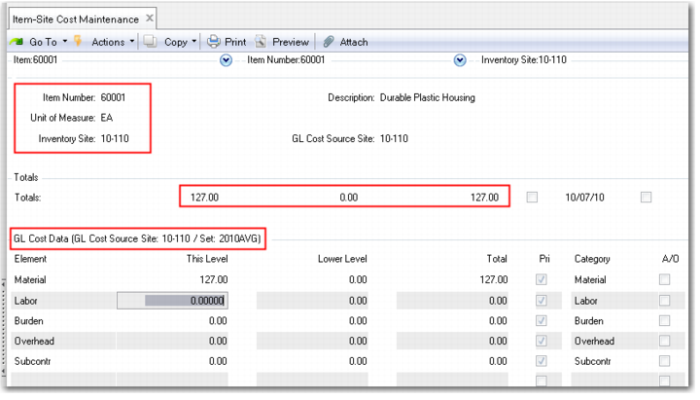
5 Use Item-Site Cost Maintenance (1.4.18) to review these costs.
6 Use Inventory Detail by Item Browse (3.2) starting with item 60001. You should have inventory of the 60001, 60002, and 60003 at site 10-100.
7 Use Transfer - Single Item to transfer 10 each of the 60001, 60002, and 60003 from site 10‑100 to site 10-110. Click Yes on the pop-up “Use To Status.” Electronic signatures are implemented in this database, when prompted for user ID enter qmi or the user ID you used to log onto the system. For the reason code use Active.
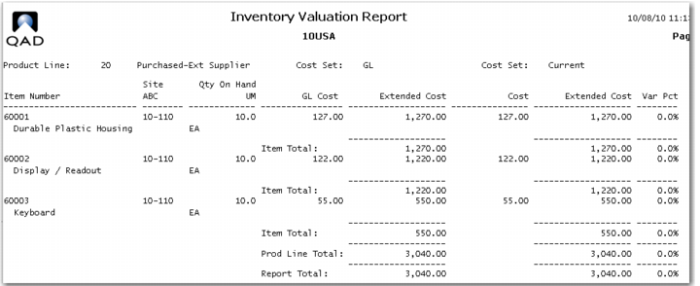
8 Use inventory valuation report (3.6.13) for site 10-110.
This is your total inventory and its cost and value for site 10-110 at this time.
9 Use Purchase Order Maintenance (5.7) to create a purchase order for these three items, 60001 - 60003. Let the system assign the PO number, use supplier code 10S1002, Bridgeville Industries. In the lower frame of the header enter site 10-110 in the site field. Advance to the line item screen. Note the PO number.
On line 1, use the enter key to get to the item number field, enter 60001, order 10 of them. Note the price field defaults to the cost in the system. Change the price to 150.00.
Use the enter key accepting the default values until you return to line 2. Buy 10 EA of the 60002 at a price of 140.00.
On line 3, buy 10 EA of item 60003 at a price of 75.00. When you are back at line 4, click the button End Lines, then click Trailer. At the trailer click next until the PO is complete.
10 Receive the PO complete. In the header check the box “Receive All” complete the receipt transaction by clicking through the screens.
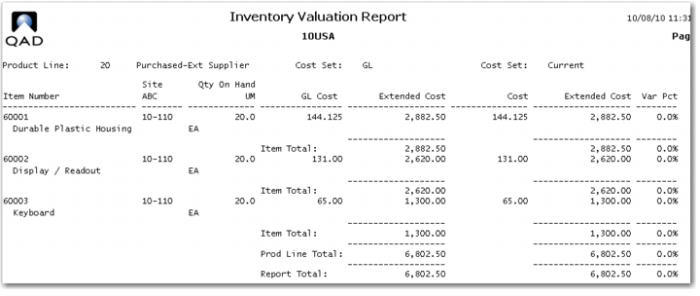
11 Run the inventory valuation report for site 10-100 again. You will see that the inventory of units has doubled and the cost has been re-averaged and the total value updated to reflect the current average cost.
You have created an average cost site, and seen how the system re-averages the GL cost whenever a new receipt occurs.
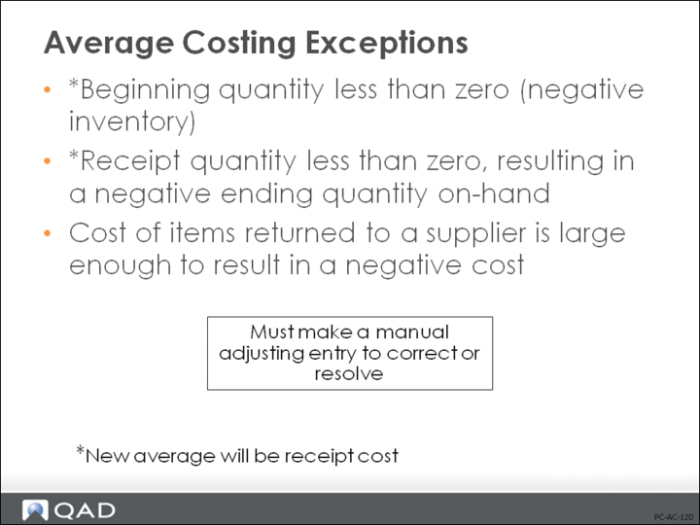
Average Cost Exceptions
When you understand how average costs are calculated, it should be apparent that you would get undesirable results in the following cases.
• Beginning quantity is less than zero
• Receipt quantity is less than zero, resulting in an ending quantity less than zero
• The cost of the items returned to the supplier results in a negative cost
To account for such situations, QAD Enterprise Applications average costing does the following:
1 If the ending quantity is less than zero, the system assumes that the new average cost is the same as the new unit receipt cost. To account for this, the amount of:
(New Average Cost - Old Average Cost) ∗ (Old Qty On-hand)
is debited to Inventory and credited to the Discrepancy account before the receipt is posted. The new average cost will be the new unit receipt cost.
2 If a receipt (positive or negative) will result in a large distortion in average cost, it is considered an exception condition and is handled as noted above.
Example: The quantity to be received is less than zero and the ending quantity is less than or equal to zero.
In both of these situations, the discrepancy is created so that you can manually manage it by making an adjusting entry. Average cost will not correct previously entered transactions. That is why the sequence is so important.