Milestone Operations
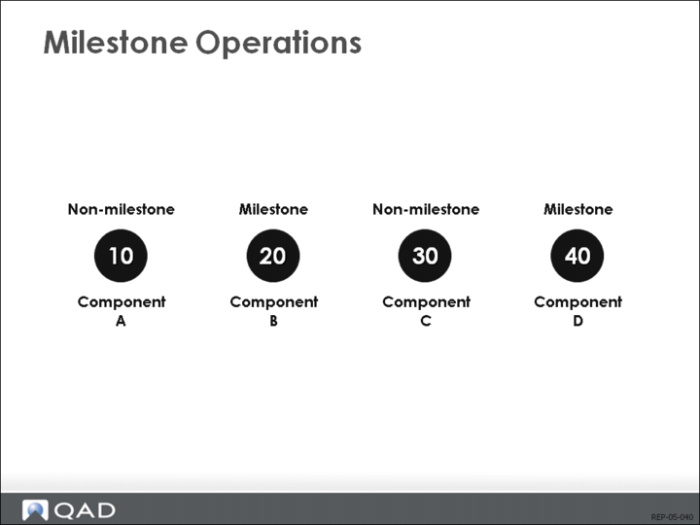
Milestone operations are routing operations where production counts are recorded. Completions initiate a backflush for this and all previous non-milestone operations, back to but not including a previous milestone. In the example above, when you report production at operation 40, the system backflushes components C and D. Production at operation 20 will backflush A and B.
Although all operations, including non-milestone operations, can use any repetitive transaction (18.22.13-21), you should limit the use of Backflush Transaction (18.22.13), at non-milestone operations, to scrap and reject.
Completing Scheduled Orders
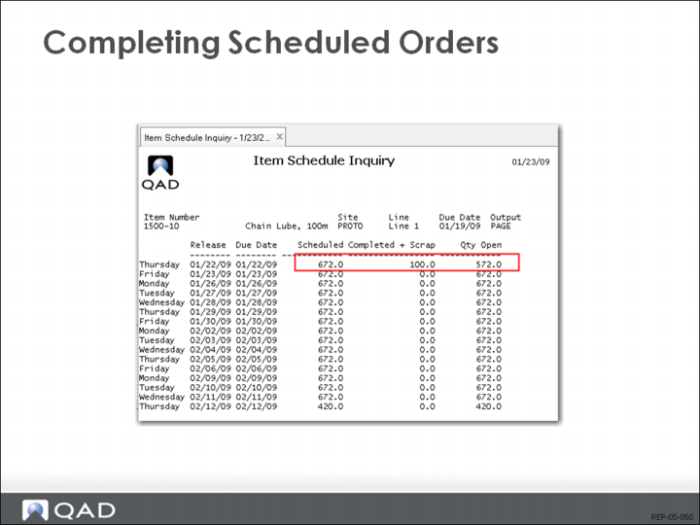
When you report you have completed and moved items at the final operation, the quantity is posted as completed at the operation, and is also posted to the repetitive schedule and the related work order. If there are multiple schedules for an item, the system determines the earliest open schedule date, and posts the completed quantities from that point forward. If the system cannot find enough open balances, the operation will be posted with the transaction quantity. However, the repetitive schedule and work order record will be posted with the open quantity available.
• Modify repetitive schedule completions using Cumulative Completed Maintenance (18.22.2.6).
• View the repetitive schedule completions using either Schedule Browse/Inquiry (18.22.2.2) or Operation Schedule Report (18.22.2.5).
• View work order completions using Work Order Browse/Inquiry (16.2).
• Delete repetitive schedules and related work orders using Schedule Delete (18.22.2.7).
Managing Schedule Consumption
How Schedules are Consumed
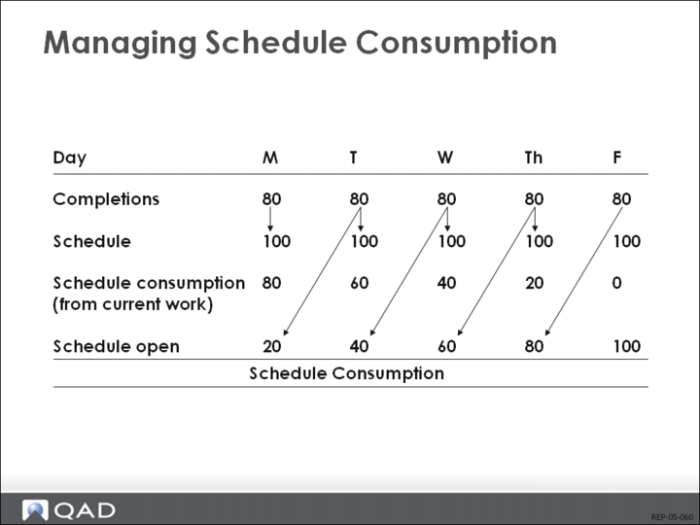
Schedule consumption relieves demand from open schedules for reported completions. In the Advanced Repetitive module the earliest open schedule is always consumed, not just completions over the scheduled quantity for that date. The example above shows how schedule consumption for lower than predicted quantifies comes from old schedules, without using current schedules. Each day’s completions fall short of the schedule. The first schedule consumed is the earliest schedule open (containing open scheduled quantities). By Friday, only Thursday’s schedule is being consumed.
Use Schedule Delete (18.22.2.7)
Limit schedule consumption in the past by deleting schedules left open that fall before a specific date. In Schedule Delete (18.22.2.7), the date defaults to Monday’s date. This provides a means to establish the earliest open schedule for purposes of limiting the backward use of open schedules.
Run Schedule Delete as a batch, a UNIX cron, or at job to ensure regular deletion of schedules.
Adjustments to Cumulative Completed
Cumulative Completed Maintenance (18.22.2.6)
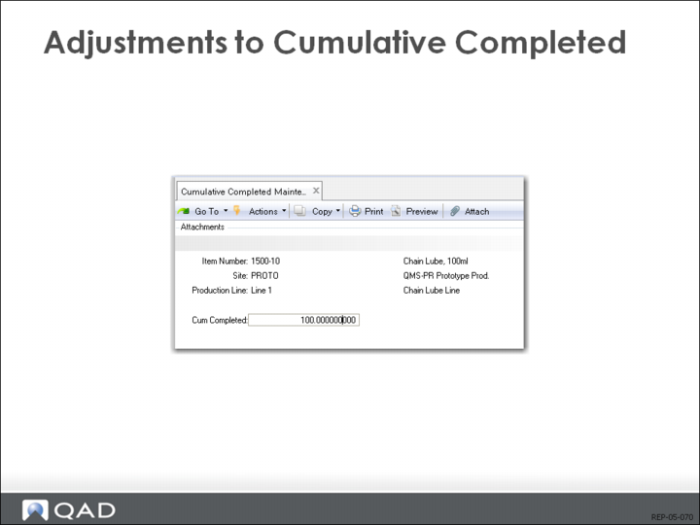
Cumulative Completed Maintenance (18.22.2.6) displays the current cumulative completed for all open schedules and permits adjustment of this total.
Reduction in Cum Quantity vs. Increase in Cum Completed
A reduction in the cumulative quantity completed reduces the quantity completed on the latest reported schedules, and increases demand by this quantity. An increase in the cumulative completed increases the earliest open schedule, and decreases demand by this quantity. If you use this function you should run MRP to replan the item. (The cumulative completed quantity is reduced when you delete schedules. Therefore, the cumulative completed is a rolling total of open schedules.)
No general ledger or inventory transactions are created by this adjustment.
There is no audit trail for these adjustments. Because of this, report totals may no longer tally as expected. This program should be secured and used only by an individual who knows the impact.
Reporting Production (Cumulative Orders)
Cumulative Order
When you report transactions against a cumulative order, you are reporting that you have spent money on material, labor, burden, and subcontract. The total value of those expenditures is accumulated into total cost in the cumulative order. Detail costs of material, labor, burden, and subcontract receiving are kept in each associated operation record.
Example
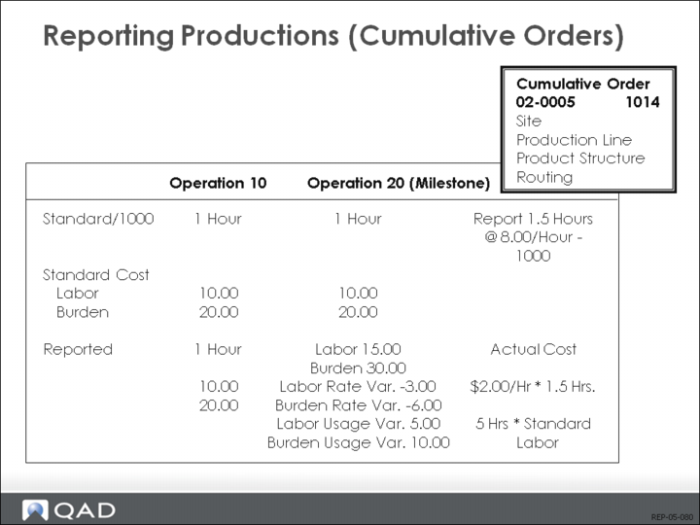
At each operation the actual labor and actual material are recorded, and a number of calculations are made. In the example shown above, an employee reports 1000 have been completed at milestone operation 20, and it took the employee 1.5 hours to do it. The standard for 1000 is to take 1 hour at 10.00/hour. Operation 10 is a milestone.
Previous Operation
For operation 10, any associated components are backflushed generating material cost. If Auto Labor Report (in the routing record) is Yes, labor and burden costs are automatically generated.
Labor Rate Variance
At the current operation a number of variances are generated. The difference between the cumulative order standard hourly pay rate and the actual employee’s pay rate is reported as a labor rate variance. Rate variances are posted with the labor and burden costs.
Labor Usage Variance
The current operation has a standard labor time of one hour. The actual labor time was one and one-half hours. This generated a usage variance of one-half hour, which generated a labor cost usage variance of $5.00 (standard labor rate of $10.00 *.5 hours = $5.00) and a burden variance of $10.00 (standard burden rate of $20.00 *.5 hours = $10.00). Usage variances are not posted immediately, but accumulate, and will be posted when Post Accumulated Usage Variances (18.22.9) or Cumulative Order Close (18.22.10) are run with Update set to Yes.