Rate Variance
Rate Variance
All transactions consuming resources immediately calculate and post rate variance. Rate variances are calculated as the difference between the cost of the resources as contained within the cumulative order as taken from the routing and work center in effect when the order is created.
Component Rate Variance
For component material, rate variance is calculated as the difference between the GL standard cost presently in effect and the GL standard cost captured in the cumulative order. Usually, there is no component material rate variance. It occurs if the GL standard cost of the component material changes during the lifetime of the cumulative order.
Labor and Burden Rate Variance
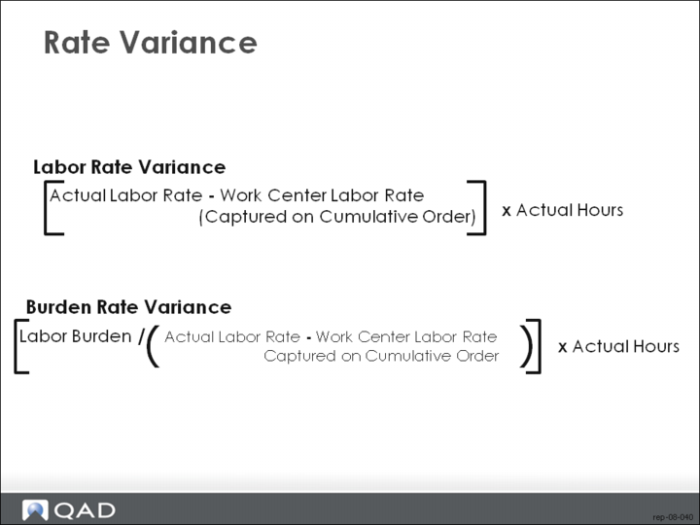
Labor and burden rate variance is calculated in a similar way. When a cumulative order is created, standard labor and burden rates are captured from the routing and work center in effect. When labor is reported at a cumulative order operation work center, rate variance is calculated as the difference between the employee pay rate and the captured labor standard.
Subcontract Rate Variance
Subcontract rate variance is the difference between the purchase order price per unit and the subcontract cost per unit as captured in the cumulative order. This is posted by Purchase Order Receipts (5.13.1).
When Rate Variances Post
Rate variances are posted only if GL standard costing is in effect for the finished item. Rate variances are not posted if GL average costing is in effect.
Method Change Variance
When MCV is Posted
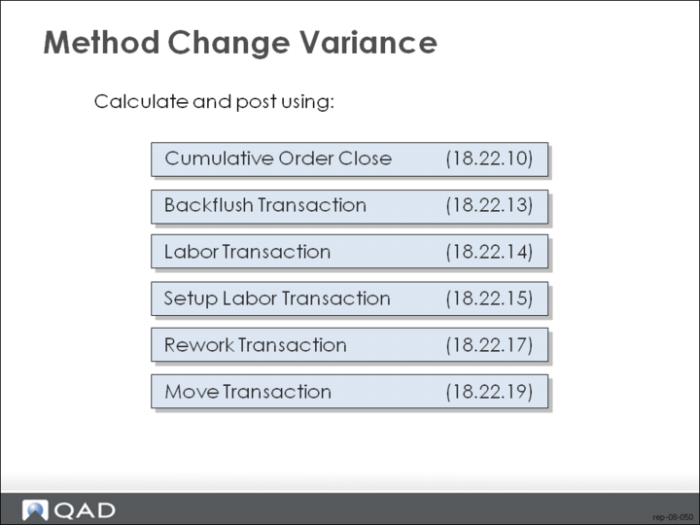
Method Change Variance (MCV) is calculated and posted by the following transactions.
• Cumulative Order Close (18.22.10)
• Backflush Transaction (18.22.13)
• Labor Transaction (18.22.14)
• Setup Labor Transaction (18.22.15)
• Rework Transaction (18.22.17)
• Move Transaction (18.22.19)
How (18.22.13) and (18.22.19) Posts MCV
In the Backflush Transaction and Move Transaction, MCV can be posted when moving from the output queue of the last operation to finished material inventory. MCV is calculated as the difference between the final operation cost contained in the cumulative order and the current GL standard cost of the finished material, extended by the quantity being reported.
Posting MCV from WC other than Cum Order Op WC
In the above transactions when labor is reported, MCV can be posted when reporting at a work center other than the cumulative order operation work center. MCV is calculated as the difference between the standard labor and burden rates of the work center being reported and the standard labor and burden rates of the cumulative order operation center, extended by the number of hours reported. This prevents charging unexpected rate variances to the work centers.
How (18.22.10) Posts MCV
In Cumulative Order Close, MCV can be posted when transferring WIP quantities to new cumulative orders. MCV is calculated as the difference between the operation cost in the former cumulative order operation and the operation cost of the future cumulative order operation, extended by the quantity transferred.
MCV and GL Costing
Method change variances are posted only if GL standard costing is in effect for the finished item. Method change variances are not posted if GL average costing is in effect.
Booking Variances and Closing Order
Rate Variances
Material, labor, burden and subcontract rate variances are posted at the time of the transaction.
Usage Variances
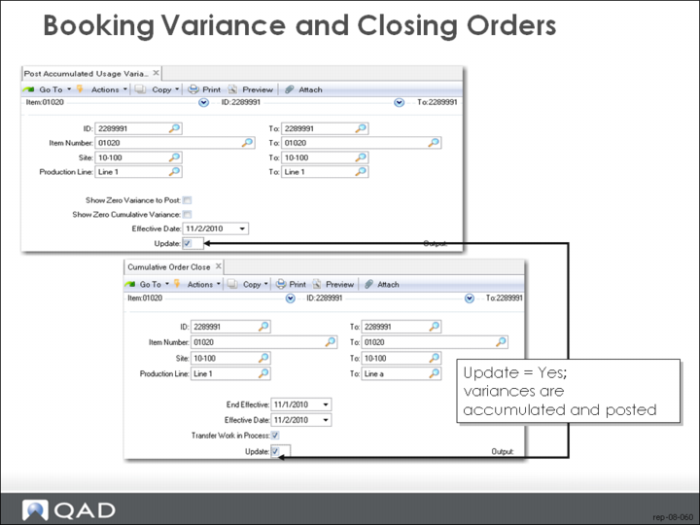
Material, labor and burden usage variances are accumulated and are posted whenever either Post Accumulated Usage Variances (18.22.9) or Cumulative Order Close (18.22.10) is run with Update set as Yes.
Method Variances
Method variances are normally taken at the time of the transaction. When you use a work center that has labor and/or burden rates different from the default, a method variance occurs. A method variance also occurs when an item is received into stock and the cumulative order has a standard cost different from the item’s GL standard cost.
Close the Order
The cumulative order and its associated operation records are the depository for the accumulation of costs and quantity balances. You determine how long the cumulative order remains open. When closing a cumulative order, you can either write off any WIP balances remaining or transfer balances to another cumulative order. When you use the transfer option, the system will attempt to locate an existing cumulative order in which to transfer the balances. If no appropriate cumulative order exists, a new one is created.
Post Accumulated Usage Variances
Post Accumulated Usage Variances (18.22.9)
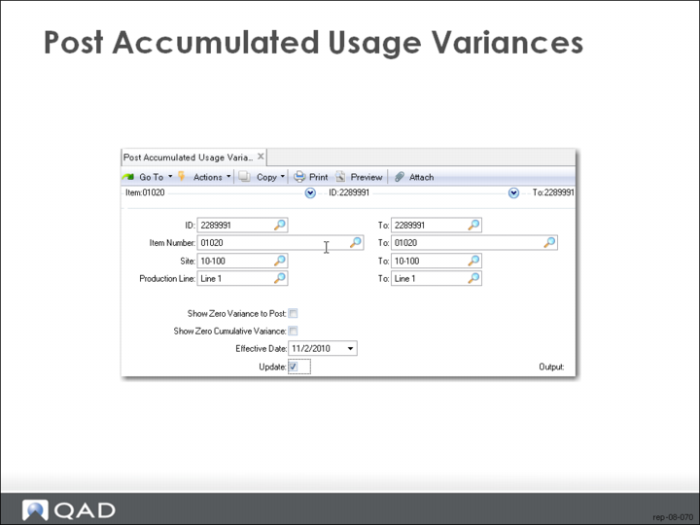
Post Accumulated Usage Variances (18.22.9) calculates and posts accumulated usage variances in cumulative orders, according to the criteria entered. This lets you post usage variances on demand without having to close the cumulative order.
Calculating Usage Variances
For each open cumulative order selected, usage variances are calculated by operation for component material, WIP labor, labor burden and subcontract. The variances calculated are for the entire life of the cumulative order. The amounts to post are reduced by any amounts previously posted. Additionally, floor stock expense is posted.
Calculating Component Material Usage Variance
Component material usage variance is calculated as the difference between the actual and expected quantities issued, extended by the cumulative order operation component cost. The expected issue quantity is the cumulative order operation standard quantity required times the quantity processed at the operation. Component materials issued that are not in the cumulative order operation product structure are considered non-standard and are treated entirely as usage variance.
Calculating Labor and Burden Usage Variances
Labor and burden usage variances are calculated as the difference between actual and expected labor hours, extended by the cumulative order operation labor hours per unit, times the quantity processed at the operation.
Calculating WIP Material Scrap Usage Variance
WIP material scrap usage variance is calculated as the difference between the actual and expected scrap quantities, extended by the cumulative order operation cost. The expected scrap quantity is the quantity processed, less the cumulative order yielded quantity processed at the operation. For example, if the yield factor at an operation is 75% and 100 were processed at the operation, the expected scrap quantity would be 100 less 75% = 25. The amount of variance is posted to the scrap account of the product line of the finished material item number.
Scrapping Without Posting
It is possible to scrap a quantity without producing a scrap posting. Consider the above example when yield is 75% and the expected scrap quantity is 25. If the actual quantity scrapped is 25, then no variance results. If there is no labor or component usage variance elsewhere, WIP is charged with exactly the amount of resources expected to produce 75. This is reflected in the fact that the operation cost has already been yielded.
Scrap Always Posted
If scrap is always posted regardless of yield, then the Include Yield field in Repetitive Control (18.22.24) should be set to No. This sets the cumulative order yields to 100%.
Posting Usage Variance
Usage variance are posted only if GL standard costing is in effect for the finished item. Usage variances are not posted if GL average costing is in effect.
Operation History Records
Record the usage variance posting by creating operation history records with one of the following types:
MUV-CMP (material usage variance-component)
MUV-WIP (material usage variance-work in progress)
FLOORSTK (floor stock expense)
RLUV (run labor usage variance)
RBUV (run labor burden usage variance)
SLUV (set-up labor usage variance)
SBUV (set-up labor burden usage variance)
SUV (subcontract usage variance)
Run Without Updating
This program can be run in a non-update mode (Update set to No). This generates a report but no database updates occur.