Price Lists
A price list defines all the information necessary to correctly price an item for a customer.
• Discount pricing structures
• Prices in other currencies
• Prices or discounts for a certain unit of measure (a case or full truckload)
• Discounts at different quantity levels
• Prices calculated as a percentage markup over GL cost
How Best Pricing Works
When implementing sales order pricing using price lists, consider your pricing practices and needs. Some of these were outlined above.
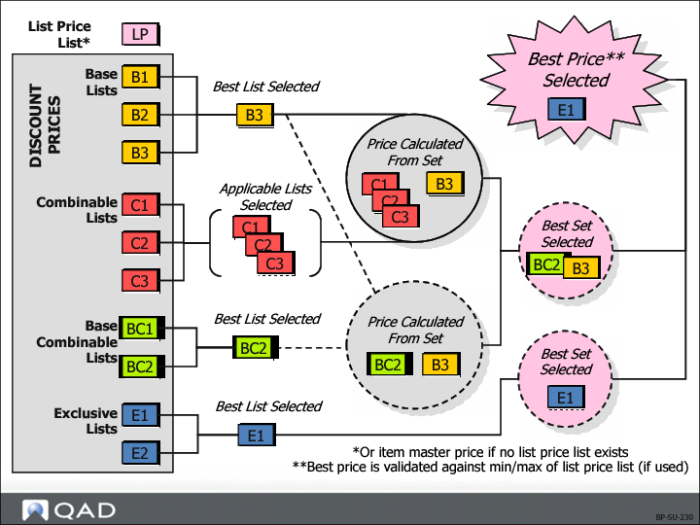
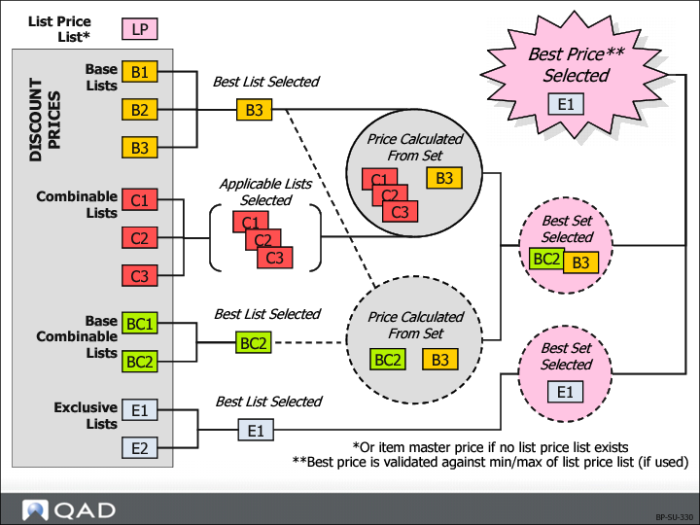
As shown here, the system uses a complex process to determine best pricing.
Note: Different types of price lists can be defined, and are processed in different ways. After reviewing the different types of best pricing, we will revisit this illustration and discuss it in more detail (see
How Best Pricing Works – Revisited).
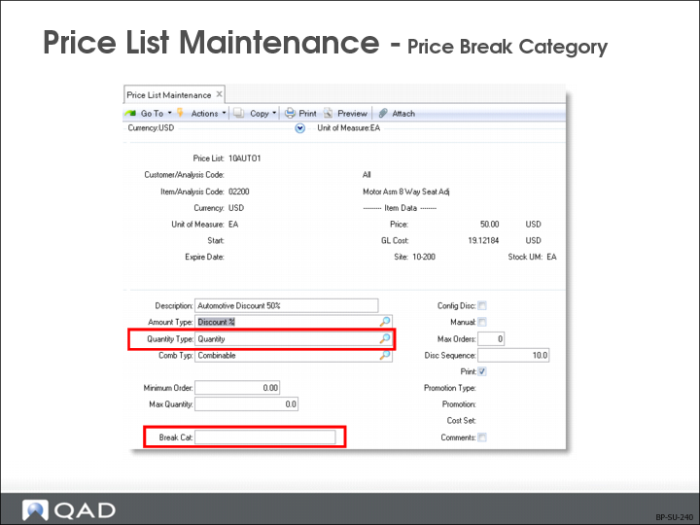
Price List Maintenance: Price Break Category
• Price break categories let you assign volume price breaks for multiple items. Discounts can be calculated based on the quantity or amount ordered on multiple lines of a sales order or quote
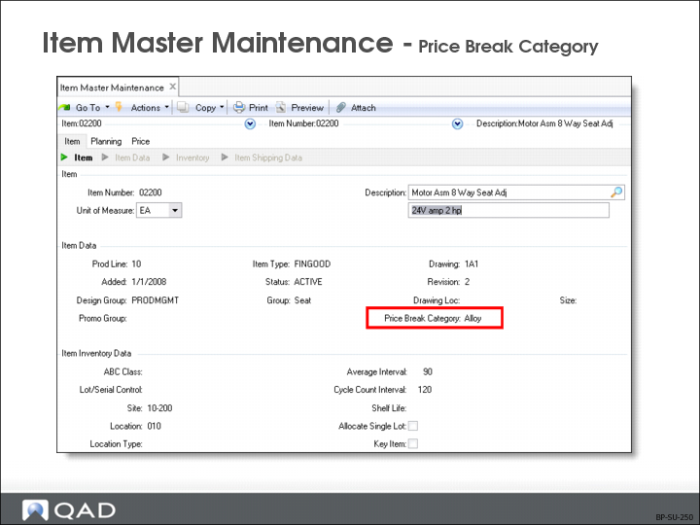
• Item break category is used to categorize or group the items that need to be accumulated together to get a better quantity break. If a break category is designated, it displays in Item Master Maintenance (1.4.1)
• Because price lists can be measured in terms of break categories, consider how items will be grouped. Break categories can be set to match other item numbers – the item with the break category adds to the quantities of the other item, but would not receive the price benefits itself
• It might be necessary to set some items so the break categories match the item number, depending on how price lists are set up
Break Cat
If left blank (default), quantity of qualifying item is used. If a break category is specified, only amounts of that break category are considered for the price list; it is possible that this quantity could be zero.
A line qualifies if the break category in the Item Master matches the break category on a selected price list or another line item on the same order.
Name price break categories as you like, but make sure that you enter the same names on price lists and other items.
Enter break categories in Price List Maintenance (1.10.1.1) and Item Master Maintenance (1.4.1)
Item Master Maintenance
Almost every function uses item numbers, so the item master record is important.
Price Break Cat
Determine prices based on combined quantities of multiple items
• Assign a price break category to
• A price list that an accessory item belongs to
• The item master of an accessory item’s principal item
• The price of the accessory item is based on the quantity of the end item
Accessory Pricing Based on an End Item Break Category
Example:
1 100 green bicycles are ordered on line 1
2 100 red bicycles are ordered on line 2
3 200 bicycle reflectors are ordered on line 3
• The bicycles should be priced based on the total quantity of bicycles sold
• The reflectors should receive a quantity price break based on the 200 bicycles ordered
• The bicycles should not receive a quantity price break based on the 200 reflectors
To implement this scenario, three items are needed in the item master: red bicycles, green bicycles, and reflectors, then
• Designate the category for both the red and green bicycles in the break category field
• Leave the break category for the reflectors blank on the item master
• Set up two price lists, one for the generic category of bicycles and one for the accessory item
The price list for the pricing of bicycles by total quantity ordered requires the same designation in the break category field that was used on the item master.
• Use a pricing table to set the discounts for total quantity of only bicycle purchases. The price list for the reflectors references:
The reflector item number in the Item Code field and
Bikes (or another designation) in the price list break category field
Use the pricing table for this price list to set discounts on the selling price of reflectors based on the total number of bicycles ordered, and set the quantities to accumulate within one order or across all open orders.
Price List Maintenance: Amount Type
In determining best pricing, the system looks for links between customer and item codes. If no links are found, it uses the default price from the Item Master. Thus, using price lists allows for multiple discount or promotional pricing schemes. Discounts and list prices must be in the same currency as the order currency
Price List
Enter a name or number for a price list.
Customer/Analysis Code
This can be one of the following:
• An analysis code that applies to customers
• A specific sold-to customer
• Blank to apply the price list to all customers
Item/Analysis Code
This can be one of the following:
• An item number
• An analysis code
• Blank to apply the price list to all items
Currency
Enter the currency code for the price list.
UM
The unit of measure associated with this price list structure. This field can be left blank if the pricing applies to any unit of measure.
Start
The first day this price list is effective. If left blank, the price list is effective for any date prior to the expiration date.
Expire
The last day this price list is effective. The date must be greater than or equal to the start date. If left blank, it implies no expiration.
Description
A short description of this price list. The description is printed on customer documents (sales orders and invoices) if the print field is Yes. Optional field; can be left blank.
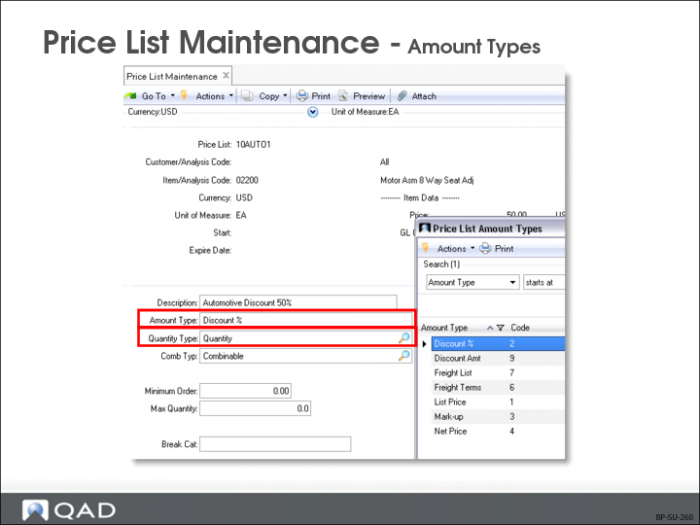
Amount Type
Determines type of discount:
• Discounts are percentages taken from the list price (as specified in the item file)
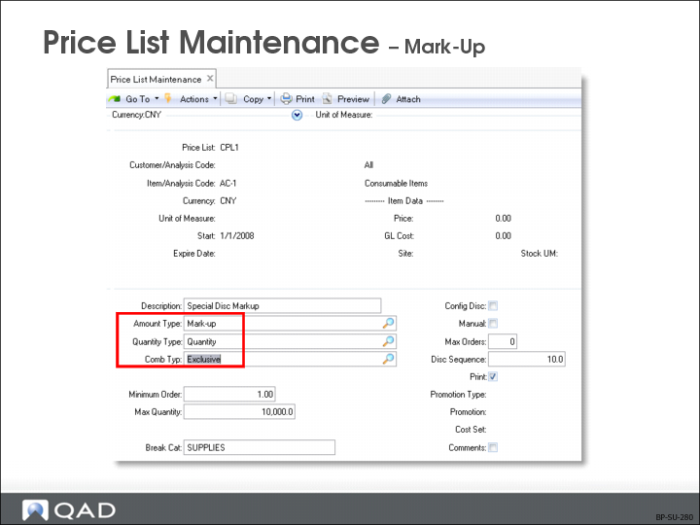
• Markups are percentages added to the item cost at the order site
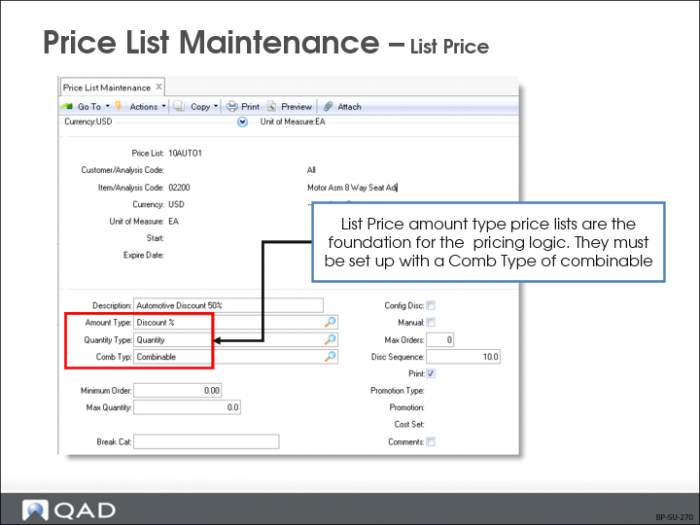
• List price tables provide pricing history and set minimum/maximum prices allowed. List price amount type price lists are the foundation for the pricing logic; they must be set up with a Comb Type of combinable.
Amount type selection also determines
• Which discount table frame appears during price list creation
• Whether price-list-specific GL information can be entered
• Amount types control information entered for the price list and how this information is used
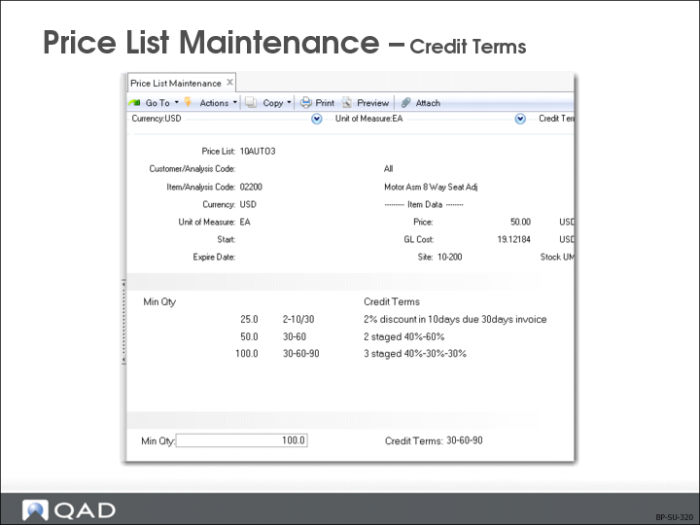
• Credit Terms
• Freight Terms
• Freight List
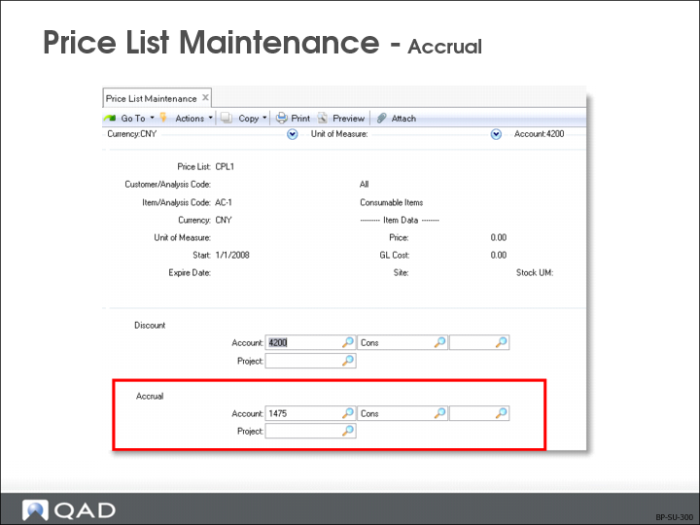
• Accrual
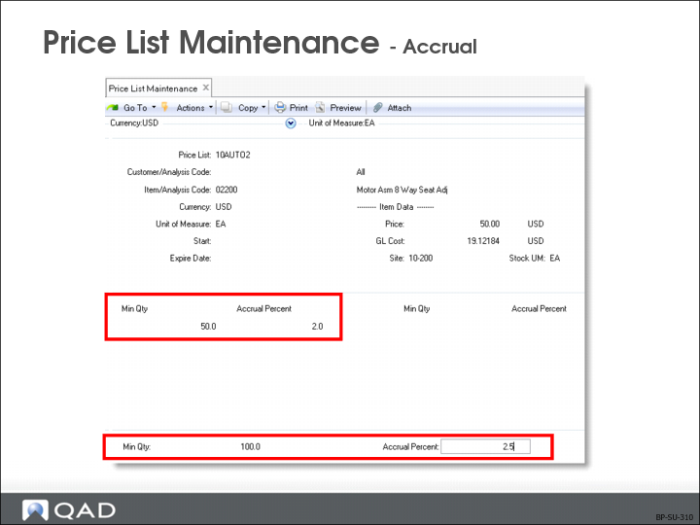
Note: The accrual price list works like discount price lists, except that instead of reducing a list price by a percentage, it causes a percentage of the net price to be accrued into a specific account, without affecting the calculation of the net price.
Qty Type
Type of quantity to be used in determining quantity breaks in the price list detail
Quantity: Pice breaks are determined by the number of items ordered
Amount: Price breaks are based on the total extended list price of items
Comb Type
The best possible new price of a line item is determined by considering multiple discounts and combining various discounts. Multiple price lists can apply.Valules are:
• Base: Base price lists are exclusive of other base price lists
• Combinable: Intended to combine with one another and with base price lists
• Base combinable: Not intended to combine with any other price lists except for base price lists
• Exclusive: Totally exclusive and can not be combined with any other price lists
Mark-up and net price lists must be of combination type Base or Exclusive. List Price Tables provide pricing history and set minimum/maximum prices and must be set up with a Comb Type of combinable.
Amount type Accrual price lists can be created with any valid Comb Type. The value is ignored since the Accrual type price list does not affect the calculation of the best net price.
Min Net Order
The minimum order amount required for this price list is used to set different prices at different order quantities.
Example: You can offer a 10% discount on sales of 0 to 99 units and a 15% discount on sales of 100 units or more.
15 different levels are allowed for each type of price list (specific prices, discounts, or markups). Each price list must contain at least one price.
Note: If the Minimum Net Order is not satisfied, the system issues a warning.
Enter levels in ascending sequence. If offering a 10% discount on sales of 0 to 99 units and a 15% discount on sales of 100 units or more, you would enter the Discount price list as:
Min Qty: 0 Amount: 10
Min Qty: 100 Amount: 15
System interprets this as 0 to 99, discount 10% and 100 to 9999999, discount 15%
Max Quantity
Maximum quantity used as a ceiling. This field and quantity type are tied together; can be quantity or amount.
• Default is zero (if zero, it is not used)
• If the quantity of a given item exceeds maximum quantity, the price list will not be used
Note: Max Qty does not work with a price list with an amount type of List Price. Entering a Max Qty for a price list with an amount type of List Price will have no effect.
Break Cat
Because price lists can be measured in terms of break categories, consider how items will be grouped.
• Quantity breaks are in the price list unit of measure if the unit of measure is blank on price list
• You must specify which customer is the pricing customer
• If there is a customer master record, the ship-to customer becomes the pricing customer
• Otherwise, the sold-to customer is the pricing customer
• Item break category groups items together to get a better quantity break
• If a break category is designated, it displays in Item Master Maintenance 1.4.1
• Only quantity or amounts of that break category are considered for the price list
Note: It is possible that this quantity could be zero.
• Break categories can be set to match other item numbers
• Set some items so the break categories match the item number
Config Disc
• If Yes, the price applies to everything in a configured product when pricing a configured item
• If No (default), the price list is applied only against the component that qualifies
Note: If not pricing a configured item, this field is ignored.
Manual
If Manual is Yes, the price list name can be entered in the Manual Price List field in
• Sales Order
• Sales Quote
• What-if
• Other inquiries or procedures where this field appears
Other price list criteria and best pricing logic still apply; specifying a manual price list does not ensure that a manual price list will be applied
Note: Only one manual price list can be specified at a time.
Max Orders
The number of times this pricing is to be used (only for reference). To see how often this list is used review the price history report or Price Lists by Customer Inquiry (1.10.1.5).
Note: This field is normally used with manual price lists when use of a specific price list is limited (such as first-time buyers, once a year sales). When the price list has been used the allowed number of times, it should be disabled by setting the price expiration date.
Markup
• A price list can be set up with an amount type of Markup
• Markups are percentages added to the item cost at the order site
• Markup type price lists must have a Comb Type of Base or Exclusive
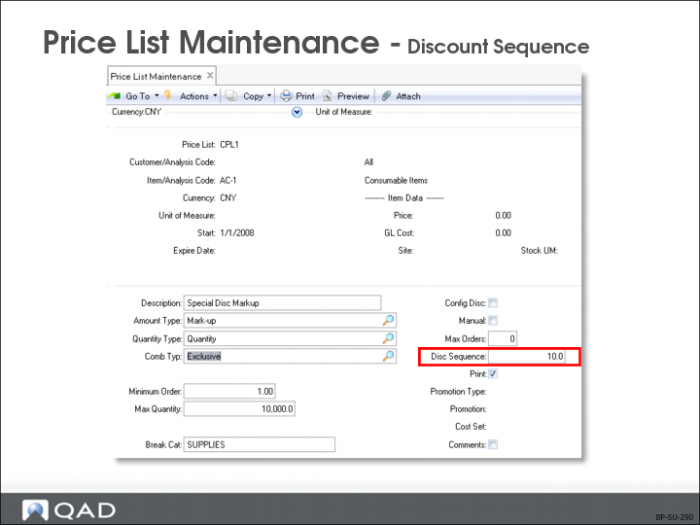
Disc Sequence
When multiple price lists are combined, this field controls discount amount allocation. Default is 10. Discounts are applied in order of discount sequence.
Note: This is not important for determining the net price; however, it is important for determining the amount posted to the G/L for each Price List.
Example: If a 20% discount and a 30% discount apply to a $200 item and the 20% discount had a lower sequence number, that price list would get a discount amount of $40 (200 * .20), and the 30% discount would receive a discount amount of $48 (160 * .30).
• Ignore discount sequences if you are using
• Additive (added) discount combinations rather than cascading (multiplied), or
• If you are not using the price list accounts
• Price lists with the same sequence number have discounts divided equally. In the example given above, both price lists would get a discount amount of $44
• Manual discounts are assigned a discount sequence of 999
• More important discounts should get lower sequence numbers
• Discount sequences control how the costs of discounting are distributed; think carefully about their setup
Note: Although discount sequences are independent of price list combinations types, make sure that your base type price lists have lower sequence numbers than combinable and non-combinable price lists.
Print
Yes (default) or No. Indicates whether this price list should be shown on printed documents.
Note: When documents are printed, you indicate whether discount information is printed at all. Even if this is Yes, only those price lists with the print field set to Yes will print. Also, the print field is stored in price history. Changing this field will not affect documents that have already been priced.
Cost Set
Cost set codes identify specific groups of product costs and must be unique. If specified, item costs associated with this cost set are used as a basis for mark-up prices
• If left blank, standard GL costs are used
• If no price is found for an item, the price list is ignored
Note: Price List Maintenance has a Promotion Type and Promotion field on the screen. These fields are maintained by Trade Management (TrM). Price List Maintenance cannot update or delete price lists generated by TrM.
Price List Maintenance: Accrual
• Posting of accrual amounts is in addition to the normal transaction amounts posted
• Accrual and expense account numbers are specified in the GL Information frame
Min Qty
Discount quantities are calculated by specifying minimum quantity or amount.
Credit Terms
• Credit terms are specified for an order or quote, independent of other discounts
• There can only be one set of credit terms for the entire order
Note: The terms set last are the ones that apply
Freight List
• A freight list is specified for an individual order or quote line item, independent of discount
Freight Terms
• Freight terms are specified for an order or quote, independent of discount
How Best Pricing Works – Revisited
How QAD Enterprise Applications Uses Price Lists
In best pricing, multiple discounts are considered and applicable discounts are combined to determine the best possible net price for a line item, as illustrated above. Multiple price lists can apply. The best discount is the:
• Best base price plus all combinable discounts, or
• Best base price plus the best base combinable price list, or
• Best exclusive price list
When the system has found all qualifying price lists, it then determines what combinations result in the best price. The rules for combining price lists are based on the Comb Type field in Price List Maintenance (1.10.1.1)
Example:
1 List price list (if one exists) has a
• Starting sales price of $10.00
• Floor price of $2.00 (cannot be sold for less than $2.00)
• Ceiling price of $15.00 (cannot be sold for more than $15.00)
2 Base price lists are compared.
• B1 = 5% discount
• B2 = 10% discount
• B3 = 20% discount
B3 gives the best discount (20%) and will advance to the next level.
3 All qualifying combinable type price lists are combined together to determine the discount amount.
• C1 = 2%
• C2 = 3%
• C3 = 4%
Total discount: 2 + 3 + 4 = 9%
4 The discount from the base price list (B3 = 20%) and the total discount from all qualifying combinable lists are combined.
• B3 (20%) + C1 (2%) + C2 (3%) + C3 (4%) = 29%, for a price of $7.10
5 The base combinable price lists are compared.
• BC1 = 8%
• BC2 = 10%
• BC2 gives the better price (10% discount)
6 Base combinable price list BC2 (10%) is combined with the best base combinable price list B3 (20%).
• BC2 (10%) + B3 (20%) = 30%
So far, this is the best price. Compare:
• B3 (20%) + C1 (2%) +C2 (3%) +C3 (4%) = 29%
7 Compare all qualifying exclusive price lists
• E1 = 50%
• E2 = 30%
E1 gives the better discount. Compare:
• E1 = 50%
• BC2 (10%) + B3 (20%) = 30%
E1 gives the best price of $5.00 ($10.00 *.50). If E1 had been less than $2.00, the sales price would become $2.00.
The final price is within range of floor ($2.00) and ceiling amounts ($15.00) in List Price price list.
Building the Best List Price
The system evaluates each applicable List Price price list. If more than one is found, the lowest price is used. If no List Price list is found, the Price field from the Item Master File is used. The price is stored in the List Price field of the sales order or quote.
Building the Best Net Price
The system accesses each applicable Discount%, Discount Amt, Markup, and Net Price price list. It then determines what combination yields the lowest price. The rules for combining price lists are based on the Comb Type field in Price List Maintenance. The Discount and Net Price fields are then updated on the sales order or quote.
Modifying Price for Minimum or Maximum
If the calculated Net Price on a sales order is above the maximum or below the minimum price (set on List Price price lists in Price List Maintenance), the Net Price on the sales order or quote is adjusted.
Manually Overriding Calculated Prices
The calculated List Price, Discount, and Net Price can be manually changed on a sales order or quote (if you have password access to these fields). When this occurs, the system records a Manual discount, which is the difference between the system-generated price and the price entered.
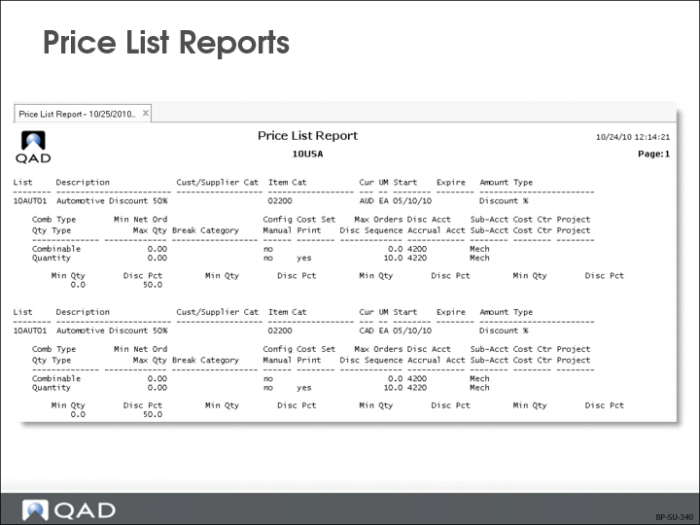
Price List Reports
• Most reports and inquiries can be selected and sorted for ranges of item/customer codes
• Also see Price List Inquiry (1.10.1.2) and Sales Order Pricing Report (7.15.7), which shows pricing detail for sales orders, including discounts used to arrive at the net price
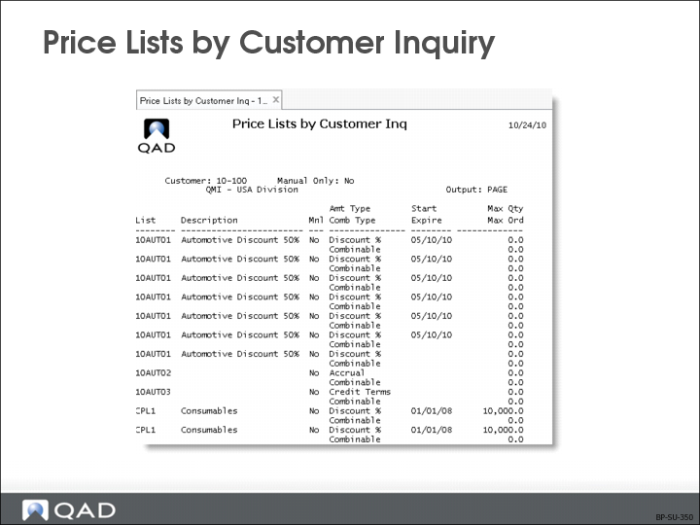
Price Lists by Customer Inquiry
Price Lists by Customer Inquiry (1.10.1.5) shows price list detail sorted by customer code.
• Yes: View manual price lists
• No: View all price lists
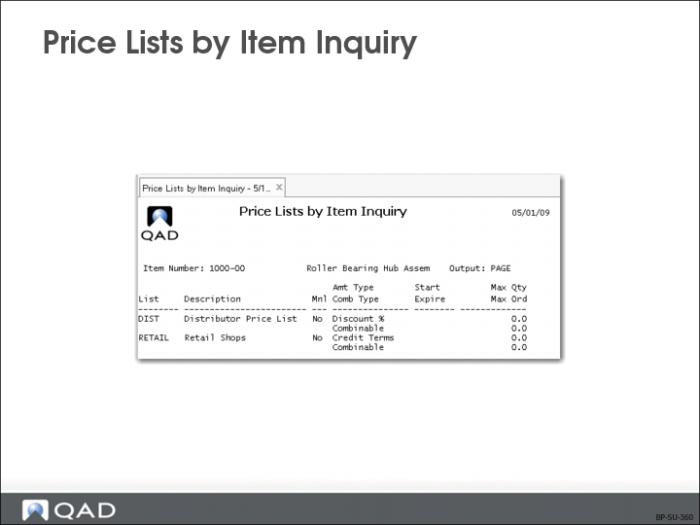
Price Lists by Item Inquiry
Price Lists by Item Inquiry (1.10.1.16) shows price list detail sorted by item code.
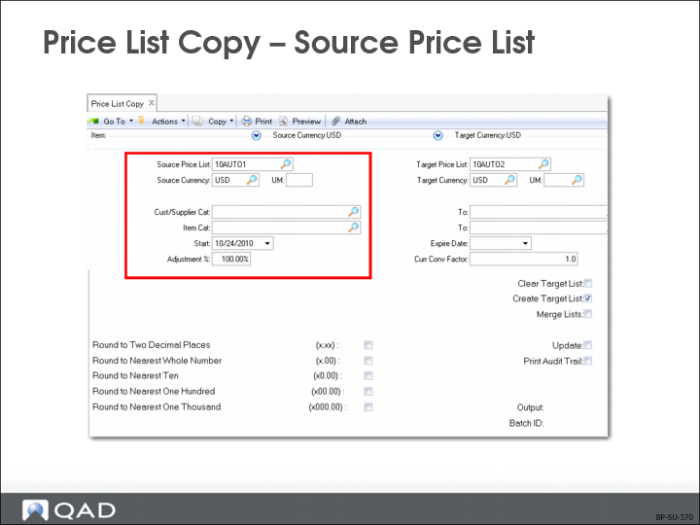
Price List Copy – Source Price List
Price List Copy allows you to quickly create new price lists based on existing ones.
• Copies a price list into any currency
• Adjusts existing price lists with increased or decreased prices
• Makes a copy of the source price list under the target price list code with a start date of today
Specific prices (Amount Type List Price or Net Price) are multiplied by the Adjustment Percent and the Currency Exchange Rate, then rounded to the specified number of decimal places. Discount and Markup percentages are copied as they are in the source price list.
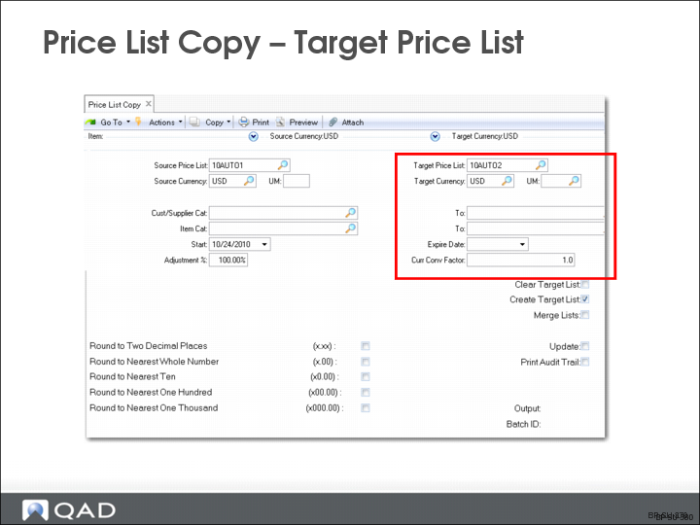
Price List Copy – Target Price List
Price List Copy makes a copy of the source price list under the target price list code with a start date of today.
• The source and target price lists can be the same
• QAD Enterprise Applications enters
• A starting effective date on the target and
• An ending effective date on the source list
• Clear an existing target Disc Tbl or merely add to it
Specific prices are multiplied by the Adjustment Percent and the Currency Exchange Rate, then rounded to the specified number or decimal places. Discount and Markup percentages are copied as is.