Setting Up Implementation Definitions
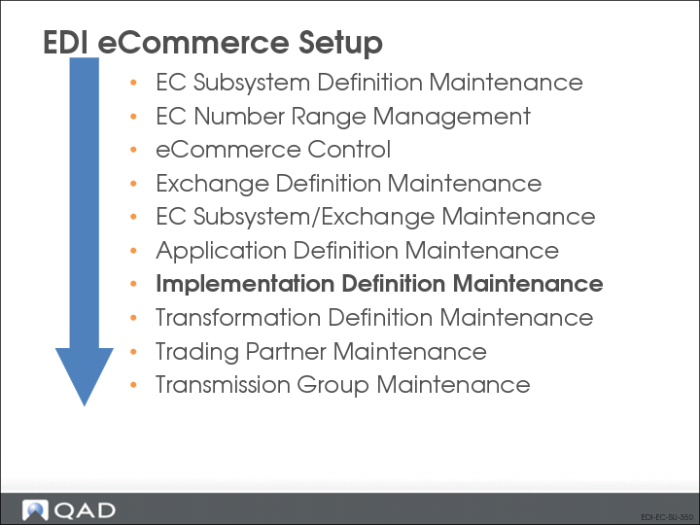
Implementation Definition Maintenance is very similar to Application Definition Maintenance (35.15.10). The major difference is that the implementation definition contains the variables, such as turnaround.
Use Implementation Definition Maintenance to define the data exchange requirements for a specific trading-partner implementation. The program includes three primary frames. Optional frames display when you are defining XML records, turnaround data, or fields to be edited during document export.
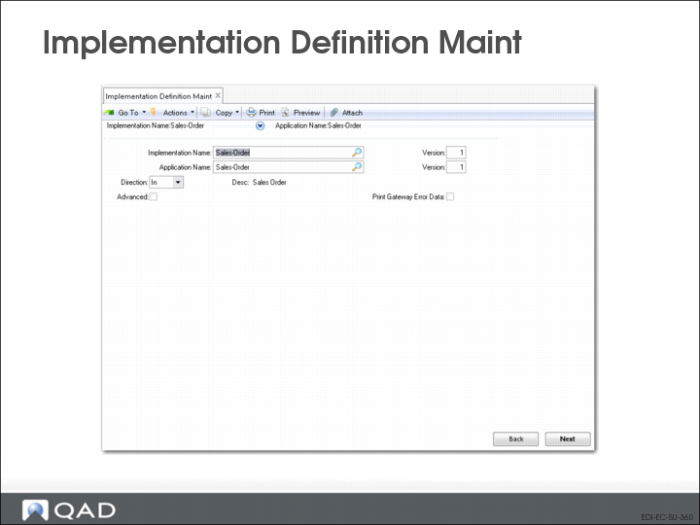
Implementation Definition Maint (35.15.13): Initial Frame
Implementation Name
Enter an alphanumeric name for this implementation.
Version
Enter a version number for this implementation. You can use the same name for more than one implementation, then use a different version number to distinguish between them.
Application Name
Enter the name of an application document definition to be copied to create this implementation definition. This can be one you created or one supplied by QAD.
Version
Enter the version number of the application document definition you are using as a template for this implementation document.
Direction
Enter the direction—inbound or outbound—of the application document definition you are using as a template for this implementation definition. Direction is relative to QAD Enterprise Applications—imported files are inbound and exported documents are outbound.
Multiple application document definitions can have the same name and version number and be distinguished only by direction. Be sure to use the right version.
Desc
Optionally enter a text description of this implementation. This description is for reference only.
Print Gateway Error Data
Enter Yes to print the data from the repository for each field defined in Implementation Definition Maintenance where Display is set to Yes.
Note: More must be set to Yes to access the Display field.
When a gateway error occurs, this feature lets you view the data that may have caused the failure.
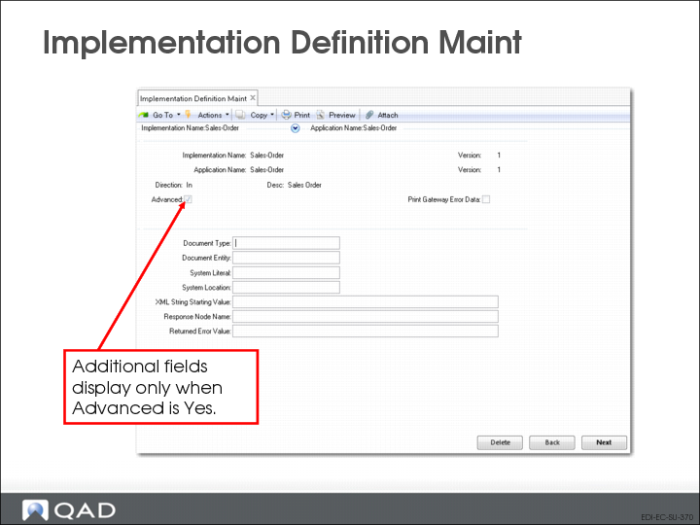
Implementation Definition Maint: Advanced (XML Setup) Frame
Document Type
Enter the document-level XML identifier for the document to be created using this definition. The resulting XML document includes this identifier in the first line.
Document Entity
Enter the URL containing the namespace definition that controls the XML structure associated with documents created using this definition; for example, http://www.w3.org/2000/xmlns/.
An XML namespace is a collection of names, identified by a specific uniform reference locator (URL), which are used in XML documents as element types and attribute names.
System Literal
Specify whether the document type definition (DTD) used to validate the content of exported XML files is on a public server or within a system domain. Valid values are:
PUBLIC: The value specified in System Location is outside the local system domain.
SYSTEM: The specified system location is within the local system domain.
System Location
Enter the path to the location where the document type definition (DTD) used to validate the content of XML files is stored.
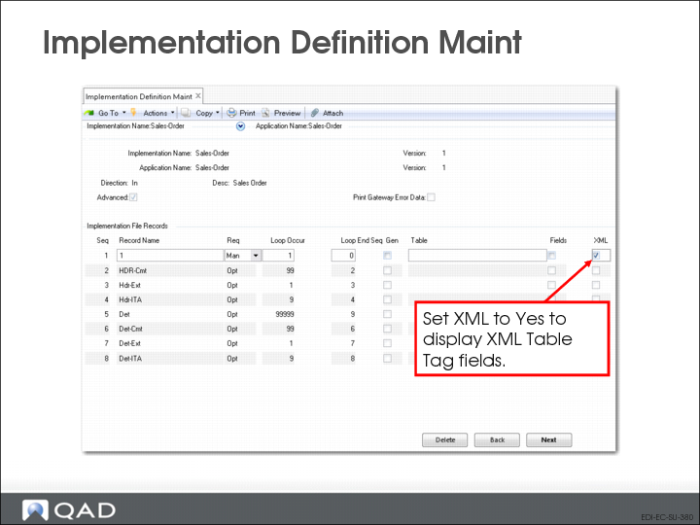
Implementation Definition Maint: Implementation File Records Frame
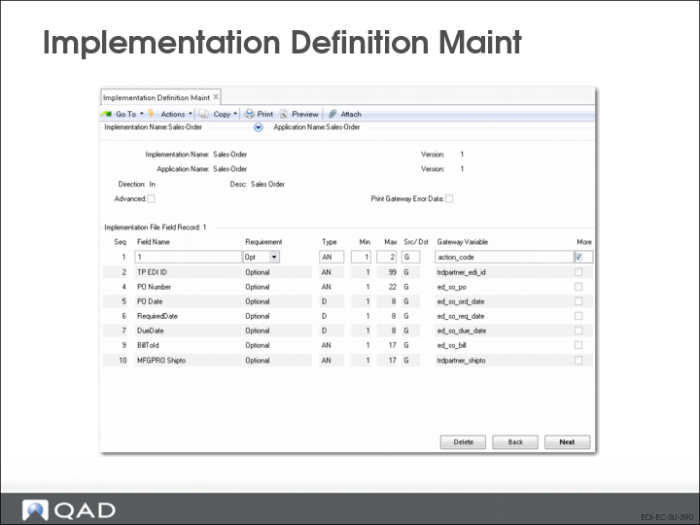
Use the next frame to edit an existing record structure or add new records.
Seq
The sequence number of this record. Choose Insert to add a new record. The system automatically assigns the next number. You can modify sequence numbers as needed. Choose Go to modify an existing record.
Important: In all cases, the first record in a document added to the repository must be sequence number 1. Other records can be numbered as you choose. The following table shows examples of valid and invalid record sequences.
Valid | Invalid |
1, 2, 3, 4, 5 | 2, 3, 4, 5 |
1, 10, 20, 22, 30 | 10, 20, 22, 30 |
After you have used an implementation definition in a transformation definition, you cannot change record sequences in the implementation definition without deleting and reentering the entire transformation definition.
Record Name
Enter a name for this record. Each record name must be unique in an implementation definition.
The transformation process uses this as the first part of the record variable, independent of the sequence number.
Note: Naming conventions apply to the record names used in application document definitions and implementation definitions. When you create new definitions, you must use these names.
Record Naming Conventions lists the naming conventions.
Record Naming Conventions
Document Type | Record Name | Description |
Sales Order | HDR | Header |
HDR-EXT | Header Extended |
HDR-CMT | Header Comment |
DET | Detail |
DET-EXT | Detail Extended |
DET-CMT | Detail Comments |
DET-SOB | SO Configuration Bill |
Customer Schedule | HDR | Header |
HDR-EXT | Header Extended |
DET | Detail |
DET-EXT | Detail Extended |
ATH | Authorizations |
Invoice | HDR | Header |
HDR-EXT | Header Extended |
HDR-CMT | Header Comment |
DET | Detail |
DET-EXT | Detail Extended |
DET-CMT | Detail Comments |
ADDR | Address |
ASN | HDR | Header |
HDR-EXT | Header Extended |
CTR-TARE-SUMM | Container Tare Summary |
TARE-HDR | Tare Header |
TARE-DET | Tare Detail |
CTR-TARE | Container Tare |
CTR-PRIM | Container Primary |
CTR-ITEM | Container Item |
ITM | Item |
ITM-EXT | Item Extended |
ITM-AUTH | Item Authorizations |
Requirement
Enter Mandatory to indicate that this record is required during the load or unload process or Optional to indicate that it is not. If the system cannot load or unload mandatory records, it generates an error message and does not process the associated document.
Loop Occurs
Enter the number of times the processing logic should loop through the records during loading or unloading.
Loop Ends Seq
Enter a defined record sequence number to indicate where the loop ends. For example, enter a Loop Ends Seq value of 2 on sequence number 2 to indicate that the entire loop sequence takes place on a single record. Or, enter an end sequence of 4 on sequence number 3 to indicate a loop that starts at 3 and ends at 4.
To specify a loop structure that includes all records, enter zero or a number higher than the last record sequence defined.
Gen
Enter Yes if this record applies generically to one or more database tables within the application. The Table field is then enabled so you can enter table names.
Table
Enter the schema names of the tables this record applies to. Separate multiple table names with commas. You cannot leave this field blank when Generic is Yes. The system validates your entries and displays a warning if the tables do not exist.
Fields
Enter Yes to display an additional frame that lets you enter or edit the fields contained in this record.
XML
Enter Yes to display two additional fields:
• XML Tag
• Namespace
Those fields do not display when XML is No.
Implementation Definition Maint: Fields Frame
Use this frame to define or update field definitions in the selected record.
Seq
The sequence number of this field in the record. Press Insert to add a new field. The system automatically assigns the next number. You can modify the number as needed or navigate to the blank fields at the bottom of the frame and assign numbers.
It is recommended that you number the fields sequentially, beginning with 1. Provided you do this, a total of 99 fields are available for each record. Although the system will accept non-sequential numbers, their use is not recommended.
Press Tab or use the arrow keys to move from line to line.
Press Enter to edit an existing field record.
Field Name
Enter or modify the name of the field. This value is used with the record name, formatted as recordname.fieldname, during transformation.
Requirement
Enter Mandatory to indicate that this field is required during the load or unload process or Optional to indicate that it is not. If the system cannot find mandatory fields while loading records, it generates an error message and does not process the associated record.
Type
Enter the type of data stored in this field. Valid entries are:
• AN: Alphanumeric
• D: Date
• I: Integer
• L: Logical
• R: Real number
Min
Enter the minimum length of this field. The system validates that required or optional data is greater than or equal to the minimum required value for the field.
Max
Enter the maximum length of this field.
• If the field lengths are variable and separated by the delimiter specified in EC Subsystem Definition Maintenance, the system validates that the field length is between the Min and Max values
• If the field lengths are fixed, the system uses this value to calculate where each field starts and ends
Src/Dst
Enter the type of variable associated with this field. Valid choices include:
• G: Gateway. This variable type is used by the gateway during the transfer process
• T: Turnaround. This variable type represents imported data that is stored in the turnaround data table, indexed, and later associated with an exported document
• D: Data entry. The operator adds this data during processing. This function is not currently implemented
Variable
Enter the name of the variable associated with this field. The gateway program uses this variable to move data into the application. The default variable is copied from the associated application definition.
More
Leave this field set to No to skip the next frame. Enter Yes to display another frame that you can use to set up fields to be edited during document export.
Implementation Definition Maint: Additional Fields (More) Frame
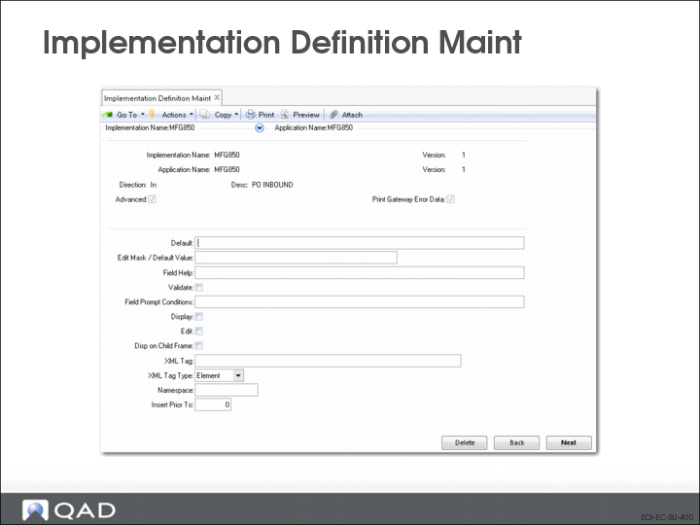
Default
Enter the value to be included in the field when Display is No. When that is the case, the system does not prompt for a value during processing.
Edit Mask/Default
When you want to display custom fields on the report generated during import, use this field to specify the field length and label to display, separated by a slash (/). For example, if you enter 4/Max, the report displays the output defined in this implementation record in a four-character field, with a label of Max.
Note: Set Display to Yes for these values to have an effect.
Field Help.
Enter text to be displayed at the bottom of the data entry screen when the cursor is in this field during editing. For example, you can describe the type of data or values that should be entered.
Validate
Enter Yes to activate the validation process for all documents using this implementation definition. The applies to both inbound and outbound documents. When set to Yes, the value of the field associated with this option is compared against the values defined in Data Validation Maintenance. If the value is not found, a transformation error occurs.
Field Prompt Conditions
This field is not currently used.
Display
This field is used under the following circumstances:
• When you are defining fields to be included in custom reports that are printed for inbound documents created based on this implementation definition. When you define a field length and column label for a custom report in the Edit Mask/Default Value field, you must set Display to Yes for the field to be included in the report.
• When Print Gateway Error Data is set to Yes in the initial frame. You must set Display to Yes so that field data displays when errors occur.
• When the implementation is for an exported document such as an invoice or ASN and you want the system to display a prompt to update a value during export. You must set this field to Yes for the data entered in the Edit Mask/Default Value field to display when the document is exported.
Edit
Enter Yes to have this field display for editing when you specify Update or Both in the Update/Export/Both field of Shipment ASN Export (35.4.1) or Invoice Export (35.4.3). See Exporting Documents.
Disp on Child Frame
This is used during the export update process. When set to Yes, this functions like the Display option but instead displays field on a child frame, retaining the information previously displayed.
XML Tag
Optionally enter an XML tag name associated with this field. If you do not enter a value, the system uses the field name as the tag.
XML Tag Type
Indicate the type of the specified XML tag. Valid values are Attribute and Element. The default is Element.
Namespace
Optionally enter the XML namespace associated with this field.
In XML, a namespace is a unique identifier for a collection of element type and attribute names. This lets you use identical type and attribute names for multiple purposes based on the namespace identifier.
Insert Prior To
When this implementation creates XML documents, specify the sequence number of the record before which you want to insert the value of this field. Use the up and down arrow keys to scroll through available record sequence numbers; the system displays the names of the associated records.
If Src/Dst is T, indicating a turnaround variable, another frame displays. Use it on inbound definitions to enter the table and field with which the turnaround data for this implementation should be associated. On implementations for outbound documents, enter the name of the function used to retrieve the turnaround data and attach it to the exported document.