Deduction Review
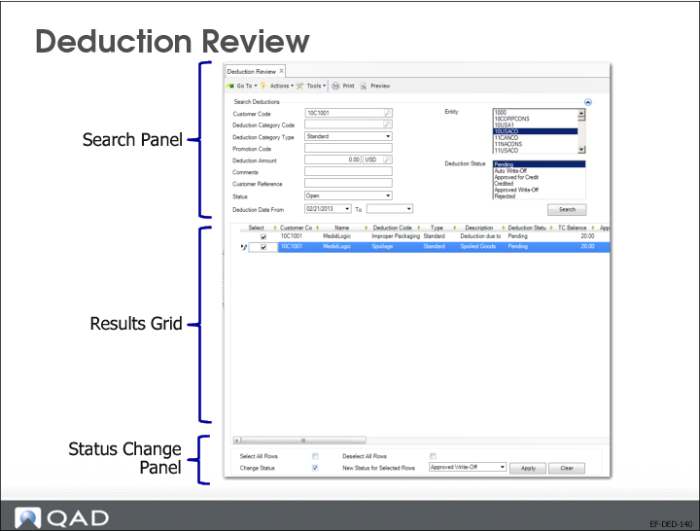
Deduction Review consists of three screen areas: a search panel for retrieving deductions to review, a results grid that displays the deductions that match the search criteria, and a status change panel where you can change the status of Pending and Approved for Credit deductions.
Deductions can have one of the following statuses:
• Pending: If the category does not allow automatic write-off, the status of the line is Pending. You can change the status of a Pending deduction in Deduction Review.
• Auto Write-Off: Deductions where the deduction amount is below the automatic write-off limit and where the deduction is automatically written off to the expense account associated with the deduction category. You cannot change the status of a deduction with the status Auto Write-Off.
• Approved for Credit: A deduction that has been made available for adjustment in Open Item Adjustment Create. Using Deduction Review, you can change the status of an Approved for Credit deduction.
• Credited: The status of a deduction that has been adjusted against a credit note in Open Item Adjustment Create. You cannot change a deduction to the status Credited in Deduction Review. However, you can filter and view deductions with this status. You cannot change the status of a Credited deduction.
• Approved Write-Off: Deductions above the automatic write-off limit that have been approved in Deduction Review and written off to the expense account associated with the deduction category. You cannot change the status of an Approved Write-Off deduction.
• Rejected: Deductions rejected in Deduction Review that have become a due item on the customer’s account. You can change the status of a Pending and Approved for Credit deduction to Rejected in Deduction Review. However, you cannot change the status of a Rejected deduction in Deduction Review.