Identify Template
• The Forecast ID identifies a template of criteria for analyzing historical sales data in the calculation
• The criteria template can be modified each time a calculation is performed
• Forecast results are stored by forecast ID, year, and item
• Prior forecast results from the calculation of annual forecasts, identified by Forecast ID, are overwritten
• Rolling forecast results, identified by Forecast ID and Forecast Year, are overwritten starting with the current month forward
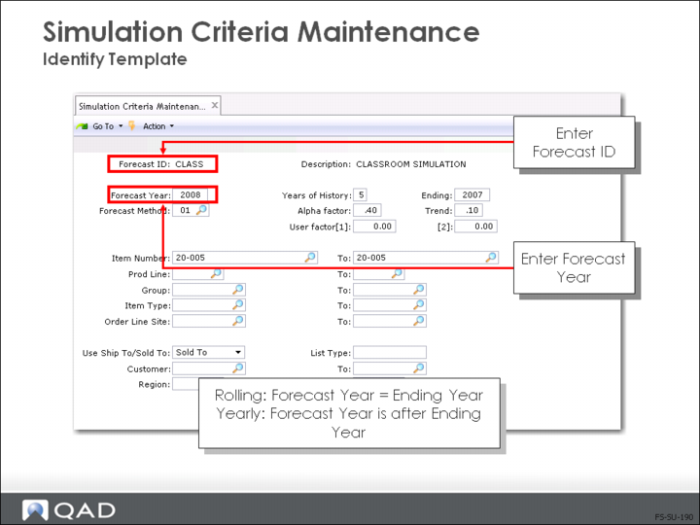
• Specify a Forecast ID and Forecast Year
Identify Template
• Forecast ID is an eight-character alphanumeric, user-assigned code
• Description is optional
Yearly or Rolling Forecast
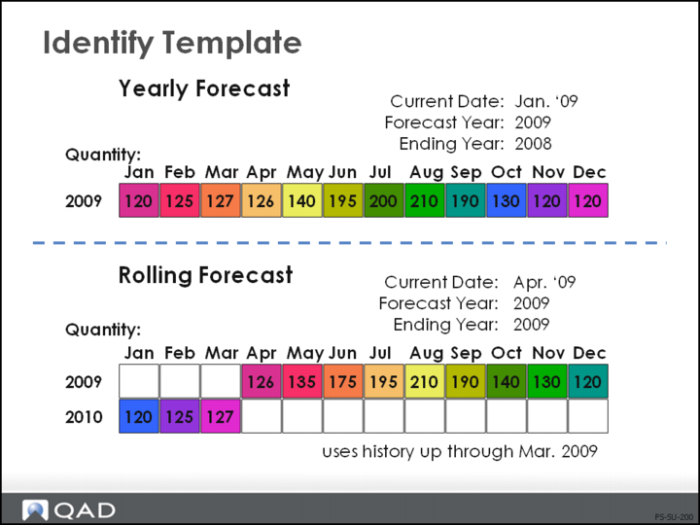
• In the first example above, the forecast has been set up as a yearly forecast:
• Uses sales history ending in 2008
• Projects forecast quantities for all the months of 2009
• In the second example above, the forecast has been set up as a rolling forecast:
• Uses sales history ending in March 2009
• Projects forecast quantities for April 2009through March 2010
• Each forecast example shown here has a unique Forecast ID
• When identifying your new Criteria Template, choose the forecast year and ending year based on whether you want a yearly forecast or a rolling forecast