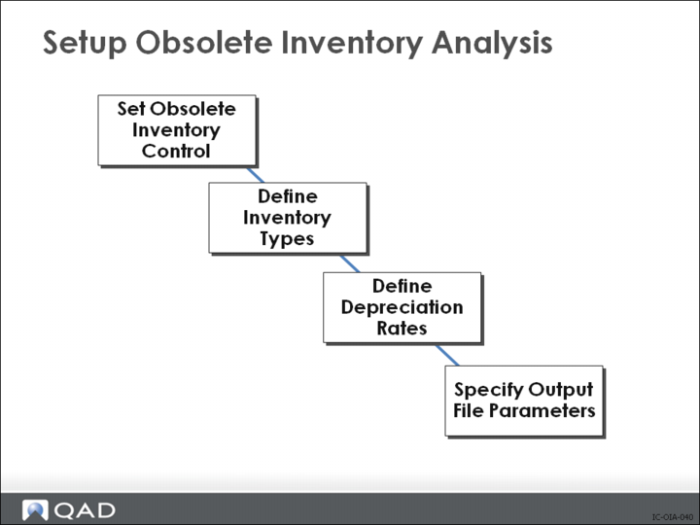
Set Up Obsolete Inventory Analysis
Use the programs in the Obsolete Inventory Analysis menu (3.5.1) as an analysis tool to identify inventory investments that depreciate and future demand for inventory. Once you identify and analyze obsolete inventory, your company financial experts can book a reserve, then use the reserve to create an inventory write-off.
The obsolete inventory analysis tool calculates an inventory supply value based on current inventory usage for specific inventory types over a predefined period. You define the inventory types. You can also create and assign depreciation rates for each inventory type.
You can use the obsolete inventory analysis tool to calculate demand for future inventory. You can choose to add the demand calculations to coverage calculations or use the greater of the two calculation results when determining the coverage.
You can specify transactions to extract for analysis; using Extract Consumption (3.5.1.7) or using Obsolete Inventory Analysis (3.5.1.9). Obsolete Inventory Analysis calculates the number of periods of supply coverage and the value of obsolete inventory reserve based on depreciation rates.
Obsolete inventory analysis programs summarize and organize analysis data in several reports or for output to several formats. The analysis data provides essential information that lets you reduce inventory and save costs as your company monitors usage and obsoletes any outdated or no-longer-used items. After you analyze data, you can choose to delete or archive the data you extracted for analysis.
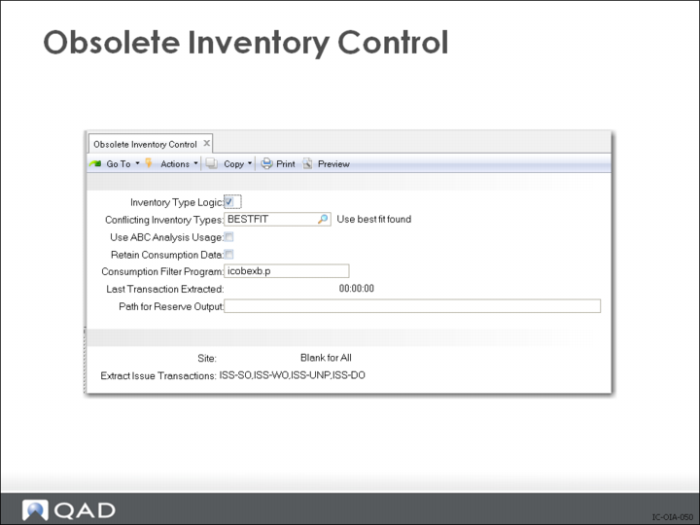
Obsolete Inventory Control
Inventory Type Logic
Indicate how you want the system to display fields associated with an inventory type in Inventory Type Maintenance (3.5.1.1), Inventory Type Item Report (3.5.1.13) and Item Inventory Type Report
No: Default display field labels and values
Yes: Display logical expressions for definitions
Conflicting Inventory Types
Specify the action when items with overlapping inventory types are found
BESTFIT (default): Choose the first inventory type with the highest number of fields.
BYPASS: Do not analyze if conflicting. No analysis data is reported where conflicts exist. The system reports conflicts if Report Conflicts is Yes in Obsolete Inventory Analysis.
FIRST: Choose the first inventory type in alphabetical order.
Use ABC Analysis Usage
Specify whether to use the average daily usage from existing ABC analysis for obsolete inventory analysis.
No: The system does not use extracted ABC analysis data. it uses the issue transactions you previously extracted in Extract Consumption (3.5.1.7) or it extracts issue transactions as needed when you run Obsolete Inventory Analysis.
Yes: The system uses extracted ABC analysis data when it performs obsolete inventory calculations.
Retain Consumption Data
Indicate whether to retain item consumption data the system uses during obsolete inventory analysis.
No (the default): The system does not retain consumption data and you cannot run Extract Consumption or Consumption Report
Yes: The system retains a table of consumption data by item, site, and period; displays the table in Consumption Report; and lets you build extractions in Extract Consumption.
Consumption Filter Program.
Enter the program used to filter consumption data for obsolete inventory analysis. The default is icobexb.p. If you leave this field blank, the system extracts all data. You can create your own filter program and enter it here.
Last Transaction Extracted.
Display only, lists the system date and time of the last inventory transaction the system extracted in Extract Consumption (3.5.1.7). This field also displays in Extract Consumption.
Path for Reserve Output.
Specify the path when you write obsolete inventory analysis data into an output file that you can optionally define in Output File Type Maintenance (3.5.1.5). A blank indicates the system creates the output file in the working directory. Use your system's conventions to specify path and directory.
Site.
Specify a site to use when gathering past transactions for obsolete inventory analysis. Leave blank for all sites.
Extract Issue Transactions.
Specify the types of transactions you want the system to extract when analyzing obsolete inventory. Separate multiple transaction types with commas. By default, the following four types are used: ISS-SO, ISS-WO, ISS-DO, ISS-UNP.