Maintaining the Control Program
The MRP control program sets some basic parameters.
MRP Control
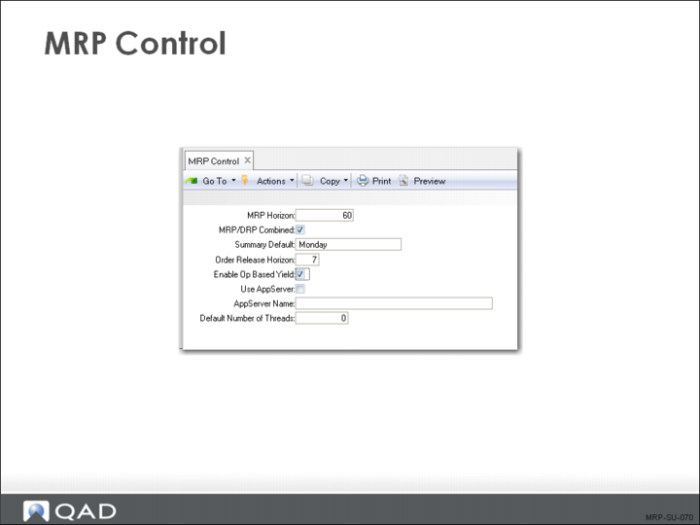
Enter appropriate values in MRP Control (23.24).
Field Definitions
MRP Horizon
The period, in calendar days, which MRP plans. MRP calculations ignore data outside this time period. Set the horizon at least one day longer than the longest item cumulative lead time in the database to avoid planning it late.
Note: If you change the MRP planning horizon, affected items are not automatically replanned when you run Net Change Materials Plan (23.1). Ensure that all items are replanned by running Regenerate Materials Plan.
MRP/DRP Combined
Indicates whether MRP planned items can also be planned with Distribution Requirement Planning (DRP). DRP is the balancing of supply and demand for items transferred between sites. If this field is set to:
No: MRP planned items can be recalculated only using the MRP functions
Yes: MRP planned items can be recalculated using the DRP planning functions
Choosing when to run DRP and MRP depends on where your DRP items are in the structure:
• If you are distributing finished products, you can usually run DRP, then MRP
• If you are supplying component items between sites, you can usually run MRP, then DRP
You would normally only need to run a combined MRP/DRP when you have DRP items at multiple levels of the product structure.
Summary Default
Indicates the day of the week all MRP summary reports and inquiries start.
Order Release Horizon
The number of calendar days before planned order release that an action message appears.
• MRP assigns Release Due action messages to orders with release dates within this release horizon
For example, if you set the release horizon to seven days, all orders due to be released within the week have a Release Due action message
• Setting this date gives planners time to take appropriate actions
• Set the order release horizon to reflect your normal paperwork lead time and how often you run MRP
If you run MRP once a week, set the release horizon to at least seven days
If you run MRP daily, you can leave this field at zero
Enable Op Based Yield
This field determines how the system calculates yield for component items when product structures and routings are exploded in material requirements planning (MRP) programs, work orders, repetitive, advanced repetitive, and configured products.
No: The system uses the Yield % field associated with the parent item in Item Planning Maintenance or Item-Site Planning Maintenance to calculate component requirements.
Yes: The system derives the yield percentage amount for components from operations on the parent item’s routing. The Yield % field associated with the item is used for the parent item only, not the components.
Note: Even when Enable Op Based Yield is Yes, this calculation method is only used for parent items with Operation Based Yield set to Yes in either Item Planning Maintenance or Item-Site Planning Maintenance.
Use AppServer
Specify whether your system uses a Progress application server to run MRP/DRP processes on a Symmetric Multiple Processor (SMP) computer.
AppServer Name
When Use AppServer is Yes, enter the name of the application server that is configured to run the MRP/DRP programs.
Default Number of Threads
When your system uses an AppServer for MRP/DRP processing, enter the default number of processing threads, or agents, that the AppServer can create. This value can be any integer up to 99.