Routing Cost Roll-Up Calculations
Routing cost calculations are used to calculate the value of this-level labor, burden, and subcontract costs per item
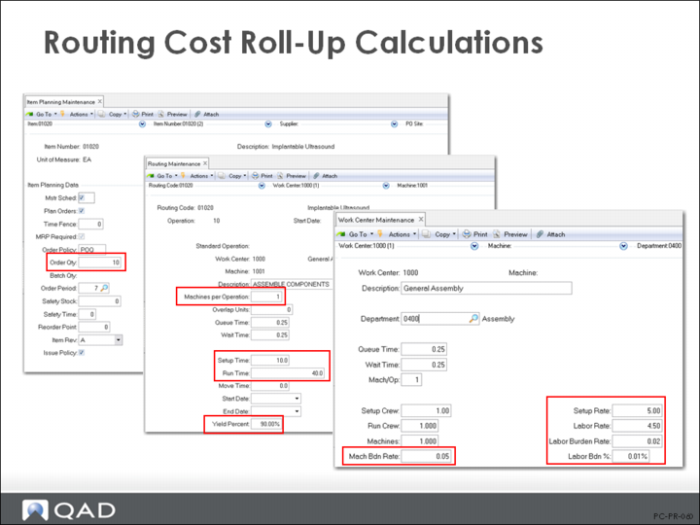
• The work center data is used to obtain hourly rates for setup and run labor. The work center also provides the burden rates as cost per hour for labor and machine burden, as well as a labor burden percent.
• The routing records provide the setup and run times (standard), as well as the machines per operation and operation yield percent.
• The item (site) planning record provides the order quantity value, which is used to amortize setup cost over a standard or normal order size to obtain a realistic cost per unit value.
When you first set up routings, Routing Cost Roll-Up enables you to verify the item cost figures and the routing itself. The regular use of the roll-up is used to determine the current cost of an item.
Roll Up Current Cost Set First
You can roll up either current or GL costs. The default is to roll up current costs.
You can roll up GL costs when they change, but it is safer to roll up current costs and then move them using Current Cost Set Move to GL (1.4.22). This function is discussed on Current Cost Set Move to GL Set.
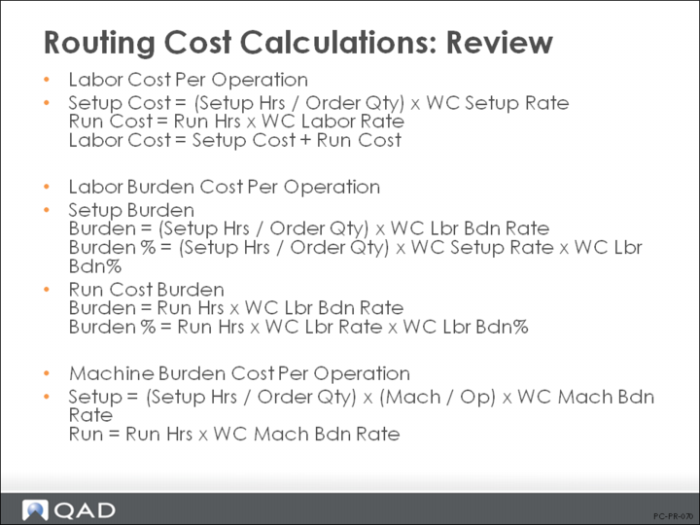
Routing Cost Calculations: Review
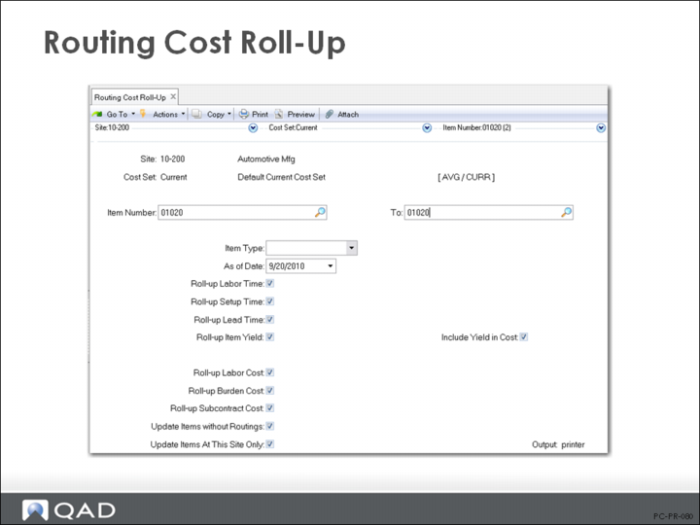
Routing Cost Roll-Up
Key fields in Routing Cost Roll-Up (14.13.13) are:
As of Date
Roll-up calculations only consider operations effective on the specified date. The default is the system date.
Roll-Up Labor Time, Setup Time, and Lead Time
Often, these fields should be set to No so that the manufacturing lead time entered in the Item Planning data is not overridden. This should be discussed with the Planners to determine how these fields should be set. The default setting is Yes.
Include Yield in Cost
Yield is calculated by operation and the compounded yield for all operations can optionally be used to update the item master yield for planning purposes (set Roll-Up Item Yield field to Yes). The order quantity planned will be increased to cover the expected losses, which will require more components and production time. This yield can be calculated into the costs (if set to Yes) or be excluded from the cost process (if set to No).
Note: QAD Enterprise Applications does not calculate a yield variance. It will calculate material and labor usage variances and a method variance, which will include the yield variances.
Roll-up Labor/Burden/Subcontract Cost
Routing Cost Roll-Up can calculate this-level costs for individual elements or for all elements: labor, burden, and subcontract. Normally set these fields to Yes.
Update Items Without Routings
This determines whether cost calculations include only those items with routings, or all items. This field allows the user to clear out costs associated with obsolete routings. For example, if a company decides to stop making an item and start to acquire it from another source, simply deleting the routing does not clear out all of the manufacturing costs associated with this item. To reset those costs to zero, run the routing cost roll-up with Update Items Without Routings set to Yes. If this item is a component, then you also need to run the Product Structure Cost Roll-Up.