Shared Data Sets
Shared sets provide great flexibility in how a system can be set up. A default set of shared set codes is supplied with the system. However, as many shared sets as necessary can be created.
The following types of data can be shared:
• Customers
• Suppliers
• Accounts
• Sub-accounts
• Sub-account COA mask
• Cost centers
• Cost center COA masks
• Projects
• Project COA masks
• Exchange rates
• Daybooks
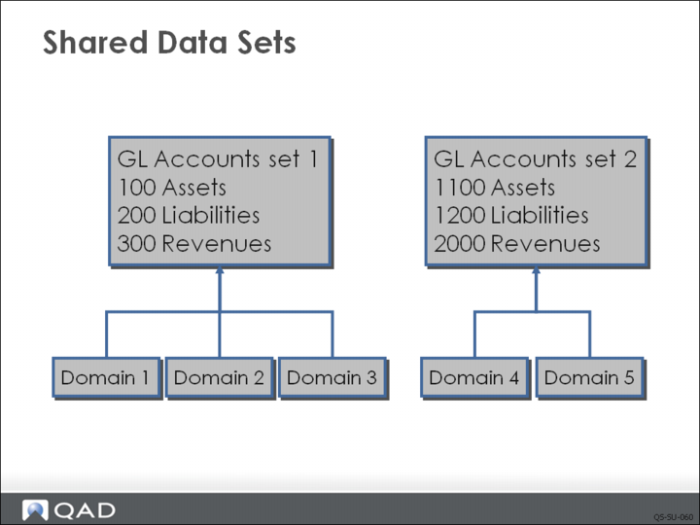
Example: Three US domains can use the same chart of accounts, while two other domains in Japan can use another accounts shared set. This streamlines and standardizes the use of accounts across the enterprise.
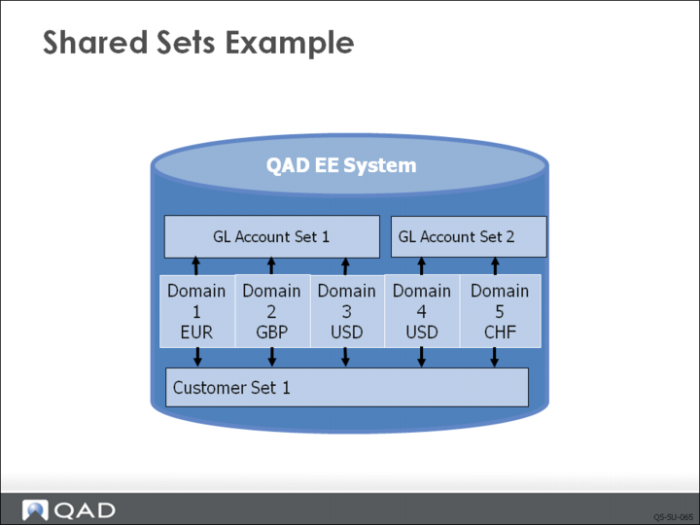
Shared Sets Example
To determine how many shared sets you need, create a table like the one below. Down the side is a list of types of data that can be shared. List the domains you plan to use on the top. Then consider what information will be shared and what will be different among domains.
Shared Set Type | US - Domain | EMEA - Domain |
Customer | AllCustomers | AllCustomers |
Supplier | AllSuppliers | AllSuppliers |
Account | US_Accounts | EUR_Accounts |
Sub-Account | US_Sub | EUR_SubMask |
Sub-Account COA Mask | US_SubMask | EUR_Sub |
Cost Center | US_CC | EUR_CC |
Cost Center COA Mask | US_CCMask | EUR_CCMask |
Project | US_Project | EUR_Project |
Project COA Mask | US_ProjMask | EUR_ProjMask |
Exchange Rate | SystemExRate | SystemExRate |
Daybook | US_Daybook | EUR_Daybook |
Discussion
A customer references an AR account. What if the same customer set is used by domains that point to different GL account sets?