Issue Components
Work order operations begin when a work order is released and its components issued.
You can issue inventory to a work order in three ways:
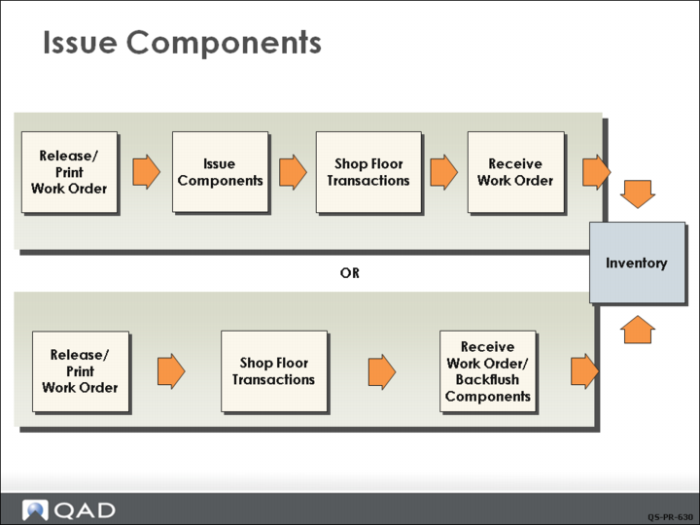
• Directly with Work Order Component Issue (16.10), illustrated in the top row of the graphic)
• When completed products are received with Work Order Receipt Backflush (16.12), illustrated by the bottom row of the graphic
• Issue inventory, report labor, and receive items with Work Order Operation Backflush (16.19), also illustrated by the bottom row of the graphic
Inventory transactions occur at different points depending on the method you use. Component quantity on-hand is reduced at a later time using the backflush method.
Work Order Receipt Backflush combines the functions of Work Order Component Issue and Work Order Receipt. Either method keeps track of the inventory transactions used to issue components to a work order and excludes floor stock, which is issued using an unplanned issue transaction.
You can monitor work order operations using the Shop Floor Control module.
Non-Standard Component Issue
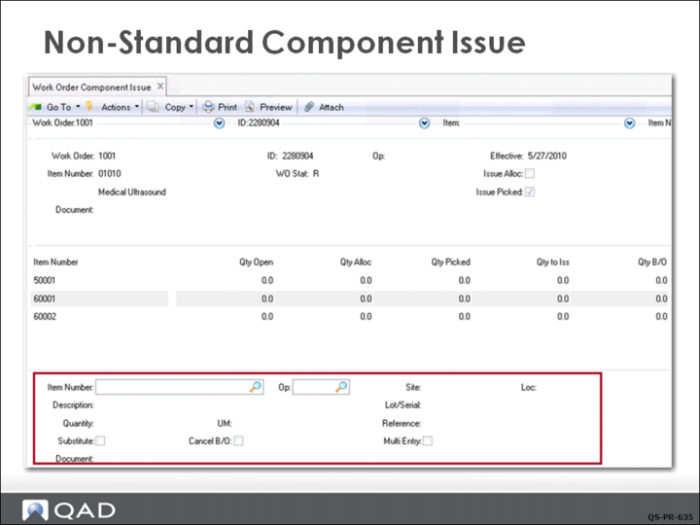
In the case of a nonstandard issue, you use the lower frame of the issue screen to manually enter the correct data. Examples of when this is used include issuing an approved substitute item in place of the standard item or issuing material from a different location. A common situation is needing to issue material from two (or more) locations to get the full quantity required.
Once data in the lower frame is filled in and you click Next, the transaction proceeds normally.