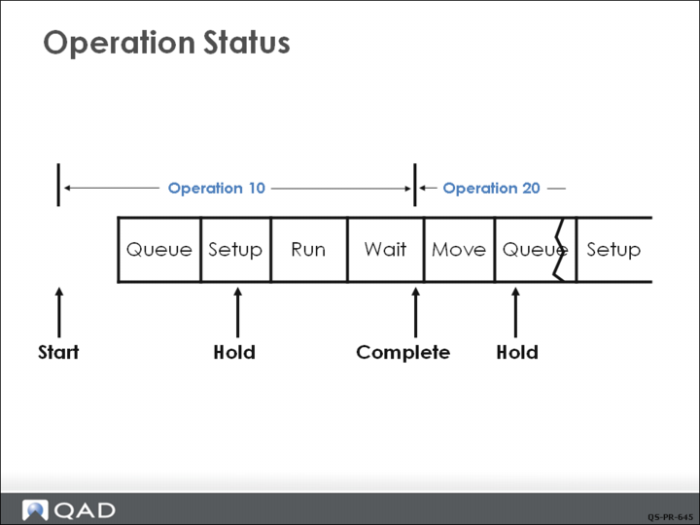
Operation Status
Operation status codes are used to indicate the detailed status of an individual operation. The status codes can be entered manually using Work Order Routing Maintenance (16.13.13) or automatically set when the Shop Floor Control labor feedback transactions are used. The system uses the following status codes:
Queue (Q)
The first operation can be set to Queue automatically upon releasing the work order if Move Next Operation is Yes in Shop Floor Control (16.20.24). Succeeding operations can be set to Queue automatically when the previous operation is reported Complete.
Setup (S)
If setup time is reported, the status is changed to Setup.
Run (R)
When run time is reported the status is updated to Run.
Complete (C)
The operation status is Complete when all work at that operation is finished.
Hold (H)
An order can be manually placed on hold at any time. This is usually done when work is stopped for some reason, such as running out of material or equipment malfunctions, or because the worker is reassigned to another task.
Not all operations use all lead-time elements, nor do all status codes need to be reported. A very short operation can be at status Queue and then reported complete, with any setup and or run time reported at that moment. The wait and move times are not status codes but elements of lead time. They are referred to as inter-operation times since they have no labor content but do require time that must be scheduled. Examples are paint drying time or transport time between operations in different buildings.