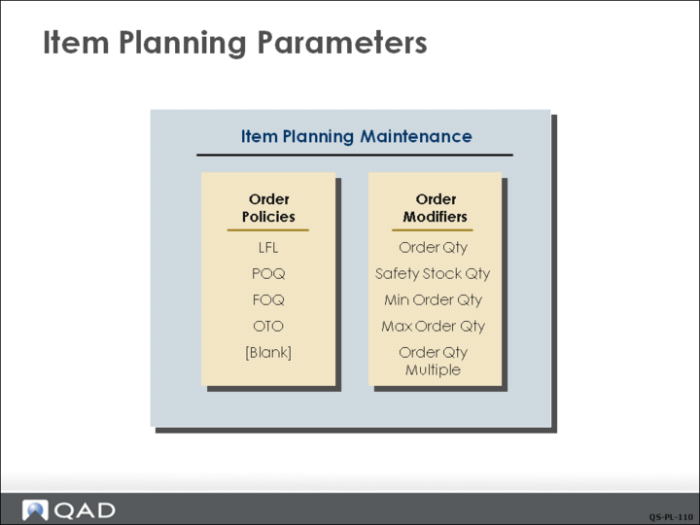
Component Item Planning: Item Planning Parameters
QAD uses item planning parameters to determine how items are planned by MRP. General item planning parameters can be defined in either Item Master Maintenance (1.4.1) or Item Planning Maintenance (1.4.7). Site-specific parameters are entered in Item-Site Planning Maintenance (1.4.17). Any parameters not entered in Item-Site Planning Maintenance default from Item Master Maintenance or Item Planning Maintenance.
Order Policies
Order policy determines the rules for planning orders. Order policies are used together with order modifiers to determine order quantities. There are four types of policies:
Lot for Lot (LFL)
A lot sizing technique where MRP plans a separate supply order for each demand order. For example, sales orders exist for the same item with quantities of 5, 10, 15, and 20. MRP will plan four orders for 5, 10, 15, and 20 units.
Period Order Quantity (POQ)
A lot sizing technique where lot size is equal to net requirements for a given time period expressed in days (Order Period field); for example, a 30‑day order period would create one planned order for all requirements for the next 30 days. The calculation of the period does not begin until the first statement of demand. For example, if MRP is run today for an item with a 30-day period but the first demand order is five days in the future, the system then counts 30 days from five days from now to create the 30-day period bucket.
Fixed Order Quantity (FOQ)
A demand rate lot sizing rule where a fixed quantity (Order Quantity field) must be ordered. For example FOQ is 100 and demand is 105. MRP will plan two orders for 100.
One Time Only (OTO)
A lot-sizing technique that produces an order only once, based on the due date of the first item required. This is typically used for projects such as creating an engineering drawing that occur only once in the manufacturing of a product.
Order Policy Blank
A blank order policy is used to prevent MRP from planning an item.
Note: An order policy that is not recognized by the system (EOQ for example) defaults to LFL.
Two other parameters are used with order policy:
Order Quantity
This specified quantity is used in conjunction with the Fixed Order Quantity (FOQ) order policy. It is also used for all item cost and lead time calculations as the standard order quantity.
Safety Stock Quantity
This specified quantity is used as inventory reserve to compensate for unexpected demand and to maintain desired service levels. This applies to all order policies, including a blank.
Order Modifiers
Order modifiers change planned order quantities. Minimum, maximum and multiple are order modifiers.
Minimum Order Quantity
This is the smallest order quantity that will be planned. Minimum quantities should only be used with items that have continuing demand, since the minimum order quantity could exceed the actual current demand. Items that have decimal demand values from yield or scrap calculations can be forced to whole numbers by setting this to 1 or to any whole number. Often the minimum quantity is a vendor-required minimum for purchased items.
Maximum Order Quantity
MRP generates a warning message when a planned order quantity is larger than the specified maximum order quantity. Excessively large lot sizes may tie up a resource so that other orders are delayed unnecessarily. Further, setting a quantity limit can uncover data entry errors (for example, entry of 1,000 instead of 100).
Order Quantity Multiple
Planned orders will be created in multiples of this quantity. That is, if the order multiple is 100, planned orders will only be created for quantities of 100, 200, 300, and so on. Order multiples are appropriate for multiple cavity molding applications, packaging, and so on.
Lead Time
Lead times determine when orders should be released to be available on their due date. Manufacturing lead time is for manufactured items; purchasing lead time plus inspection lead time is for purchased items. Safety lead time can be added to both. Lead time is calculated by the system using the operation times in the route and the standard order quantity for manufactured items. The lead time for purchased items is entered by the planner.