Component Item Planning: Planned Orders
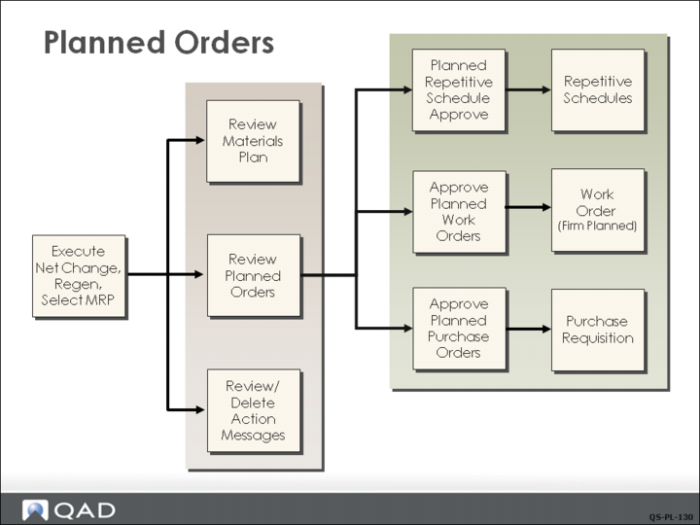
MRP creates planned orders to satisfy net requirements if the parameter for order policy is not blank, and Plan Orders is set to Yes in Item Master Maintenance. The system creates either planned work orders or planned purchase orders, based on the Pur/Mfg code.
Internally, both planned work orders and planned purchase orders are stored as work orders with status Planned. The primary difference between them is that orders for purchased items are created without work order bills.
Planned Order Approval
The process of approving planned work orders changes the status of work orders from Planned to Firm Planned. While planned orders can be modified or deleted by each successive MRP run, firm planned orders have due dates and quantities that are fixed with respect to the MRP planning process. The due dates and quantities for firm planned orders can be changed manually in Work Order Maintenance.
The process of approving planned purchase orders deletes the planned purchase orders and creates purchase requisitions. Purchase requisitions can be reviewed by buyers or purchasing agents and filled by purchase orders. Once the purchase order is released, it becomes supply for the item at that site.