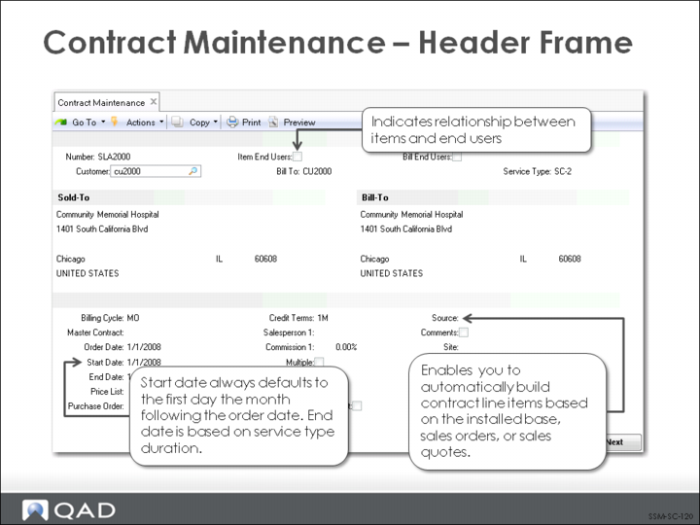
Contract Maintenance - Header Frame
You create a contract in Contract Maintenance (11.5.13.1). Several of the key fields are determined as follows:
Number
Enter a number uniquely or let system assign from Contract Control.
Bill End Users
Indicate who should receive invoices.
Service Type
Determines default service type for each contract line.
Billing Cycle
Enter code indicating how often to bill lines on contract.
Master Contract
Can link contracts together for printing.
Order Date, Start Date, and End Date
The order date defaults from the system date when this contract is created and is a reference-only field. The start date always defaults to the first of the month following the order date and indicates when the terms and conditions become effective. The system calculates the end date by adding the duration of the service type being used to the start date. Although you can add new line items to existing contract, no end-of-coverage date can go beyond the contract header’s end date.
Price List
Defaults from the Contract Price List specified for the service type in effect and provides prices for contract line items and any additional charges (such as zone charges or additional caller) needed. You can change price list at any time; however, new price list only affects new records added to the contract. Existing prices are not recalculated.
Source
Contract line items can be generated automatically by entering a value in the Source field (blank indicates manual entry):
I (Installed Base). Contract line items can be created by selecting from items in the installed base that belong to the current end user.
O (Sales Orders). Contract line items can be created by selecting from lines on a specified sales order.
Q (Sales Quotes). Contract line items can be created by selecting from lines on a specified sales quote.