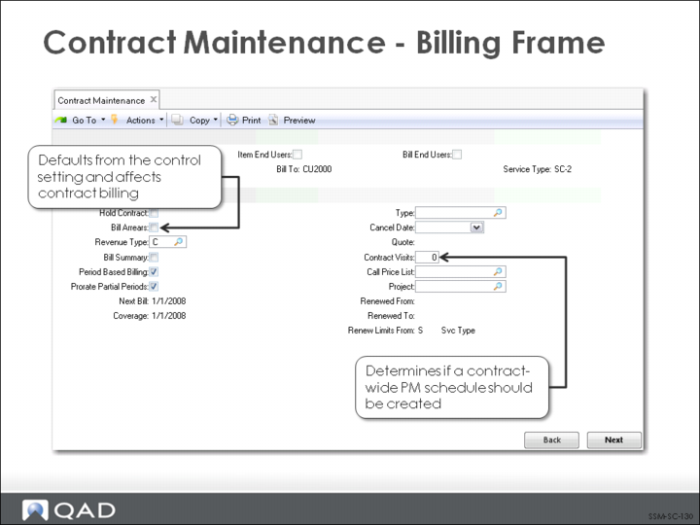
Contract Maintenance - Billing Frame
Many of the fields in the second header frame default from SSM Accounting Control (36.9.10).
Hold Contract (Y/N)
If Yes, this contract will not be released for billing. This is useful if the price for the contract is still in negotiation and is not finalized with the customer. However, the contract is still considered in force as far as providing coverage in other service activities.
Defaults from SSM Accounting Control (36.9.10).
Bill Arrears (Y/N)
If No, the customer is billed in advance for contract coverage. If Yes, the customer is billed for periods that have already passed. This field defaults from the Bill Arrears field in SSM Accounting Control (36.9.10).
Revenue Type
There are three types with default set in SSM Accounting Control.
1 Cash Basis: to post revenue upon receipt, set to C. Revenue is recorded in the period it is actually received.
2 Accrued Revenue: to accrue revenue, set to A. Bill Arrears must be set to Yes. Revenue is recorded in the period which it is earned.
3 Deferred Revenue: to defer revenue, set to D. Bill Arrears must be set to No. Collected revenue is held in deferred account and posted periodically over the contract duration when you run Revenue Recognition.
Defaults from SSM Accounting Control (36.9.10).
Period Based Billing
Indicates whether contract billing is synchronized with calendar months.
Yes: Invoicing begins on first day of the next calendar month, regardless of the contract start date.
No: Billing periods for contract invoices use actual start date of contract header and line.
Period Based Billing work in conjunction with Prorate Partial Periods.
Defaults from SSM Accounting Control (36.9.10).
Prorate Partial Periods
Indicates how the system should invoice for coverage periods that are less than a month.
Yes: Invoices are generated for partial periods based on the percentage of the month the partial period represents.
No: Partial periods are essentially given away free and no invoice is generated for them.
Defaults from SSM Accounting Control (36.9.10).
Visits
Enter the number of PM visits to be scheduled for each end user on the contract.
When Item End Users is Yes, you can set up PM schedules for individual items, but not for end users. PM schedules are discussed in more detail later.
Renew Limits From
C (contract) The system copies the current limits from the contract and modifies the effective dates to match the new contract’s start and end dates.
S (service type) The system copies limits from the service type, applying limits effective on the new contract’s start and end dates.
Defaults from SSM Accounting Control (36.9.10).