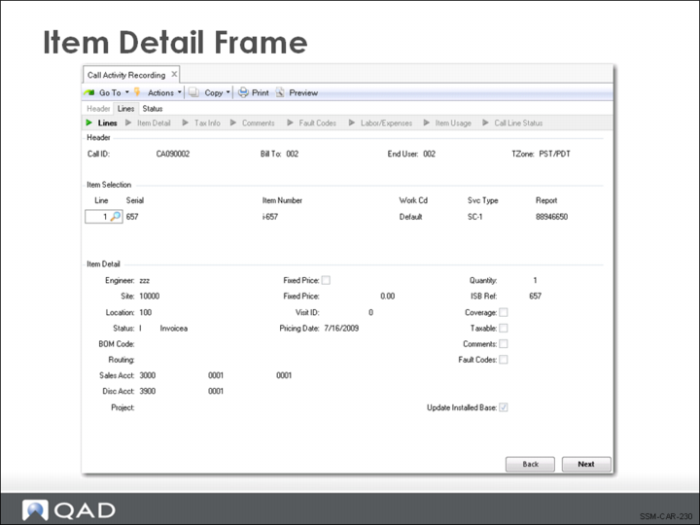
Item Detail Frame
Project
The project field is for reference, so that you can attach a GL project code if needed. If a project is associated with the contract providing coverage on the call, it displays by default in this field.
Fixed Price (Y/N) and Fixed Price
If this is a fixed price work code, Yes displays in this field; otherwise, it is no. Fixed price repair means that the customer is charged a fixed amount for service, regardless of the price of the individual item used. If Fixed Price is Yes, the system searches the price list specified on the header for a price for this item with the fixed price unit of measure specified in Call Management Control. If none is found, the default price will be zero and must be entered manually.
Coverage (Y/N)
Defaults from the Coverage Window setting in Call Management Control, but can be modified. If Coverage is Yes, a frame displays showing coverage information such as contract number, contract service type, start and end date, active service type, warranty service type, if any, and install and expiration dates.
Fault Codes (Y/N)
Defaults from the Use Fault Codes setting in Call Management Control. Setting Fault Codes to Yes brings up a frame where you can enter various problem, cause, and resolved codes, just like the one displayed in Call Maintenance. If fault codes were used in Call Maintenance, the values set there display here so that you can make adjustments or add new information.
Update ISB (Y/N)
Defaults to Yes if the item is already in the installed base. Also defaults to Yes if the value for Update ISB for the end user and Update ISB for the item (from Service Item Maintenance) is Yes. Otherwise, defaults to No. This setting enables you to control how the installed base is updated. If this field is Yes and the call line item is not in the installed base, a pop-up displays so you can specify ISB parameters and add the item to the installed base. If the call line item is already in the installed base, no additional frames display.
If Update ISB is Yes and Load Available Structure is Yes in Service Management Control, the system automatically adds all component items issued as item usage to the installed base, if they have been marked as belonging in the installed base in Service Item Maintenance. Items returned that exist in the installed base are removed regardless of the setting of Load Available Structure.