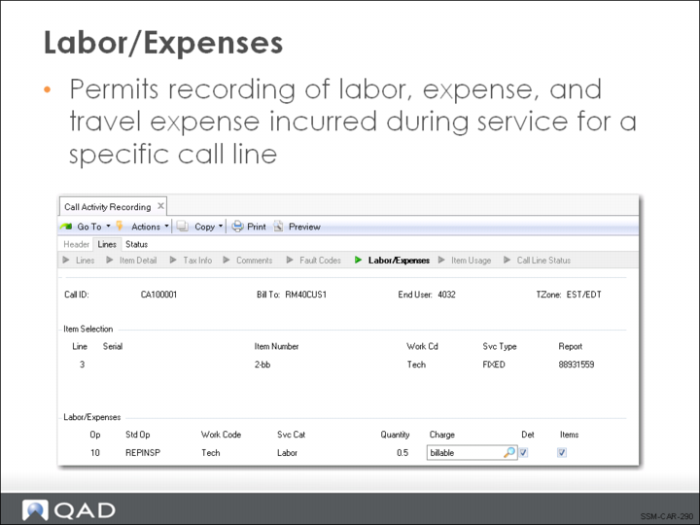
Labor/Expenses
The Labor/Expenses frame enables you to record the operation steps taken and expenses incurred in servicing the call line item. Notice that the fields in the Item Selection frame retain their values. All information recorded in the Labor/Expenses frame will be recorded against the displayed item.
Op
Op is the operation number, which is used to track the sequence of tasks performed within a service, much like a routing sequence. Operation numbers always start by default with 10. If the service BOM and routing associated with the item being repaired are loaded into CAR, each operation on the routing will already be available for editing.
While multiple items can be consumed for one operation, only one line of labor or expense can be recorded per operation. If you need to specify several different service categories, each must be associated with a separate operation number.
Std Op
Standard operation codes are set up using Service Std Operation Maint (11.19.21). If you have created codes representing common operations performed in the repair or maintenance of an item, you can enter them here. If a service standard operation code is entered, values for the service category and quantity default. If the standard operation has a BOM associated with it, you are prompted to load the items specified as item usage for this operation. The labor rate of the work center associated with the routing step or standard operation is used for calculating labor costs.
Once a line has been recorded, the operation cannot be changed, since other values came from it. If the wrong standard operation is specified, you must delete the line and reenter it.
Work Code
Defaults from the Item Selection frame (which defaulted from the call record), and can be modified. If coverage limits have been set up using work code/service category combinations, this work code is used to determine the applicable limit. It is used when the system suggests a charge code and also in the search for a price for labor and price and cost for expenses. If the work code is changed, the default charge code is automatically recalculated by the system.
Svc Cat
Service categories are predefined in Service Category Maintenance with one of the following attributes set to Yes: Labor, Expense, Travel Labor, or Travel Expense. For standard operations and operations defined as part of a service routing, this service category defaults from the operation. Otherwise, it defaults from the Default Labor Svc Cat field in Call Management Control.
Service coverage limits can be consumed based on the service category specified. Service category is also the basis of pricing for labor and expenses and for cost prices for expenses. If the service category is changed, the default charge code is automatically recalculated. Once a labor or expense record is saved, the service category can be modified, but only to a service category of the same type. You cannot switch a labor or travel labor category to expense or travel expense.
Quantity
The number of units of the associated service category consumed by servicing this line item. For labor, this is calculated in hours. For expenses, it represents 1 unit of the service category. If a standard operation is used or this operation has been generated from a routing, this field defaults from the operation run time. The quantity is used to calculate the extended price according to the formula:
(Quantity x Price) - Covered Amount