Item Usage
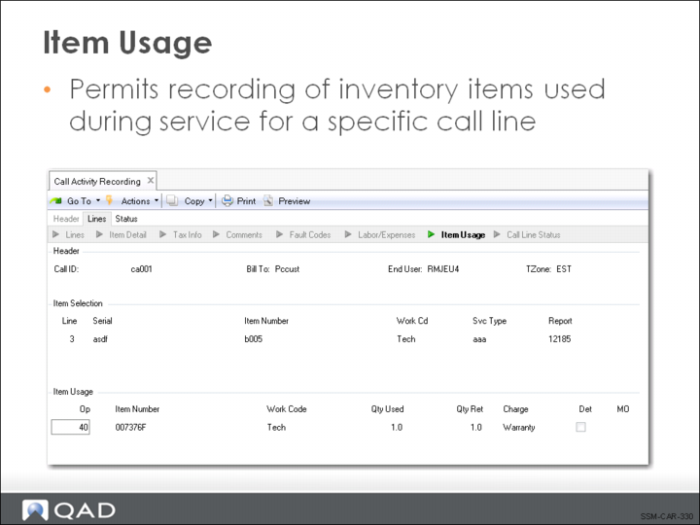
The Item Usage frame is the portion of Call Activity Recording where you report the inventory items (parts) used to repair or service the item listed in the Item Selection frame. Item usage can be recorded against each operation or all items used can simply be added after you complete the Labor/Expenses frame.
The Item Number must be a valid inventory item defined in the Item Master. If a service BOM is associated with the item being repaired, it is exploded and the items are loaded as item usage for the first operation without an attached BOM. If you need to record the use of a non-inventory item, it should be entered as an expense in the Labor/Expense Usage frame.
The Work Code defaults from the call line and can be modified. If coverage limits have been set up using work code/service category combinations, this work code is used to determine the applicable limit. It is also used by the system to determine the default charge code. If the work code is changed, the default charge code is automatically recalculated by the system.
The Qty Used is the number of units of the item consumed in servicing this line item. If this usage line was loaded from a service BOM, the standard quantity per of the component is loaded into this field. If this usage line was loaded from a Material Order, the order quantity defaults into this line. The quantity used is used in the calculation of the extended price according to this formula:
(Qty Used x Price) - Covered Amount
Qty Ret indicates the number of units of this item being returned. If the item being issued is repairable (as defined in Service Item Maintenance), the Qty Ret defaults to the Qty Used.
Returns in CAR are not the same as RMAs. Items are normally returned as part of an exchange when the engineer replaces a defective or worn item with a new one or because items were ordered for this call on an MO and not required. Returning items is discussed more in a later lesson.
A charge code is a suggested for items just as for labor and expenses.
Setting Det (Detail) to Yes activates the display of the Detail frame, which shows more complete data for this line item. If you are returning items and want to update the installed base, set this to Yes so you can enter the serial or ISB reference of the returned item.