Depot Order Maintenance
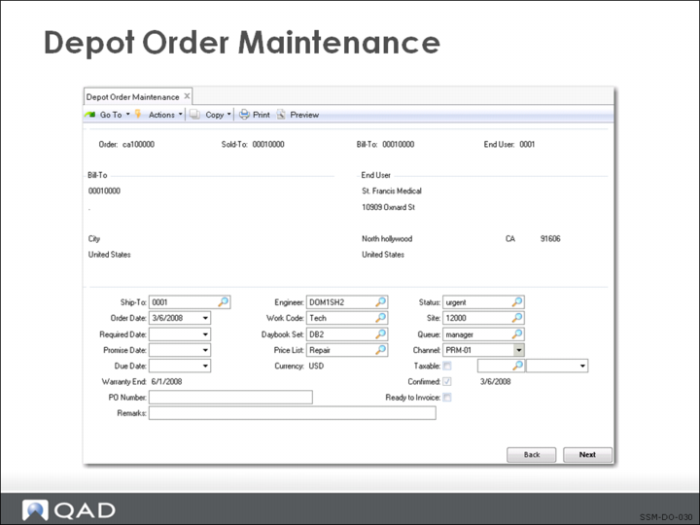
Use Depot Order Maintenance (11.1.2.1) to manage depot orders. Depot orders can only be created from an existing service call that has an associated work code with the Repair Center field set to Yes. The Depot Order ID is the same as the call ID and cannot be updated.
Depot Order Header
The header frames of Depot Order Maintenance contain fields that display information defaulted from the call: call ID, sold-to, bill-to, name and address, and ship-to information. Other fields are used to record receipt and delivery data. The Confirmed field defaults to Yes; it can be set to No to indicate that customer authorization for the repair has not yet been received. Other fields on the headers contain tax environment, salesperson, and freight-related information.
Depot Order Lines
When entering information about a specific line item, indicate the repair type for the item, either Repair or Replace. If Replace is selected, the system automatically generates a second depot order line with a repair type of Replacement.
• Use the Item Repair Data frame to record information about the item repair, including BOM code, routing, service type information, and pricing information. You can use either fixed pricing or time and materials pricing types.
• Use the Item Receipt frame to record receipt information for the returned item: receipt date, quantity, site, and so on. An Item Receipt Shipment Data frame displays shipment information, such as the actual date of shipment; this frame is updated when the repair or replacement item is shipped out via sales order shipments or the workbench.
If a depot order line is identified as being a replacement repair type, an MO is created automatically for this line using the alternate item ID if one has been specified on the depot order; otherwise, the MO uses the item ID. The remainder of the information required to create the MO defaults from the depot order/call. The system uses the existing credit checking functionality to ensure that the order does not exceed authorized credit limits.
Viewing Information
Use the Depot Order Browse (11.1.2.2) to view information about current depot order records, such as status of the call/call line, receipt, and shipment dates.
Depot Order Maintenance Flow
Depot order activity occurs in the following order:
1 Header information defaults in from call.
2 Specify items to be shipped to the customer.
3 Specify if items to be received from the customer are to be repaired or replaced.
4 Enter trailer information, including trailer codes, tax, and standard credit information.
5 Complete the trailer that totals billing amounts and trailer codes.
6 Receive an item from a customer for repair in Depot Order Maintenance. All item receipts from customers are done in Depot Order Maintenance.
7 All depot order shipments are done through standard shipping functions, such as Sales Order Shipments.
Use the frame in Depot Order Maintenance to review shipment data, such as activity (repair receipt, repair shipment), actual date of activity completion, and so on; these fields are read-only. The data on this frame updates when the repair or replacement item is shipped using sales order shipments or the workbench.