Internal Routing Maintenance
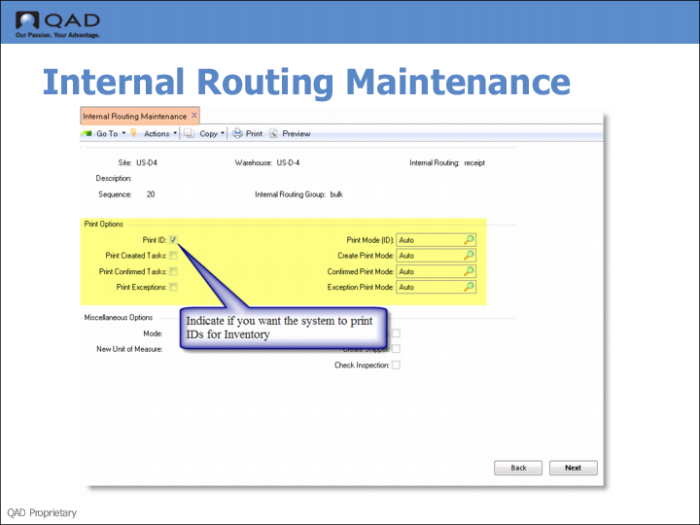
Use the fields in the Task Printing Frame of Internal Routing Maintenance (4.2.5 if using QAD Warehousing or 80.2.5 is using AIM).
Fields
Print IDs
Indicate if you want the system to print IDs for inventory. If you specify Yes, enter values for the other fields related to ID printing. If you enter No, you can ignore the other printing parameters in the group.
The setting you enter in Warehouse Maintenance defaults to internal routings set up in the warehouse.
You can also specify in Item Maintenance whether you want identifications to be printed for each item by entering Yes in the Print ID field.
Also, in Alternate Unit of Measure Maint, you can set this parameter to control the printing of ID labels for inventory measured in this UM. This is the main level of printing control. However, it is not mandatory to define an alternative unit of measure. If no alternative UM is defined, the printing control comes from the item-warehouse definition.
The other fields are discussed earlier in this chapter; see
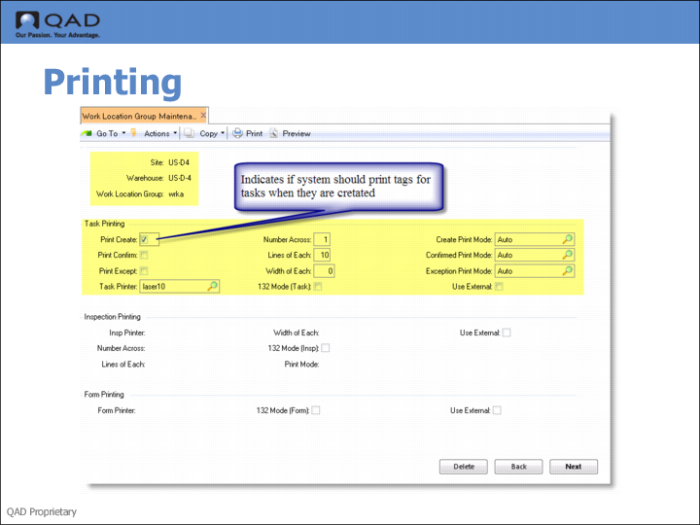
Print Create.
Work Location Group Maintenance
Use Work Location Group Maintenance (4.3.9 if using QAD Warehousing and 80.3.9 if using AIM) to set task printing fields for the WLG.
Fields
The fields default from Warehouse Control (see
Warehouse Control) or Warehouse Maintenance (
Warehouse Maintenance).