Work Centers
• A work center is a production facility that performs specified tasks.
• It identifies machines, groups of similar machines, people, or subcontract suppliers.
• In QAD Enterprise Applications, work centers link departments with operations.
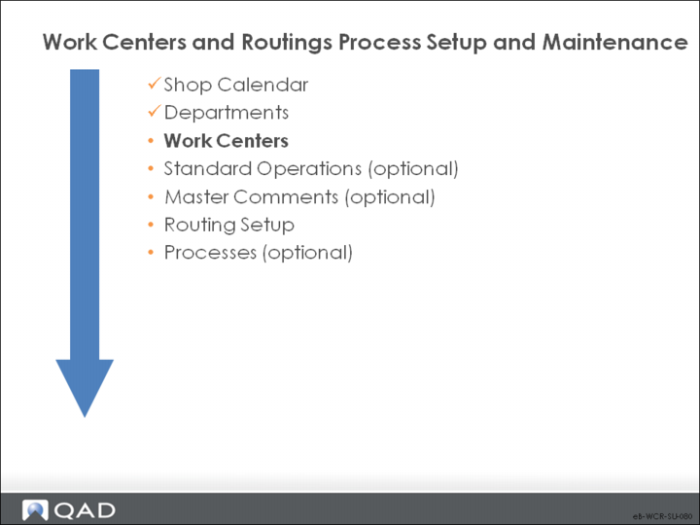
• Departments are a prerequisite to entering work centers.
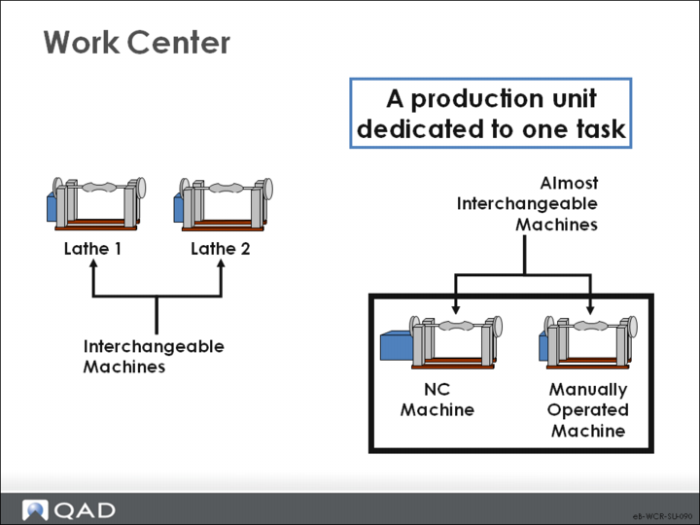
A work center is a production area with one or more people and machines. Work centers can be specific, as shown here with lathes. Or they can be general, as with manual assembly where one work center with several people can perform many different tasks.
Work Center Maintenance
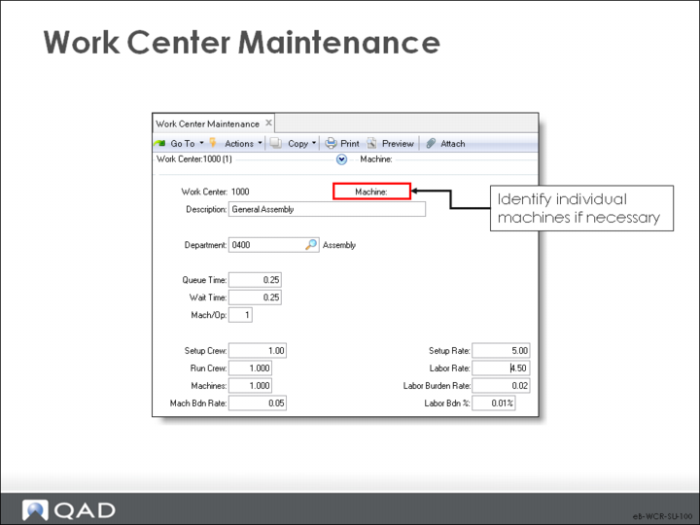
Use this function to create and modify work centers.
• For subcontracting, set up a work center for each type of subcontract operation or supplier. Where possible, it works best when the subcontract work center has the same code as the supplier. Set subcontract work center rate costs to zero. Subcontract costs as managed as purchase cost and are indicated on the subcontract operation in the route.
• Most manufacturing functions in QAD Enterprise Applications access work center data. Some static data (Description, Setup Crew, Run Crew) only prints on reports.
• Work Center data controls processing in four areas:
• Scheduling. When a routing operation is specified at this work center, lead time fields (Operation, Queue Time, Wait Time, and Machines per Op) default to the routings.
• CRP. Capacity for this work center is the number of machines in a work center multiplied by the number of available hours (from Calendar Maintenance).
• Costing. Manufacturing costs are calculated in Routing Cost Roll-Up. Labor costs multiply the setup and run times at each operation by the setup rate and labor rate. Burden costs use Mach Bdn Rate, Lbr Bdn Rate, and Lbr Bdn %. Subcontract costs are taken from subcontract cost at the operation level.
• Accounting. Each work center belongs to a department, which determines the GL accounts that track variances, labor, and burden costs.
The following describes key fields in this program.
Work Center
An alphanumeric code for the work center.
Machine
A code for a machine used in the work center. You can leave this field blank.
• Specify a machine only if there is more than one machine in the work center and they cannot be used interchangeably (that is, each machine is different or dedicated to different items).
• When machine codes are specified, assign each routing operation to a particular machine.
• You can review capacity and load by machine or aggregated by work center.
Department
The department to which this work center is assigned.
Queue Time
The standard queue time, in decimal hours, a job normally spends waiting at this work center before it is set up and processed. This value displays as the default when you enter a standard operation, routing operation, or process operation for this work center.
• Manufacturing lead time includes queue, setup, run, wait, and move time. Lead time is used for operation scheduling and capacity requirements planning. Queue time is independent of order quantity and can be compressed in past due situations
• When scheduling operations, the system looks at the shop calendar for the work center to determine how many hours are available for queue time in each calendar period.
Wait Time
The standard wait time in decimal hours that a job normally spends waiting at this work center after processing has been completed. This value displays as the default whenever you enter a standard operation, routing operation, or process operation for this work center.
Uses for wait time include drying, cooling, aging, and curing. Wait time is independent of order quantity. An order must wait at least this amount of time before it can go on to the next operation; wait time cannot be skipped in past-due situations. Wait time is expressed in hours. The shop calendar does not affect it.
Mach/Op
The number of machines at this work center that can work at the same time to process a given operation. The default is 1. This value displays as the default whenever you enter a standard operation, routing operation, or process operation for this work center.
The Mach/Op field affects scheduling of operations at this work center machine. During scheduling, the system uses the operation run time divided by the Mach/Op. You can also use this field to indicate multiple operators on one machine.
Setup Crew/Run Crew
The number of people normally required to set up and run this work center. These fields are for reference only; they appear on some selected reports and inquiries. No scheduling or cost calculations use this data.
Machines
The number of machines or people in this work center. The total capacity for a work center is the number of working hours times the number of machines. If some of the machines in this work center can operate at the same time, enter that number in the Mach/Op field.
Machine, Setup, and Labor Rates
The values in these fields enter into item cost calculations and labor feedback functions to determine and post actual costs and variances. These rates apply to all operations carried out at this work center and cannot be changed for individual operations.
Mach Bdn Rate
The burden rate per hour applicable to machine run time and setup at this work center. Standard machine burden cost at the operation is calculated as:
(setup time / order quantity x routing machines per op + run time) x WC mach burden rate
If yield is included in the standard cost, machine burden reflects the cumulative yield from all operations
Setup Rate
The average hourly rate paid to set up this work center. If no setup labor is reported for an operation, the system assumes that standard setup was completed and not reported. Setup is posted at standard during operation close or work order accounting close. The setup portion of standard labor cost is calculated by multiplying the standard setup time by the setup rate
• Setup time is the time it takes to set up all machines
• Machines/operation is not considered here
• This cost is divided by the item order quantity
• Labor burden percentage is applied to the setup cost
• Actual setup cost is calculated by multiplying the actual setup time by the setup rate for the work center
Labor Rate
The average rate paid per labor hour to run this work center. The run portion of standard labor cost is calculated by multiplying the standard run time by the run rate
Actual run cost is calculated by multiplying the actual run time by the labor rate for the work center.
Lbr Bdn Rate
The labor burden rate per hour applicable to both setup and run time at this work center. The labor burden portion of standard burden cost is calculated using:
• The labor burden rate and labor burden percentage
• The labor burden rate is multiplied by the operation setup and run times
• Actual labor burden is calculated using the actual hours reported and the burden rates and labor costs from the work center where the operation was reported
Lbr Bdn%
The labor burden percentage applicable to the total labor cost at this work center. The labor burden portion of standard burden cost is calculated using the labor burden rate and labor burden percentage
The labor burden percentage is multiplied by the total labor cost for operation setup and run
Actual labor burden is calculated using the actual hours reported and the burden rates and labor costs from the work center where the operation was reported