Routing Update
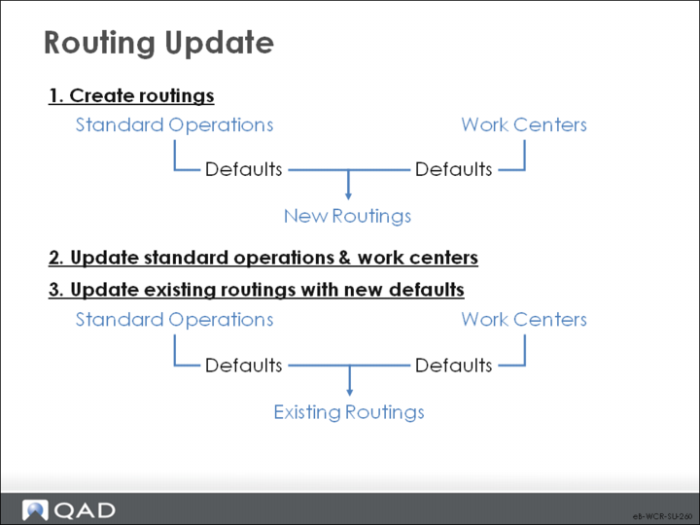
This update can help you maintain existing routings when standards change; it updates all or a range of routing and work center data.
This program updates existing routings with any new default data from standard operations and work centers. Run it only if standard operations or work center standards change.
For example, an engineering change order modifies the standard time and temperature for a heat treat cycle. Hundreds of items use the standard operation heat treat cycle. Update the Standard Operation record, then run this Update transaction. All routes using this standard operation are updated to the new time and temperatures.
Note: This update overrides any changes made to routings that use the default information. Protect this feature with a password.
Routing Update Criteria
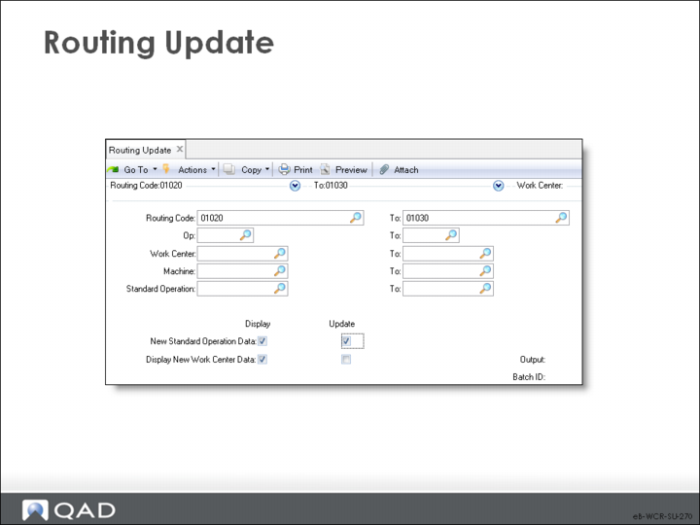
Routing Code/Op/Work Center/Machine/Standard Operation
Use these selection criteria to limit the routings to update.
The program produces a report. By specifying No to update, you can produce a report without updating; use this report to verify what you are doing, then update.
Display/Update, New Standard Operation Data/New Work Center Data
Use these fields to control the function.
The report this function produces compares the operation information to the standards and prints an asterisk whenever they do not match.
Set Display to Yes to include the information on the report. To review only, set Display to Yes and Update to No. After going over the report, you can set Update to Yes and rerun to effect the changes.