Work Order Maintenance Screen
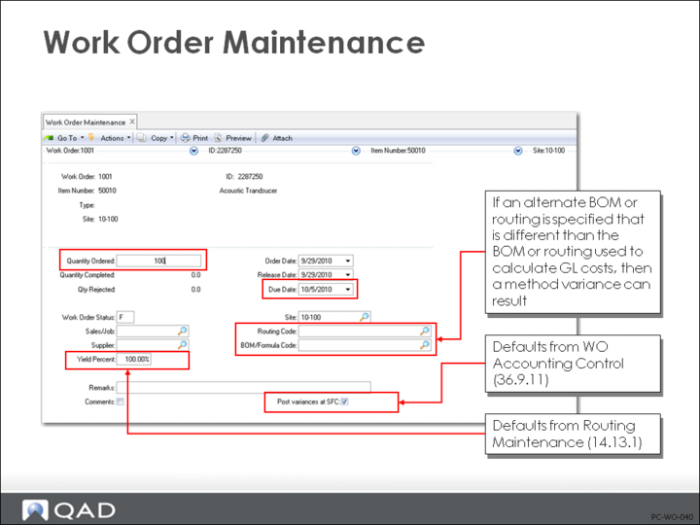
Work orders specify:
• Item, quantity, and due date
• GL accounts for WIP, material, subcontract, floor stock. and method variance
• BOM and routing code
• Status
These can be changed, including changing the BOM and routing code to any valid alternate. These are copied to the work order when it is exploded or released.
Note: Accounting controls can make it difficult or impossible to change account codes.
Status
The work order status can be [P]lanned, [F]irm Planned, [B]atch, [E]xploded, [A]llocated, [C]losed, or [R]eleased. Only released work orders can be processed for material issues, receipts, and labor in the work order and shop floor modules.
Yield
Yield is the item default yield and can be changed manually. If changed, there is no automatic change to rolled up component requirements or cost. For manually entered work orders, MRP will use the revised yield percentage to compute a “scrap requirement” and critique the material plan accordingly. Planned work orders generated by MRP have their order quantities inflated to allow for the yield percentage.
Note: Changing this yield will result in Method Variance.
BOM and Routing
These will default from the Item (Site) Planning data menu (1.4), and generally reflect the BOM and routing codes used to cost the item. Approved alternates can be added if the status is [E]xploded, [A]llocated, or [R]eleased.
Post Variances at SFC
This field defaults from Work Order Accounting Control (36.9.11) setting, but can be changed manually for each work order in Work Order Maintenance (16.1).
• If this is set to Yes, QAD Enterprise Applications will calculate labor rate and usage variances upon labor input and create GL transactions
• If set to No, QAD Enterprise Applications will calculate variances but not move them until a receipt is processed. This modulates the variances when operations span more than one shift or day or employee.
Project
If a project code is entered, this code will be added to each GL transaction processed for this order.
Accounts
These are the default accounts and can be changed for this work order.