Component Issues
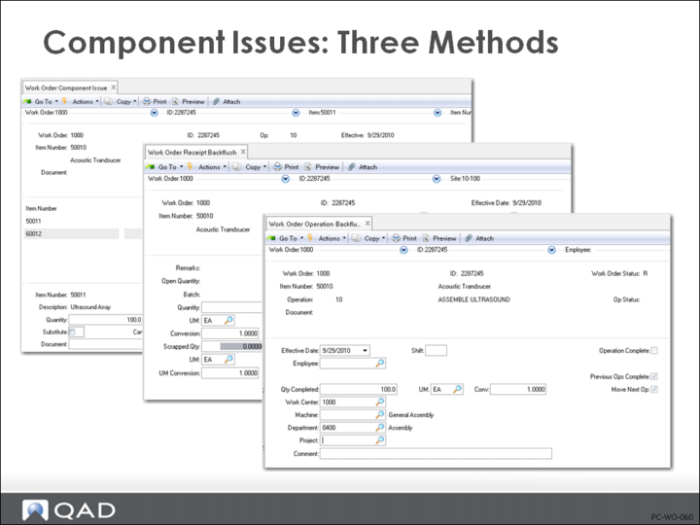
Component Issues: Three Methods
Component materials can be issued in one of three ways:
1 Work Order Component Issue (16.10). Most work orders list their required components. When materials are issued from stockroom to manufacturing, a Work Order Component Issue (16.10) records this, decreasing inventory costs and quantities and increasing work in process (WIP).
2 Work Order Receipt Backflush (16.12). Automatically issues components based on the number of finished items received and the standard quantity required. Additional items can be issued or quantities can be changed manually. Standard costs are used.
3 Work Order Operation Backflush (16.19). Use to report production activity on manufacturing work orders. This program combines issuing, reporting, and receipt features found in other programs:
• The issuing functions of Work Order Component Issue
• The labor reporting functions of the three labor feedback programs in Shop Floor Control: Labor Feedback by Work Order, Employee, and Work Center
• The receipt functions of Work Order Receipt
Each time you use this transaction to report production quantities, the system does one or more of the following: Issues (backflushes) components to the operation at which you are reporting; Backflushes labor and burden to the reporting operation; Moves the quantity processed to the input queue of the subsequent operation, if Move Next Op is Yes in this program; Receives completed end items into inventory when you report production at the final operation in the routing and Move Next Op is Yes.
At this time, it also updates the quantity completed and reduces the quantity open on the applicable work order.
Floor Stock
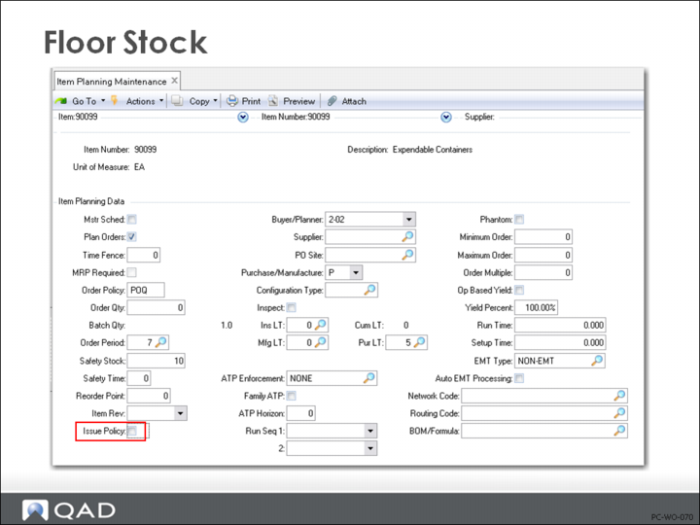
Floor Stock using Item Planning Maintenance (1.4.7)
Floor stock components have Issue Policy set to No in Item Master Maintenance (1.4.1), Item Planning Maintenance (1.4.7), or Item-Site Planning Maintenance (1.4.17). They are issued to the floor in bulk rather than for individual orders and appear on the Work Order Component Issue screen with Quantity Required as zero. These items should not be issued here, but from stock using Issues Unplanned (3.7). Floor stock costs are charged to the work order during the Work Order Accounting Close (16.21), prior to calculating variances.
Issue Policy = No should only be used for very inexpensive items that are hard to control such as small screws and washers. With backflush capability, even these items can be accounted for at standard directly to the work order.
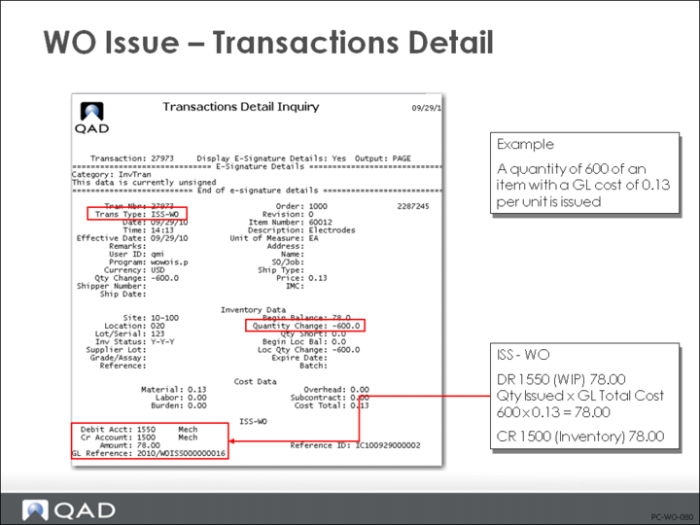
Work Order Issue: Transactions Detail
When materials are issued by Work Order Issue (16.10) or Work Order Receipt Backflush (16.12), a GL transaction is created to record the issue. Typically, materials are issued from the same site as the work order, creating a GL transaction as follows.
• Component materials are issued from inventory at their total GL cost. This credits Inventory account defined in Inventory Account Maintenance (1.2.13) for the product line, issue site, and issue location if a record exists; otherwise, uses Product Line Maintenance (1.2.1)
• This entire amount is now considered part of Work in Process and debits the WIP account from the work order.
• If the cost of the components issued does not match the frozen cost in the work order bill (Work Order Bill Maintenance (16.13.1)), a material rate variance results. This compares the total GL cost of the item issued (it might be a substitute) to the frozen cost. The difference is removed from WIP (credit WIP) and booked as a material rate variance (debit Material Rate Variance, see
here).
The frozen cost is created when the work order is Exploded, Allocated, or Released; a WIP Revalue updates the frozen standard cost
Floor Stock and Unplanned Issues will not create material rate variances
Note: The GL transaction created by a work order component issue is easily traced. Its type is IC, indicating that it is generated by an inventory transaction and its description indicates that it was a work order issue (ISS-WO) and identifies the work order number.
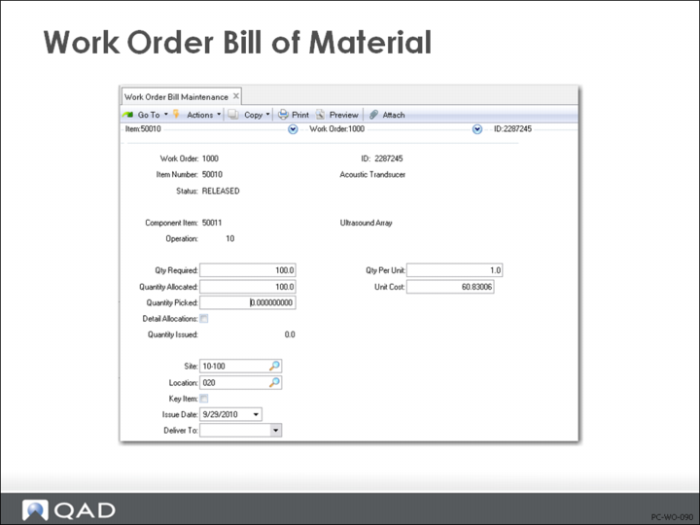
Work Order Bill of Material
Work order bills list components required for a work order. The standard bill for the item-site is used initially, but can be changed manually. Work order bills control component picking and issuing, and provide standards against which variances are calculated.
Work order explosion or release generates a bill automatically. These Bills can be modified using Work Order Bill Maintenance (16.13.1). As the work order moves through manufacturing, the work order bill tracks the status of each item number, indicating whether it is allocated, printed on a picklist, or issued. Quantity issued is used to calculate work order cost.
Each item number is listed with the quantity required and the issue site. Quantity required is calculated by multiplying the quantity per unit on the bill by the work order quantity, then adjusting for scrap percentage. Site defaults to the work order site.
When using standard costing, material rate and usage variances are calculated based on the standards in work order bill.
• Material Rate Variance is calculated when material is issued to the work order. It is the difference between the standard item cost and the cost in the work order bill, each multiplied by the quantity issued. Variances result from issuing items from another site where they have a different cost, issuing a substitute, or from changing standard costs without running the WIP Material Cost Revaluation to reflect new standards in existing bills.
• Material Usage Variance is calculated by Work Order Accounting Close. The system determines Earned Quantity, which is the expected component quantities from the work order bill to make the quantity reported complete or scrapped. Earned quantity is compared to actual issues (at item standard cost). Any difference is posted as a variance.