Exercise 2: Set Up a Work Order
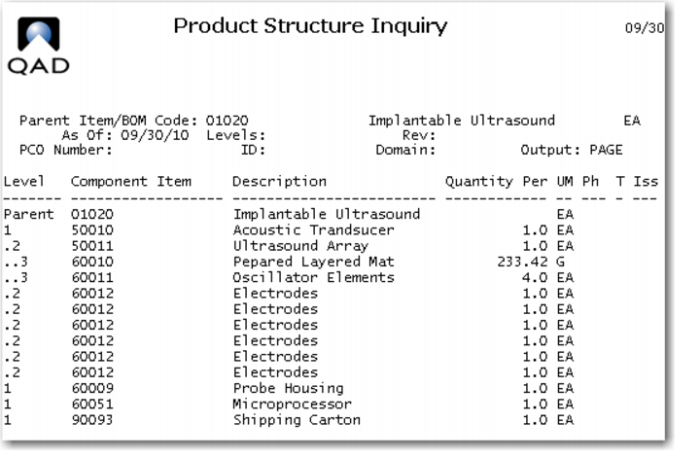
1 Review the Product Structure of the 01020, Implantable Ultrasound. Use Product Structure Inquiry (13.6).
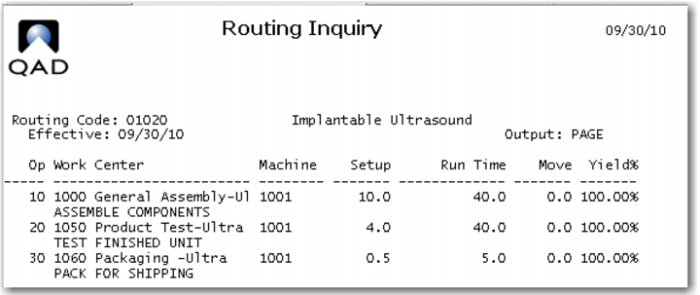
2 Review the Route for the 01020, Implantable Ultrasound. Use (14.13.3).
For these exercises you will modify many elements of the data for these items. This will provide a review of the cost setup and provide knowledge of the cost elements for this item.
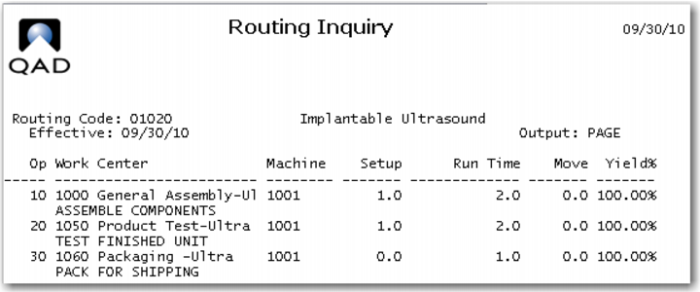
3 Modify the route for item 01020, use (14.13.1) to change the setup and run times as shown. The setup time for operation 10 and 20 is 1 hour and no setup for operation 30. The run time for operation 10 and 20 is 2 hours and for operation 30 1 hour.
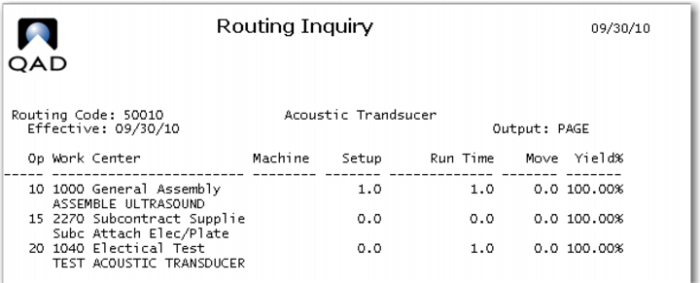
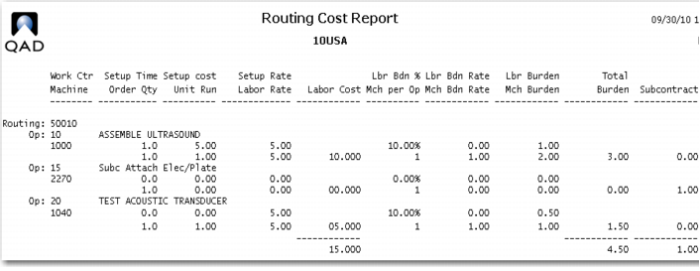
4 Modify the Route for the 50010 as shown in this graphic. Make setup at Op 10 1 hour and at all others zero. Run time is 1 hour at operations 10 and 20. Operation 15 is a subcontract operation, set its subcontract cost to 1.00 and uncheck the comments box.
The 1.00 cost of operation 15 can be seen on the Routing Cost Report.
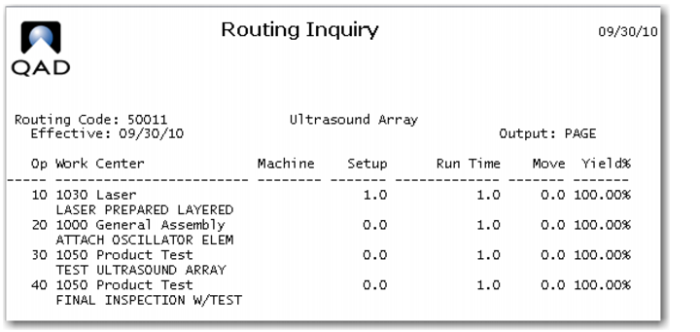
5 Modify the Route for the 50011 as shown in this graphic. Make setup at Op 10 1 hour and the yield 100%, setup at all other Ops is zero, run time is one hour at all operations
6 Modify the This Level Material Cost data for purchased items. Use (1.4.9) and the exploded product structure above. Use a short cut and enter the new material costs directly into the GL Cost Data Set AND the Current Cost Data Set for site 10-100.
Item | Material | Overhead |
60010 | 1.00 | 1.00 |
60011 | 1.00 | |
60012 | 1.00 | |
60009 | 30.00 | |
60051 | 300.00 | |
90093 | 1.00 | |
Only the 60010 gets an overhead cost.
7 Modify the Work Center Data as follows: Use (14.5).
W.C. | Mach | Mach Bur | Labor | Setup | Lab Bur Rt | Lab. Bur% |
1000 | | 1.00 | 5.00 | 5.00 | 0.00 | 10 |
1000 | 1001 | 1.00 | 25.00 | 25.00 | 0.00 | 10 |
1030 | | 1.00 | 5.00 | 5.00 | 0.00 | 10 |
1040 | | 1.00 | 5.00 | 5.00 | 0.00 | 10 |
1050 | | 1.00 | 5.00 | 5.00 | 0.00 | 10 |
1050 | 1001 | 1.00 | 25.00 | 25.00 | 0.00 | 10 |
1060 | 1001 | 1.00 | 25.00 | 25.00 | 0.00 | 10 |
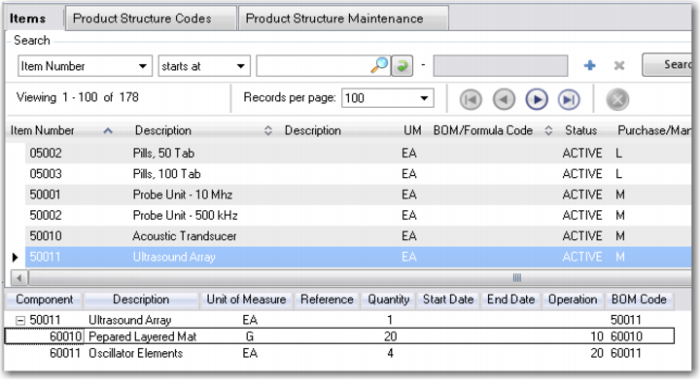
8 Modify the Product Structure of the 50011 Ultrasound Array to call for 20 G of the 60010 Prepared Layer Mat.
9 Many of the items are either serial or lot controlled. To simplify the Exercise delete either the S or the L from the Lot/Serial field, use (1.4.5) for these items:
Item No. | Lot/Serial is | Make |
01020 | S | Blank |
50010 | S | Blank |
50011 | S | Blank |
60010 | L | Blank |
60011 | L | Blank |
60012 | L | Blank |
60051 | S | Blank |
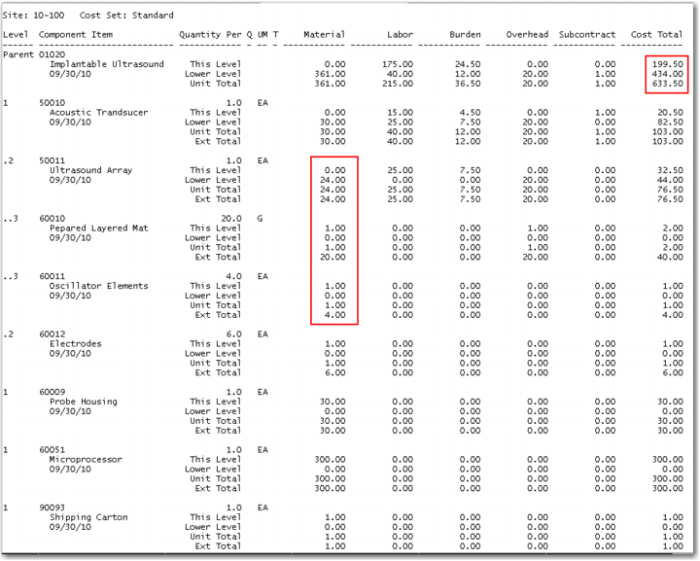
10 Run the Routing Cost Roll Up and the Product Structure Cost Roll Up for the entire domain using the Standard - GL cost data set. Note the rollup defaults to current; you need to change it to Standard. Then review the Product Structure Cost Report.
By having set up the cost data with whole numbers it should be easier to see how the lower level material, labor, burden, overhead, and subcontract costs roll up to the end item level.
To be clear, the two components of the 50011, the 60010 and 60011, (level 3) roll up to the 50011; the costs of the 50011 and the 60012 (level 2) roll up to the 01020 along with the other level1 items.
In the material column the This Level cost is multiplied by the Quantity Per to get the Extended Total at each level. This is the cost that is rolled up. The cost of the 60010 is 1.00 and 20 are required, the overhead is also 1.00, the Extended Total of 40.00 is rolled into the Lower Level Material Cost of the 01020.
Burden is only absorbed through Labor so only manufactured items earn burden. The cost of the only subcontract operation is obvious.