Exercise 4: Floor Stock Issues
QMI has decided the 90093 shipping carton should be a floor stock item, also referred to as Bulk Items.
1 Use item Planning Data Maintenance (1.4.7) to change the Issue Policy field for item 90093 to unchecked, meaning it is not issued.
2 Create a work order for 1 each of the 01020 at site 10-100. Leave the status field at F.
3 Use Work Order Component Check (16.5) to see if any items are short. If necessary use Receipts Unplanned (3.9) to receive any needed components.
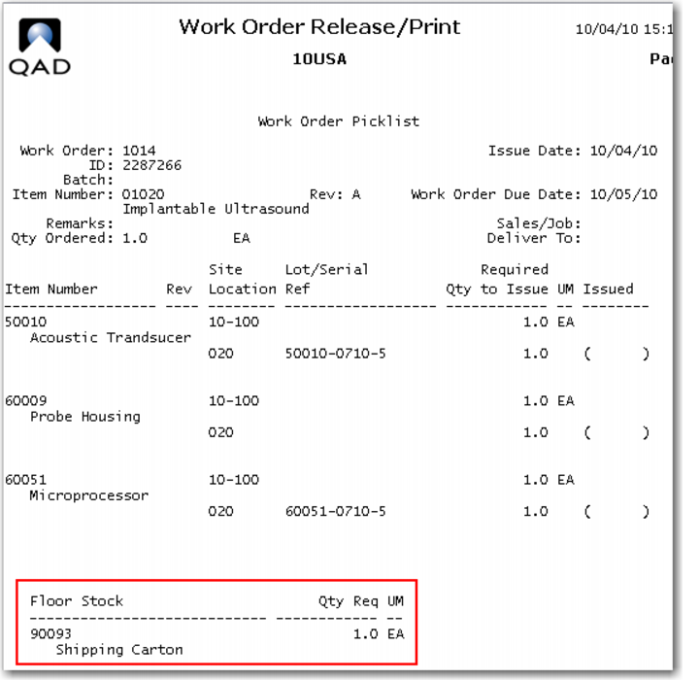
4 Use Work Order Release and Print (16.6) to release the order and print (view) the picklist. Review the picklist; note that the 90093 is no longer included on the picklist, but is referenced as Floor Stock.
5 Issue the components to the work order as in previous exercises; note the 90093 does not appear on the list of items to issue.
6 Use Issues Unplanned (3.7) to issue 5 of the 90093 to the production floor. What account is the system using for the debit transaction? The system is debiting 1600 Floor Stock.
7 Receive the work order complete and run the work order accounting close. Review the report this generates.
Review the Transaction Detail Inquiry (3.21.1) for the accounting close. What transactions have been created? There is a credit to floor stock (1600) and a debit to WIP (1550) this has removed the cost of the carton from inventory (1600) and charged it to WIP
8 Change the 90093 back to an issued item (1.4.7).