Labor Reporting
Labor Feedback by Work Order
There are three ways to handle labor accrual:
1 Report actual setup and run times
2 Accept standard setup and report actual run time
3 Accept standard setup and run times
This section examines the first scenario - the effects of reporting actual setup and run times. Later, by completing the exercises that are associated with this section, you will see both the effects of accepting standard setup and run times, and reporting actual setup and run times.
Reporting Actual Setup and Run Times
Labor feedback transactions report the quantity completed and the actual labor time spent on a particular work order and operation.
• All labor feedback transactions must specify a work order, operation, employee, and work center
• Each can specify setup, run, and down time
Down time (or non-productive labor) is not related to a work order and has no effect on WIP or variances. It is posted as a miscellaneous Cost of Production, which attracts burden absorption.
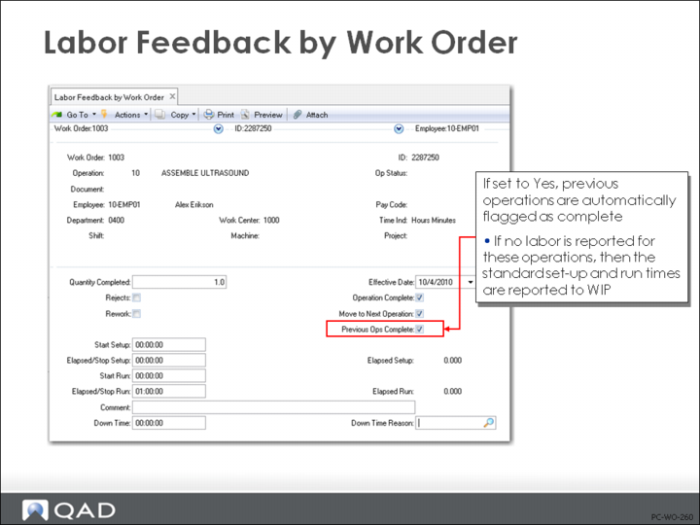
In Labor Feedback Work Order (16.20.1), Labor Feedback Employee (16.20.2), Labor Feedback Work Center (16.20.3), and Operation Complete Transaction (16.20.5), you can flag previous operations as complete (see figure on preceding page).
Example: You have five operation steps, but only report operations three and five. When you report these operations, the previous operations are automatically flagged as complete. If no labor has been reported for these operations, the standard setup and run times are posted to WIP.
Standard run time is determined based on the quantity completed at the reported operation (that is, if you report 100 complete at operation three, the system assumes that 100 units went through operations one and two).
Variances occur whenever actual rate or time does not match the standard.
Labor and Burden Absorption
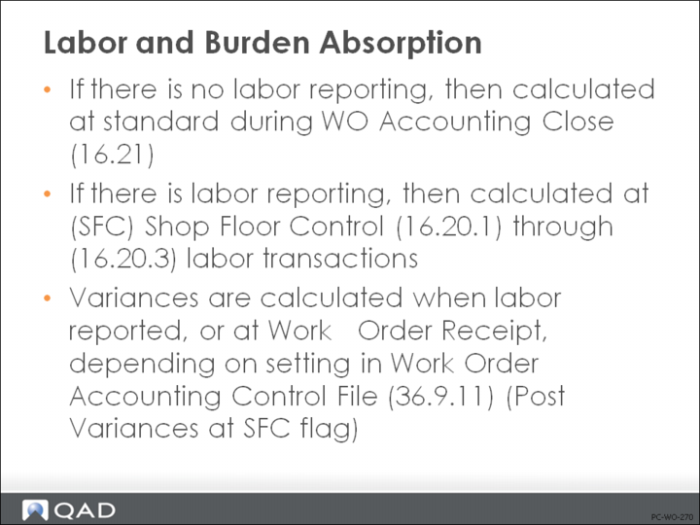
The timing for labor and burden absorption is based on whether you report labor.
No Labor Reporting
If you do not report labor, then no absorption will occur until the work order is closed and the Work Order Accounting Close (16.21) is performed.
With Labor Reporting
If you do report labor, then absorption will occur at the time labor is reported for each operation. This is independent of the amount received on the work order.
If you have the Post Variances at SFC field set to Yes on the work order, at the same time the absorption occurs, any variances calculated will be posted. Otherwise, the variances are not calculated and posted until Work Order Receipt (16.11) or Work Order Receipt Backflush (16.12).
Labor Calculations
Setup and run times are treated the same, but if reported at the same time, the system creates two sets of entries: one for setup and one for run time.
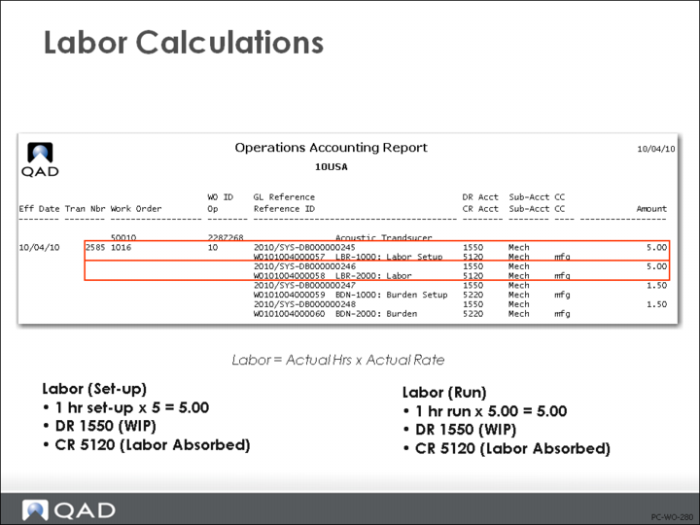
The actual amount of labor is posted to WIP (debit) and Labor Absorption (credit), and is calculated as:
Actual Hrs * Actual Rate
If employee pay rates are not loaded into the system, the standard rate at the work center where work was reported is used.
Example: An employee spends 1 hour setup time and 1 hour run time at a pay rate of $5.00 per hour. The results and calculations are shown in the figure above. Labor Burden transactions at 10% are also shown.
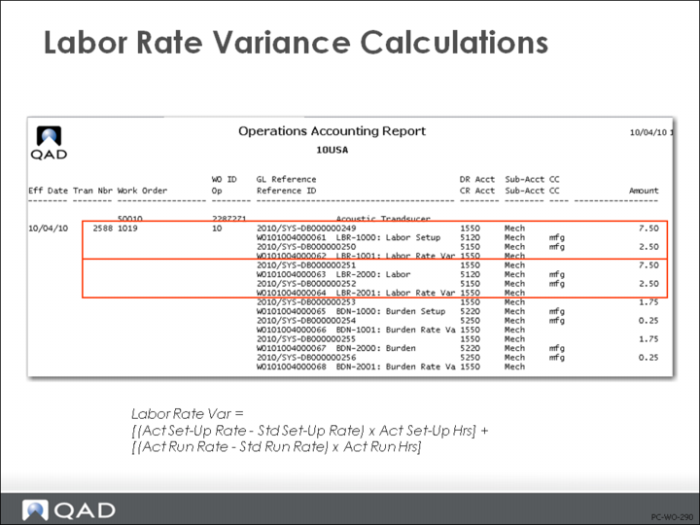
Labor Rate Variance
Labor Rate Variances are posted if the employee pay rate does not match the standard pay rate at the work center where the work was reported.
Calculations
Labor Rate Variance is calculated at the time shop floor labor feedback is reported (only if actual employee pay rates are entered) as:
[(Act Setup Rate - Std Setup Rate) * Act Setup Hrs] + [(Act Run Rate - Std Run Rate) * Act Run Hrs]
• Actual Pay Rate Maintenance is updated using (14.13.21).
• When variance posting occurs, a positive (unfavorable) or negative (favorable) variance is debited to the Labor Rate Variance account and credited to WIP
The Labor Rate Variance is normally posted at the same time that labor is posted. However, if Post Variances at SFC field in Work Order Accounting Control or Work Order Maintenance is No, variance posting will be delayed until Work Order Receipt (16.11) or Work Order Receipt Backflush (16.12).
Example: Because the employee’s pay rate of 7.50 per hour is different than the standard pay rate of 5.00 per hour, there is a labor rate variance, as shown in the figure above. The corresponding burden calculates are also shown.
Labor Usage Variance
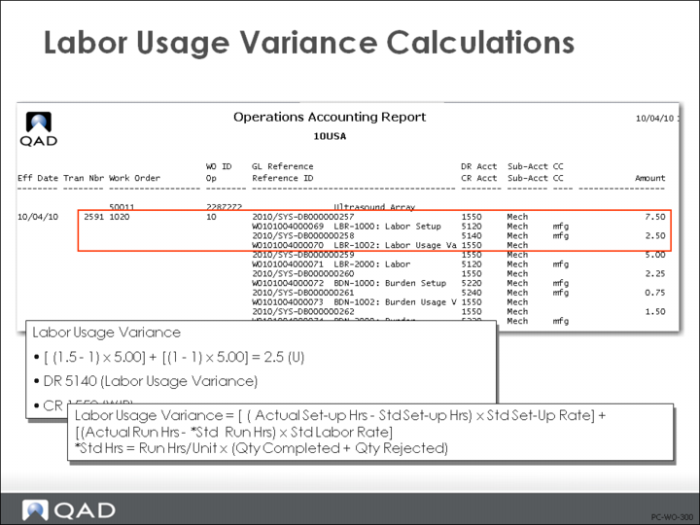
Labor Usage Variances are posted when actual setup and/or run time differ from the time it should have taken to set up and/or make the number of units reported as complete (referred to as earned hours).
Calculations
Labor Usage Variance is calculated at the time shop floor feedback is reported as:
[(Act Setup Hrs - Std Setup Hrs) * Std Setup Rate] + [(Act Run Hrs - Std Run Hrs) * Std Run Rate]
Where:
Std Run Hrs = Run Hrs/Unit * (Qty Completed + Qty Rejected)
When variance reporting occurs, a positive (unfavorable) or negative (favorable) variance is debited to the Labor Usage Variance account and credited to WIP
The Labor Usage Variance is normally posted at the same time that labor is posted. However, if Post Variances at SFC field in Work Order Accounting Control or Work Order Maintenance is No, variance posting will be delayed until Work Order Receipt (16.11) or Work Order Receipt Backflush (16.12).
Example: The employee earns the standard rate but has reported 1.5 hours for the setup operation. The standard is one hour so a labor usage variance is created, as shown above. The runtime transaction is reported at standard, so no variance is posted.
Note: For operations that span reporting shifts (or days), hold off reporting variances until work order receipt. Set Post Variances at SFC to No in Work Order Maintenance (16.1) or Work Order Accounting Control (36.9.11).
When labor is reported with no completed units, no labor was earned. The total amount not attributable to setup is flagged as unfavorable variance. The setup portion only posts the true variance amount and is unaffected by units. The unfavorable variance is offset later by a favorable variance when completed items are reported. In an operation that takes 12 hours to finish, shift one reports 8 hours and zero complete. All 8 hours is unfavorable variance. Shift two works 4 hours and completes 100 units. It should have taken 12 hours, so shift 2 shows an 8 hours favorable variance.