Work Orders
>
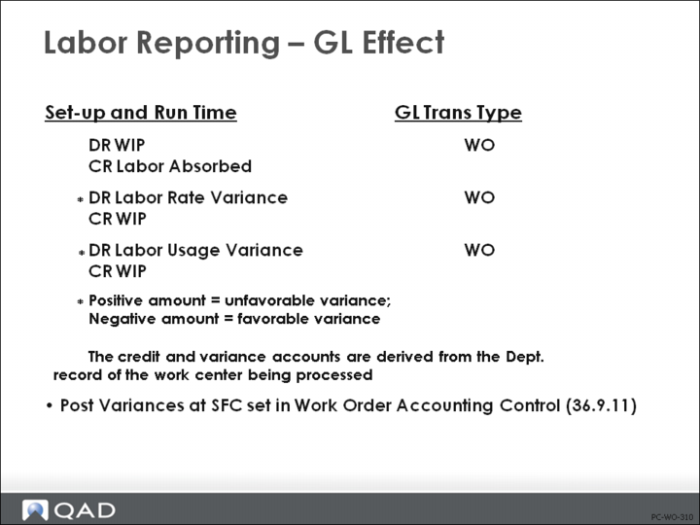
Labor Reporting: GL Effect (Default GL Entry)
Labor Reporting: GL Effect (Default GL Entry)
• Debits WIP
• Credits Labor Absorbed. The credit account is derived from the Department record of the work center being processed
Upon shop floor reporting, labor usage and rate variances are calculated (see following note). If the variance amount is positive, then it is an unfavorable variance; if the amount is negative, then it is a favorable variance. The variance accounts are derived from the Department record (Department Maintenance (14.1)).
Note: The Labor Usage and Rate variances are normally posted at the same time that labor is posted. However, if Post Variances at SFC field in Work Order Accounting Control or Work Order Maintenance is No, variance posting will be delayed until Work Order Receipt (16.11) or Work Order Receipt Backflush (16.12).
Burden Calculations
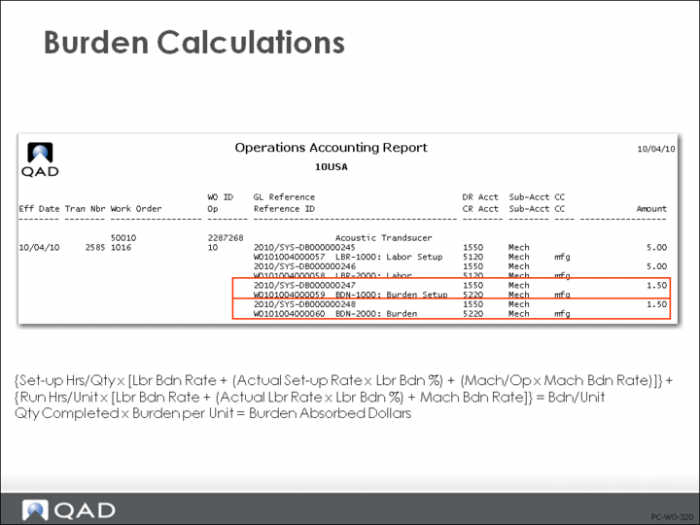
Burden is the variable overhead associated with production operations, and the Burden account is used to accumulate accrued burden for a department. Each operation can have labor burden and/or machine burden depending on how variable overhead is applied. Machine burden is applied as a machine hour rate; however, labor burden can be applied either as a labor burden rate and/or as a percentage of direct labor cost.
Example: Continuing with the example given earlier, the burden associated with the employee’s one hour of setup and one hour of run time is shown in the figure above. Labor Burden is 10% of the Labor Rate. The machine burden rate for this work center is 1.00/hour, or 1.50 for the setup and the run time.
Note: The setup burden and run burden are kept separate, as in many cases the rates will be very different.
Burden Rate Variance
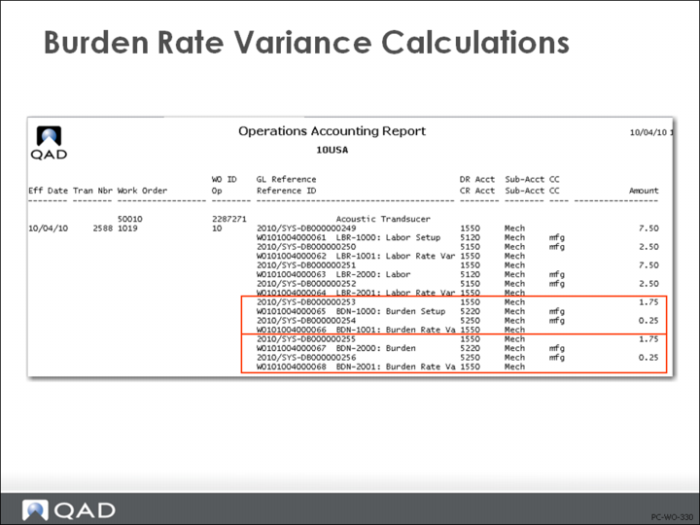
Burden Rate Variances are posted only if burden is calculated as a percentage of labor cost and the employee pay rate is different than the work center standard.
Calculations
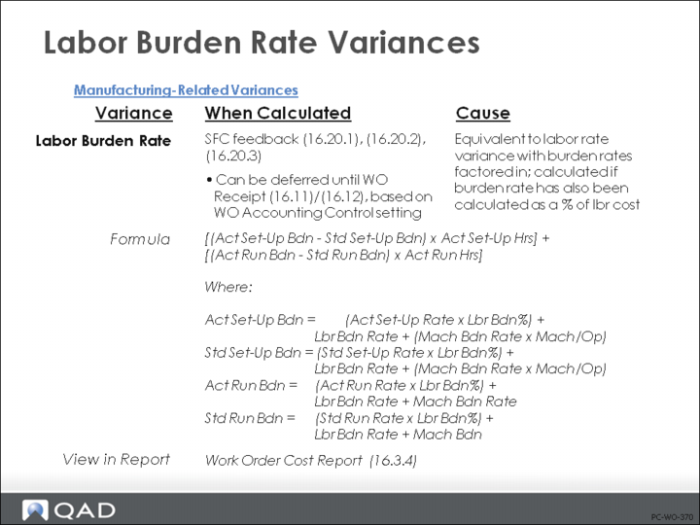
It is calculated at the time shop floor feedback is reported as:
[(Act Setup Bdn - Std Setup Bdn) * Act Setup Hrs] + [(Act Run Bdn - Std Run Bdn) * Act Run Hrs]
Where:
Act Setup Bdn = (Act Setup Rate * Lbr Bdn%) + Lbr Bdn Rate + (Mach Bdn Rate * Mach/Op)
Std Setup Bdn = (Std Setup Rate * Lbr Bdn%) + Lbr Bdn Rate + (Mach Bdn Rate * Mach/Op)
Act Run Bdn = (Act Run Rate * Lbr Bdn%) + Lbr Bdn Rate + Mach Bdn Rate
Std Run Bdn = (Std Run Rate * Lbr Bdn%) + Lbr Bdn Rate + Mach Bdn Rate
Note: The Burden Rate Variance is normally posted at the same time that labor is posted. However, if Post Variances at SFC field in Work Order Accounting Control or Work Order Maintenance is No, variance posting will be delayed until Work Order Receipt (16.11) or Work Order Receipt Backflush (16.12).
Example: Because the employee’s pay rate of 7.50 per hour is different than the work center standard of 5.00 per hour, a burden rate variance is created, as shown in the figure above.
Burden Usage Variance
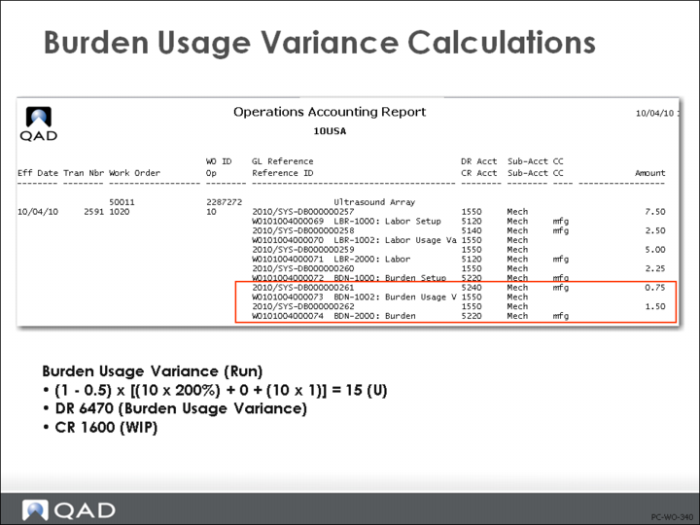
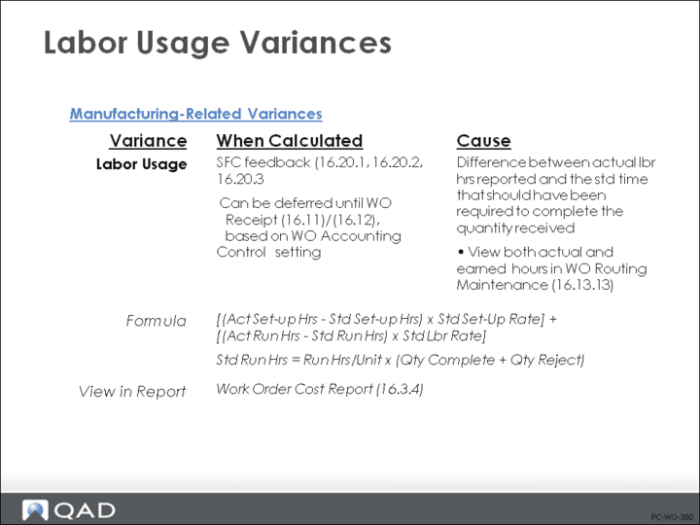
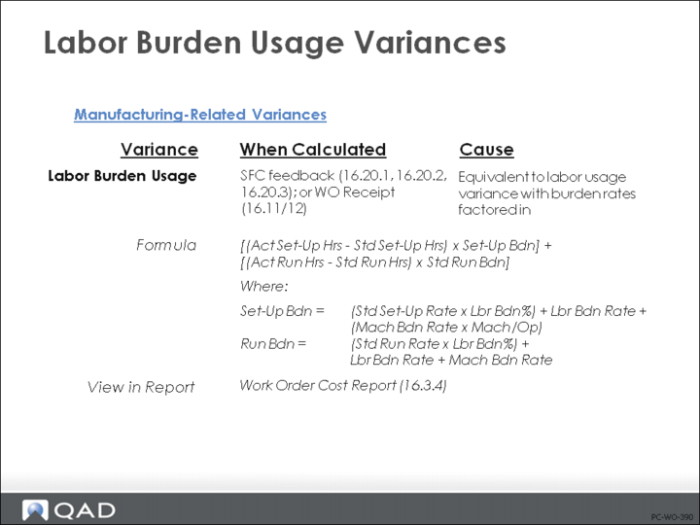
Burden usage variance results if the actual hours do not match the standard hours required on the routing. The extra burden on those hours is a burden usage variance. This variance applies to burden calculated by any of the three allocation methods - burden rate, burden percentage, or machine hours.
Calculations
Burden Usage Variance is calculated at the time shop floor feedback is reported as:
[(Act Setup Hrs - Std Setup Hrs) * Setup Bdn] + [(Act Run Hrs - Std Run Hrs) * Run Bdn]
Where:
Setup Bdn = (Std Setup Rate * Lbr Bdn%) + Lbr Bdn Rate + (Mach Bdn Rate * Mach/Op)
Run Bdn = (Std Run Rate * Lbr Bdn%) + Lbr Bdn Rate + Mach Bdn Rate
The Burden Usage Variance is normally posted at the same time that labor is posted. However, if Post Variances at SFC field in Work Order Accounting Control or Work Order Maintenance is No, variance posting will be delayed until Work Order Receipt (16.11) or Work Order Receipt Backflush (16.12).
Example: From the earlier example because the employee’s actual run time (1.5 hour) does not match standard run time (1.0 hour), a burden usage variance is created, as shown in figure above as well as the labor usage variance.Anytime there is a labor variance there will be a burden variance.
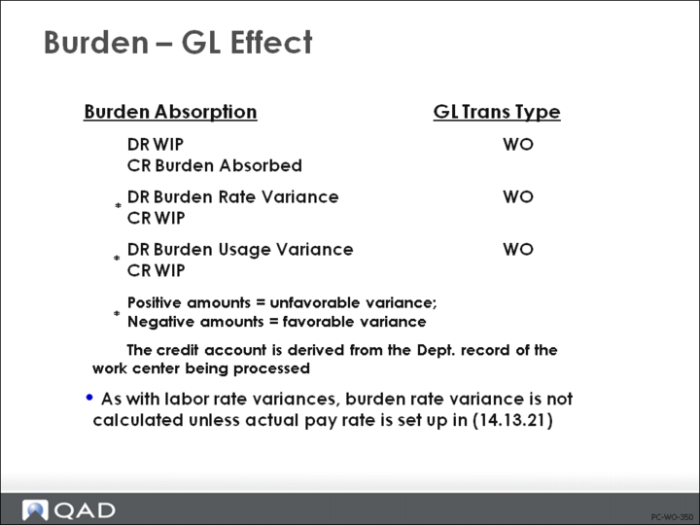
Burden: GL Effect
The default general ledger entry:
• Debits WIP
• Credits Burden Absorbed
The credit account is derived from the Department record of the work center being processed
Upon shop floor reporting, burden usage and rate variances are calculated (see following note). If the variance amount is positive, then it is an unfavorable variance; if the amount is negative, then it is a favorable variance.
Note: The Burden Usage and Rate variances are normally posted at the same time that labor is posted. However, if Post Variances at SFC field is No in Work Order Accounting Control or Work Order Maintenance, variance posting will be delayed until Work Order Receipt (16.11) or Work Receipt Backflush (16.12).
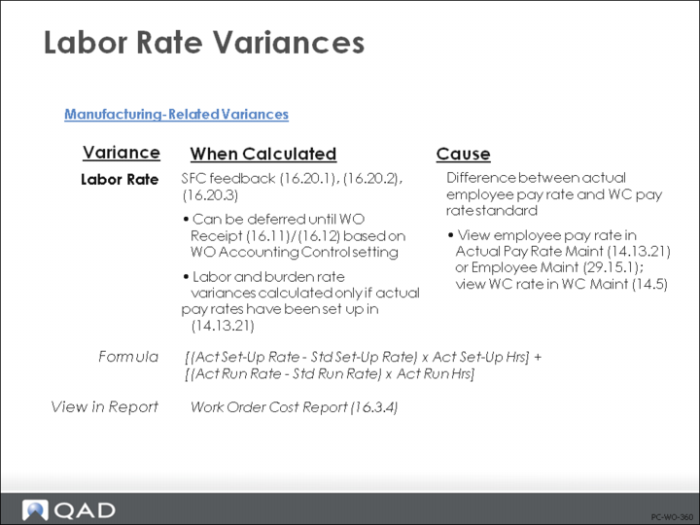
Labor Rate Variances: Summary