Exercise 8: Scrap at Work Order Receipt
In this you will process a work order and scrap some a unit at work order receipt. To demonstrate an additional function you will use work order receipt backflush. You will not process any labor transactions so you will see all labor booked at standard based on the backflush quantity. So the costs will look familiar you will use the 50010 as in the previous exercise.
1 Create a work order for two of the 50010 at site 10-100, set the status to R. As you are using a backflush transaction, do not issue components.
You had a bad day in manufacturing and one of the units has been damaged beyond repair.
2 Use Work Order Receipt Backflush (16.12) for your order. Note in the header the system has defaulted the Receive and Backflush boxes with a check mark. This indicates you are going to both receive the finished units and backflush the components required for that number of items with this one transaction. Leave both boxes checked.
In the body of the form note the open quantity of 2. In the quantity field enter 1, and in the Scrapped Quantity field enter 1. Close the order, check the close box. After the system shows you the item being received a screen appears that asks how many units worth of components do you want to backflush. The system defaults to the open order quantity. As you have used all the components leave the quantity at 2. The following screens are the component issue screens and are processed the same way.
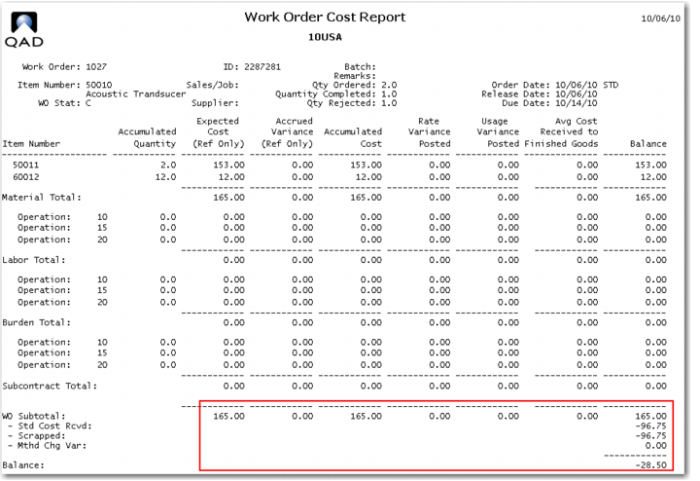
3 Review the work order cost report.
You see that the order has been charged with two sets of components and credited with the GL cost of the one unit received, and the cost of the one unit scrapped. There are not yet any labor charges.
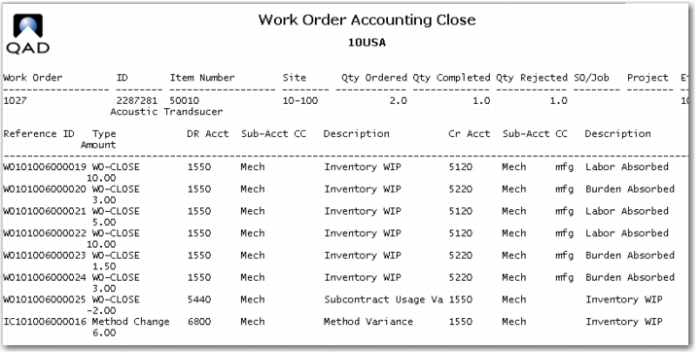
4 Run work order accounting close, and review the report.
The labor and burden charges have now been made, and the subcontract and method variance.
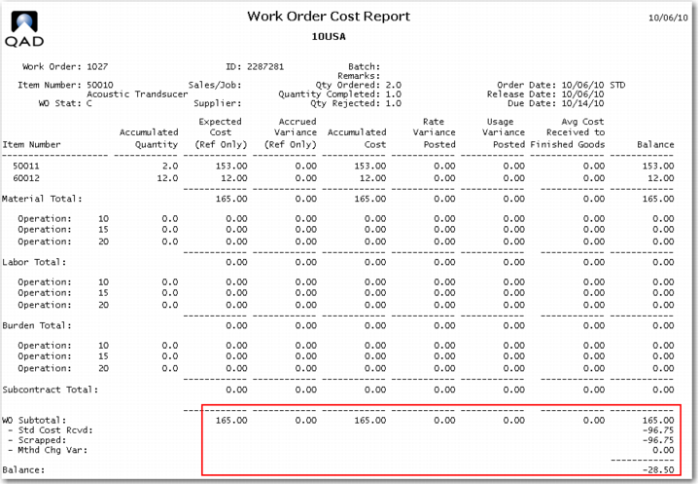
The work order cost report now looks like this.
Why is there a 6.00 method change variance on this order? Because you made two on one order and the standard order quantity is one. Setup time is only charged once per order, while run time is per piece. This order saved 5.00 in setup labor and 1.00 in setup machine burden.