Work Order Setup
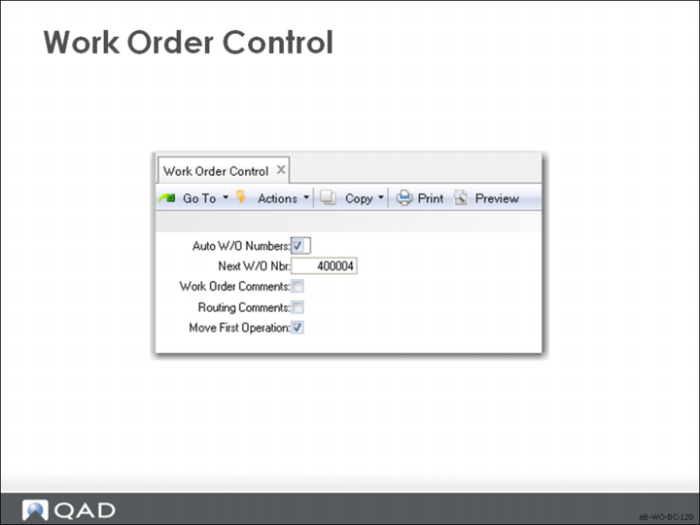
Work Order Control Setup
Note: In QAD Enterprise Edition, financial control settings are updated in a program separate from operational settings. This architecture supports detailed segregation of duties assigned with role-based security. In QAD Standard Edition, all control settings are updated in one program.
Field Definitions
Auto W/O Numbers
If No, you assign the numbers manually. This field does not affect the work order ID number, which the system assigns if you do not
Next W/O Number
The next automatic work order number for system-assigned numbers. It is not used for MRP planned orders.
Work Order Comments
Indicates whether comments are normally entered on manual work orders. This choice sets the default when you enter or modify an order
• Yes: The order comment field defaults to Yes and the transaction comment screen appears for entry of printing or non-printing comments
• No: It defaults to No. If you normally do not use comments, set this field to No to avoid being prompted each time with the comment entry screen
Routing Comments
Indicates whether comments are normally entered on each routing operation. This choice sets the default when you enter or modify a work order routing operation
• Yes: The operation comment defaults to Yes. The transaction comment screen displays for entry of comment text
• No: The default is No
You can manually change the field on individual work order routing operations
Move First Operation
Indicates whether the work order release function sets the status of the first operation to Q (queue).
• Yes: At work order release, the status of the first operation is set to Q. It then appears on the dispatch list for the specified work center, and the Q indicates that it is waiting to be started. If there is a lengthy picking effort and the work order is unlikely ready as soon as it is released, this choice is not appropriate.
• No: The operation status is left blank; you can change it manually.
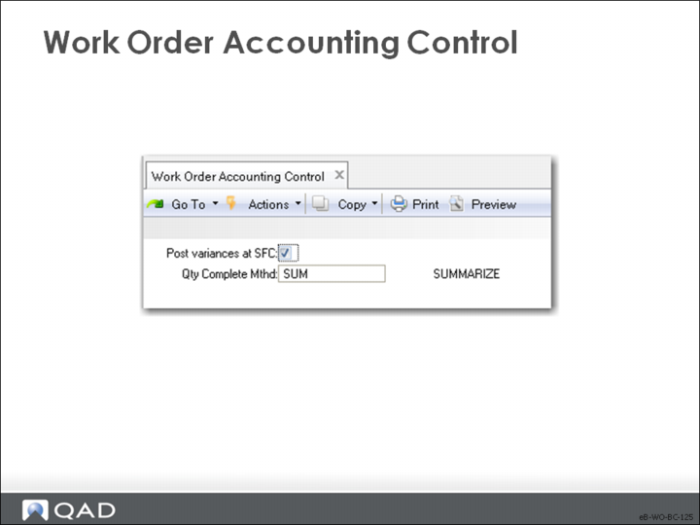
Work Order Accounting Control Setup
Post Variances at SFC
Indicate whether variances are only calculated and posted at the time of work order receipt
• Yes: Labor and burden variances are posted whenever shop floor labor feedback transactions are entered. If you have short run times, set this field to Yes.
• No: Variances are suppressed and not calculated or posted until the work order is received. This suppression reduces the number of variance transactions posted to the GL, particularly if many shop floor labor transactions are processed before material receipts are recorded
If you have long run times, set this field to No, suppressing variance calculations until finished product is received.
Quantity Completed Method
Used with Co/By Products to calculate the base process quantity complete for a joint order set. Valid values are:
SUM (Summarize): The total quantity complete for all co-products and by-products in the joint order set
SUMC (Summarize Co-products): The total quantity complete for co-products only
MAX (Maximum): The base process quantity required to complete the co-products that consumed the greatest amount of the base process in proportion to the quantity ordered.
MIN (Minimum): The base process quantity required to complete the co-product that consumed the least amount of the base process in proportion to the quantity ordered.
ORD (order): The quantity ordered on the base process order
Note: The control setting value displays as the default on all work orders, except for routable work orders, which default from the parent work order.