Maintaining WO Routings
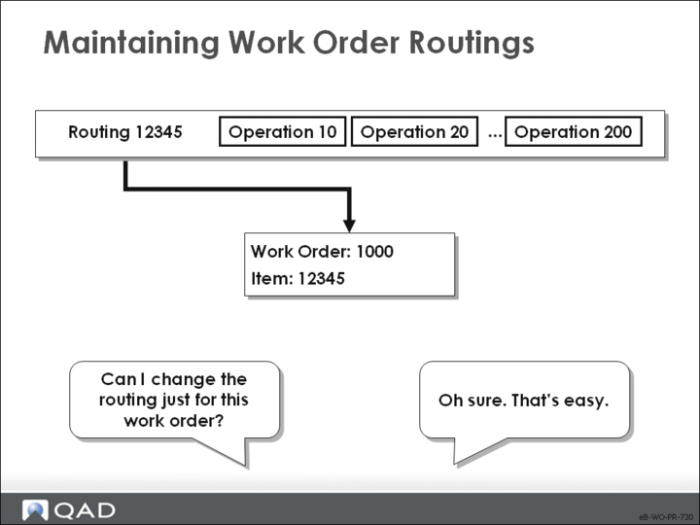
This function enables you to customize routings on individual work orders. Work order routings list all operation steps for a given work order and provide standard operation costs against which variances are calculated. They begin as the standard routing for the relevant item-site but can be changed manually.
Work order routings list all operation steps for a given work order and provide standard operation costs against which variances are calculated. They begin as the standard routing for that item-site but can be changed manually.
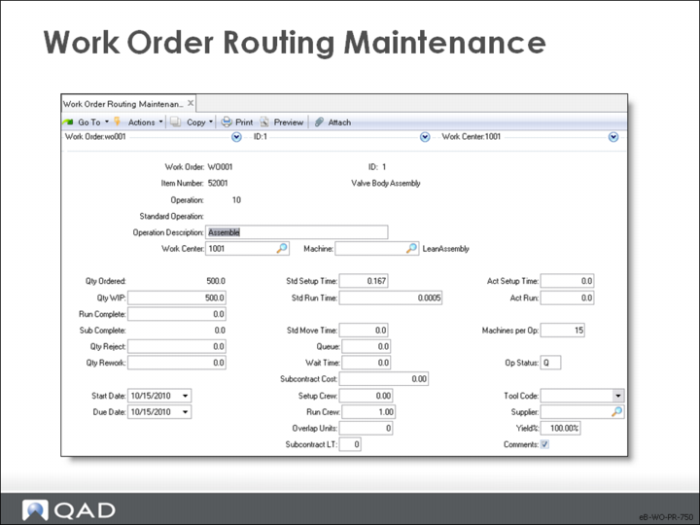
Work Order Routing Maintenance
Work Order / ID
The work order and ID numbers
Item Number
Display only
Operation
The operation number identifying a manufacturing step required for this work order
Standard Operation
Display only
Description
A short description of this manufacturing operation. This description prints on most reports, inquiries, and printed shop documents
Work Center
The work center where this operation is normally performed. If work is reported at a different work center than planned, any difference in work center labor or burden rates is written off as a work order rate variance
Machine
The machine normally performing this operation
Qty Ordered
Display only
Note: The following fields concern quantities at the operation. When using Shop Floor Control, do not change quantities manually using Work Order Routing Maintenance.
Qty WIP
The quantity in process at this operation
• As the work order proceeds through the manufacturing process, you can monitor the quantity moved from operation to operation
• You can set Work In Process (WIP) quantity manually using the Operation Move transaction, or automatically as labor and completions are reported
• The quantity completed may not be the same as the WIP quantity due to rejects, scrap, or rework. For example, you start with 100 units at the first operation, but get 95 out of the last operation, a loss of 5 units during the process
Run Complete
The quantity completed at this operation — the number of good items received not including any scrap or reject quantity
Sub Complete
Display only
Qty Reject
The quantity rejected at this operation
Qty Rework
The number of items at this operation that needed rework before continuing to the next operation
• When you have usage variances, look at the rework quantities; rework can account for much of this variance, since it requires more material and labor than expected
Start Date
The date this operation is scheduled to begin
• The system calculates scheduled start and stop dates upon work order entry but they can be adjusted manually
• Scheduled dates print on the work order routing document, and help CRP calculate capacity loads
Due Date
The date this operation is scheduled to be completed
• The system calculates scheduled start and stop dates upon work order entry but they can be adjusted manually
• Scheduled dates print on the work order routing document, and help CRP calculate capacity loads
Std Setup
The standard time, in decimal hours, it takes to prepare this work center to carry out this operation, independent of order quantity
• If actual setup labor is not reported for an operation, the system assumes that standard setup was completed and was not reported; setup is posted at standard during Work Order Accounting Close.
• Actual setup can be compared to standard setup
Std Run
The time, in decimal hours, it normally takes to process one unit at this operation
• Actual run times can be compared to standard
• The system applies the standard setup time when the setup time reported in the Shop Floor module is zero when this operation is closed on a work order
Std Move
The time, in decimal hours, it normally takes to move work from this operation to the next, independent of order quantity
• Since move time is often dependent on what the next operation is, this value normally is changed on each routing or process operation
• Move time is stated in terms of the Order Quantity of the item, but can be changed manually on the work order
Queue
The time, stated in decimal hours, a job normally waits at this work center before this operation is set up and processed
Wait
The wait time, in decimal hours, for this routing operation – the time a job normally spends waiting at this work center after this operation has been completed
Setup Crew
The number of people normally required to set up this operation
• This field is for reference only and appears on some reports and inquiries
• No scheduling or cost calculations use setup and run crew
Run Crew
The number of people normally required to run this operation at this work center
• This field is for reference only and appears on some reports and inquiries
• No scheduling or cost calculations use setup and run crew
Overlap Units
The number of units requiring completion at this operation before work can begin at the next operation
• This value is the default on all work orders referencing this routing code and can be changed on each work order routing
• If overlap is not used, set overlap quantity to zero
• In a process flow industry, normally overlap quantity is 1
Subcontract LT
The average number of calendar days it normally takes a subcontractor to perform this operation
Act Setup
The actual time, in decimal hours, spent setting up this work center for this operation
Act Run
The actual time, in decimal hours, spent working on this operation, apart from setup time
Machines Per Op
The number of machines at this work center that can work at the same time to process a given operation
Status
The current state of a work order operation. Operation status tracks a work order through the manufacturing process and can be set manually using Work Order Routing Maintenance, or automatically using Shop Floor Control functions
Values are blank, Q, S, R, C, or H
• Blank – When a work order is first exploded, all operation status codes are blank
• Q – Queue: The operation is waiting to be set up and run at the designated work center. Usually when a work order is released it is moved into queue at the first operation. When an operation is completed, it can be moved into queue at the next operation automatically or using the Operation Move transaction
• S – Setup: The work center is in the process of being set up to run this operation. Status is changed to S when setup time is recorded in the Shop Floor Control module
• R – Running: This operation is in process. Status is changed to R when run time is recorded in the Shop Floor Control module
• C – Complete: This operation is complete. This status can be set automatically when reporting labor for this operation, or at operations after this one
• H – Hold: This operation is on hold, perhaps waiting for machine repair or for components. This status can only be set using Work Order Routing Maintenance
Tool Code
A code identifying the tool this operation normally uses. This field is for reference only and appears on some reports and inquiries
Supplier
For subcontract operations, the address code of the normal or preferred supplier
Yield
The normal yield percentage for this operation – the percentage of any order expected to be in usable condition after this operation
Comments
• Yes: Display a screen for input of comments concerning this operation
• No: Proceed without accepting comments