Setting Up Other Modules
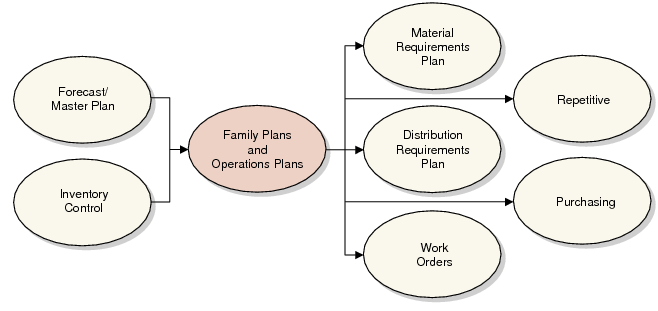
Plan Calculation Inputs/Outputs shows the modules that interact with operations planning calculations. Both the family plan and operations plan incorporate sales forecasts and inventory balances. The operations plan, in turn, can generate MRP and DRP requirements, work orders, repetitive schedules, and purchase requisitions.
Plan Calculation Inputs/Outputs
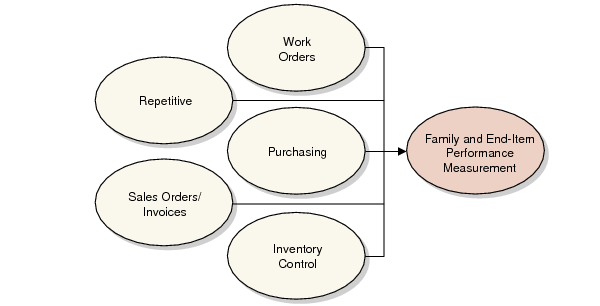
Performance Measurement Inputs shows the modules that provide data to operations planning performance reports. Performance reports include quantities from completed work orders and repetitive schedules, purchase order receipts, sales order shipments, and inventory balances.
Performance Measurement Inputs
You should implement most or all of the other required modules before implementing Operations Plan.
Implementation is also a good time to review your company’s coding schemes and other business practices to take advantage of the capabilities offered by QAD software.
Multiple Domains and Database
If you plan to import operations planning data from sites in other domains within a single database or in separate databases, you must ensure that you use consistent codes for items, sites, and so on. Inconsistencies can create problems transferring planning data.
If the domains are in different databases, ensure that database connection information is properly set up. The system determines when database switching is needed automatically based on the domain associated with the site in Site Maintenance (1.1.13).
If a database runs other manufacturing software, make sure that the codes from that database are duplicated in the database used for operations planning.
See User Guide: QAD System Administration.
System Administration
Operations Plan uses the holiday calendar if Move Holiday Production Backward is Yes in Operations Plan Control (33.1.24). In this case, calculations reschedule production backward for non-production weeks.
Generalized codes for item type (pt_part_type) and item group (pt_group) are selection criteria in many operations planning reports and processes.
See User Guide: QAD System Administration for information on calendars and generalized codes.
Set up security for most operations planning programs to prevent unauthorized changes to master data, family plans, and operations plans. This also reduces the possibility that someone will prematurely copy simulation plans over the live plans, approve operations plan orders, or delete records. You can set up security at the menu and field levels.
See User Guide: QAD Security and Controls for information on security.
General Ledger
Operations planning inquiries and reports use the company financial calendar to display the family plan and operations plan in financial periods as well as calendar weeks. Before you implement Operations Plan, set up financial calendars to support the entire operations planning horizon.
See User Guide: QAD Financials.
Distribution Requirements Plan
In multisite environments, use the Distribution Requirements Plan module to link sales forecasts and their corresponding production requirements.
Set DRP Control (12.13.24) to support combined MRP/DRP processing. That way, whenever you run MRP, the system also runs DRP, and vice versa. DRP uses the network and source network codes to distribute operations plan item requirements among company sites.
Items/Sites
Most operations planning records and activities are associated with specific company sites. Set up site security in the System Security menu (36.3).
All items used for operations planning are associated with a product line. Product line is a selection criteria in some operations planning reports and processes.
Set up unit of measure conversion factors whenever you plan sales, inventory, and production in different units of measure. For example, you may plan sales and inventory in cases, but production in tons. Similarly, you need conversion factors whenever you use different units of measure for family-level and end-item planning. You may plan in metric tons at the family level but use kilos at the end-item level.
See User Guide: QAD Security and Controls.
Set up item and item-site records for all items included in operations planning calculations.
• End items are grouped for family-level planning under a family item number.
• The operations plan approval programs use the item-site Purchase/Manufacture code. Set it to blank or M for manufactured items, L for line manufactured items, W for flow items, P for purchased items, or F for family and subfamily items. For DRP items, set it to D in item-site records for marketing sites—sites that generate sales forecasts for the item.
• For DRP items, specify the network code.
• Operations planning uses the time fence. When you calculate or explode the operations plan, you can protect items from last-minute changes inside the time fence.
• For purchased items, operations planning uses inspection, safety, and purchasing lead times for production scheduling.
• For manufactured items, operations planning uses manufacturing and safety lead times for production scheduling.
• Operations planning target inventory calculations ignore safety stock quantities.
Resource Plan
A primary objective of operations planning is to verify projected production load from the family plan and operations plan against available capacity. Therefore, you must set up resource bill records for critical resources such as equipment and labor. Operations planning uses item resource bills to calculate projected load for individual items.
Work Orders
To process operations plan production requirements as work orders, implement the Work Orders module.
See User Guide: QAD Manufacturing.
Repetitive
To process operations plan production requirements as repetitive schedules, implement the Repetitive module.
In the Enterprise Operations Plan module, you can allocate production requirements by percentage between multiple lines in a site. The production line record has an additional Primary Line field when you implement Operations Plan. This field identifies whether a line is an item’s sole production line. If your company currently uses Repetitive, during the conversion process, you must run Production Line Update (33.25.3) to update existing production line records before you can set up line allocation records in Operations Plan. Operations Plan also uses the line’s run crew size to project site labor hours.
Operations Plan uses line shift calendars to calculate the number of available production hours and utilization for each production line. If no shift calendar is available, it uses the shop calendar for the supply site.
See User Guide: QAD Manufacturing.
Material Requirements Plan
If you use DRP, you can set MRP Control (23.24) to support combined MRP/DRP processing. That way, when you run MRP, the system also runs DRP, and vice versa.
See User Guide: QAD Manufacturing.
Purchasing
To process operations plan production requirements as purchase requisitions, implement the Purchasing module.
See User Guide: QAD Purchasing