Setting Up the Operations Plan Module
Programs used for Operations Plan system setup are located in the System Setup Menu (33.1). The system setup is mandatory for all installations.
• Review the GL calendar.
• Build calendar cross-references.
• Set up Operations Plan Control.
Review the General Ledger Calendar
Before building calendar cross-references, review the general ledger calendar.
• Use GL Calendar Browse (33.1.1) to show calendar periods starting with a specific fiscal year.
• Use GL Calendar Report (33.1.2) to show calendar periods for a range of entities and fiscal years.
Note: The system defines the first week of a new calendar year as the first Thursday in January, in accordance with ISO standards.
Build Calendar Cross-References
In the Enterprise Operations Plan module, you can plan production either in calendar weeks (Monday–Sunday) or in financial periods. Calendar Cross-Reference Build (33.1.4) creates records that link the calendar and the financial calendar.
Calendar Cross-Reference Build (33.1.4)
Year/To
Enter a range of calendar years, starting with the current year.
Calendar Cross-References shows typical linkages created by the build process.
Calendar Cross-References
Shop Calendar Weeks | | Fiscal Periods |
001 January 1 – 7 | = | 001 January 1 – 31 |
002 January 8– 14 | = | 001 January 1 – 31 |
003 January 15 – 21 | = | 001 January 1 – 31 |
004 January 22– 28 | = | 001 January 1 – 31 |
005 January 29 – February 4 | = | 001 January 1 – 31 |
006 February 5 – 11 | = | 002 February 1 – 29 |
If a calendar week spans two financial periods, the build assigns the week to the period associated with the Monday date.
Example: You run the build and you have a monthly financial calendar. Week 005 is January 29 – February 4, but the week is linked to period 1 because Monday, January 29 is still in period 1. The build does this because planning activities assign item quantities to the Monday of the week.
Use Calendar Cross-Reference Inquiry (33.1.5) to verify that cross-references between calendar weeks and general ledger periods now exist for all years in the planning horizon, including the current year. Before planning for a new year, verify that cross-references exist for that year. If they do not, build them.
Configure the Control Program
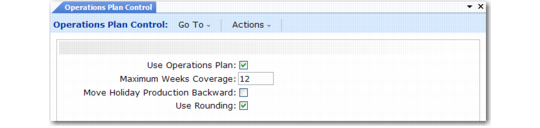
The settings in Operations Plan Control (33.1.24) affect family plan and operations plan calculations. You can reconfigure the Control at any time. Changes to Control settings affect only subsequent planning activities.
Operations Plan Control (33.1.24)
Use Operations Plan
Enter Yes to activate operations planning fields in other modules.
Maximum Weeks Coverage
Enter the maximum number of upcoming weeks (greater than zero but less than 99.99) the system should scan when netting sales forecasts against inventory balances. This setting affects the processing time of these calculations.
Move Holiday Production Backward
Enter Yes to prevent the system from scheduling production for non-production weeks. A non-production week is one that has no scheduled work days. Every day in the non-production week must be set up as a holiday in Holiday Maintenance (36.2.1).
Use Rounding
Enter Yes if family plan and operations plan calculations should round item quantities to whole numbers. Enter No if they should calculate decimal quantities.