Setting Up Hierarchies
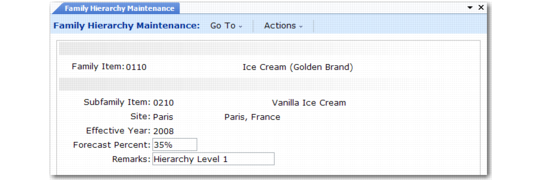
To set up new hierarchies and to change forecast percentages for existing hierarchies, use Family Hierarchy Maintenance (33.3.1). When you set up hierarchies, the system checks for cyclical relationships to prevent you from accidentally assigning a subfamily to itself.
Set up a hierarchy for every family item. Start from the lowest level and work upward to the top family level. The subfamilies for the lowest level must be end items.
Family Hierarchy Maintenance (33.3.1)
Family Item
Enter the family item number. This item must be set up previously in Item Master Maintenance with a Purchase/Manufacture code of F (family).
Subfamily Item
Enter the end-item or family-item number to assign to this level of the hierarchy.
Site
Enter the site code.
Effective Year
Enter the hierarchy year.
Forecast Percent
Enter the percentage of the total family sales forecast typically contributed by this subfamily. Family Plan Explosion (33.7.14) can use this percent to calculate dependent end-item production demands from family demands.
Remarks
Optionally enter a remark about the subfamily level. This remark prints on the Family Hierarchy Report (33.3.3).
Use three programs to review hierarchy data:
• Family Hierarchy Inquiry (33.3.2) displays subfamily levels in a family hierarchy by year, site, level, and item.
• Family Hierarchy Report (33.3.3) is similar, but you can select information for a range of items, sites, and years.
• Family Hierarchy Where-Used Inquiry (33.3.8) displays family items that include the specified subfamily.