Changing Subfamily Relationships
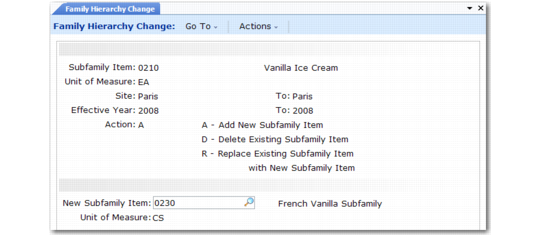
After you copy hierarchies, use Family Hierarchy Change (33.3.6) to add, delete, or replace subfamilies for individual marketing sites and years.
Note: Regardless of how you change subfamilies, you must later adjust the forecast percentages for all other subfamilies at the affected level, in all hierarchy records you change.
Family Hierarchy Change (33.3.6)
Subfamily Item
Enter the number of an end item or family item for the subfamily level affected by the change.
Site/To
Enter a range of sites to be updated.
Effective Year/To
Enter a range of years to be updated.
Action
Enter the action you want to take with this family relationship:
• Add. The system adds it (along with its lower-level subfamilies, if any) to the same level of the hierarchy as the subfamily item you specify. It also copies the existing subfamily’s forecast percent to the new subfamily.
• Delete. The system deletes the subfamily relationship with any higher- or lower-level hierarchies. However, it does not delete lower-level hierarchies previously linked to the subfamily.
• Replace. The system replaces only the subfamily item. It does not change lower-level subfamily relationships.
New Subfamily Item
Enter the number of the family item or end item to replace the specified subfamily item.
UM
The screen displays the inventory unit of measure from the item master record.