Loading Data from Non-QAD Databases
Loading data from non-QAD databases is a distributed process. You can review and correct data as you load it, and then again after you load it into the Enterprise Operations Plan module.
Loading Item-Site Data
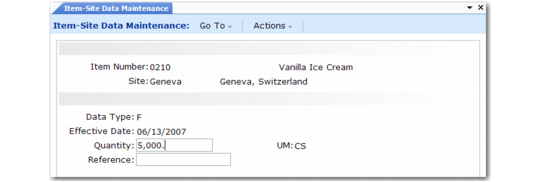
You can record data in Item-Site Data Maintenance (33.13.3) manually. However, to load many records, it is more efficient to generate an ASCII file from the source database, then use the CIM programs in the System Administration module to load the file into Item-Site Data Maintenance.
See User Guide: QAD System Administration for information on CIM.
Item-Site Data Maintenance (33.13.3)
Item Number
Enter the end-item number.
Site
Enter the site code.
Data Type
Enter F (sales forecasts), S (actual sales), W (actual production), P (production due), or I (on-hand inventory balances).
Effective
Enter the effective date for including the loaded data in operations planning calculations. When loading inventory quantities, you must set the effective date to the previous Monday.
Quantity
Enter the item quantity to load.
Reference
Optionally, enter a comment about the item quantity. This comment prints on the Item-Site Data Report (33.13.5).
Use two programs to view loaded item-site records.
• Item-Site Data Inquiry (33.13.4) shows records by item number, site, and data type.
• Item-Site Data Report is similar, but you can select ranges of items, sites, and effective dates.
Consolidating Loaded Data
After you load data, you must consolidate the loaded item quantities into weekly buckets. Operations planning requires these to generate family plans, operations plans, and performance reports.
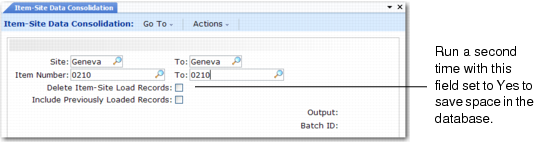
After you successfully consolidate, reduce the database size by rerunning the consolidation program to delete the original load records.
Use Item-Site Data Consolidation (33.13.6) to consolidate the loaded data.
Item-Site Data Consolidation (33.13.6)
Site/To
Enter the site range.
Item Number/To
Enter the item number range.
Delete Item-Site Load Records
Enter Yes to delete previously consolidated item-site operations planning records. Do not do this until you have completed operations planning processing for the planning period.
Include Previously Loaded Records
Enter Yes to include previously consolidated records in this process.