Changing Sales Data
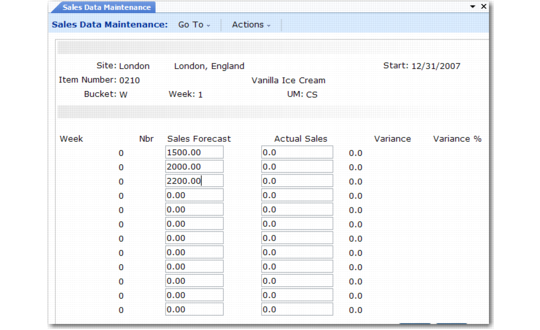
To change previously loaded forecast or shipment quantities, use Sales Data Maintenance (33.13.13). You can also use this program (manually or with CIM) to record sales quantities.
See User Guide: QAD System Administration for information on CIM.
By default, the screen displays item information in calendar weeks, but you can switch to general ledger periods.
Warning If you normally plan in weeks, do not change quantities in period view. If you do, the system permanently reassigns all weekly quantities to the first week of each period.
Sales Data Maintenance (33.13.13)
Site
Enter the site code.
Start
Enter the start date for the first calendar week or financial period. The default start date is the system date. If the date you enter is not the Monday of the week or the first day of the period, the system changes it.
Item Number
Enter the item number.
Bucket
Enter W to group item quantities into calendar weeks that start on Mondays. Enter P to group quantities into financial periods with a start date that is the first day of the period.
Nbr
Enter the number of the first calendar week or financial period to display. If you enter a bucket number instead of a start date, the system fills in the start date for you. The system also changes the start date to the first day of this week or period if this day is not already the start date.
UM
Enter the unit of measure for viewing and changing item quantities. The default unit of measure is from the item master record.
Sales Fcst
Enter the sales forecast quantity to update. Sales orders that consume forecasts do not automatically reduce these sales forecast totals.
Actual Sales
Enter the sales shipment quantity to update. You can update this only in week view. In period view, the system cannot associate shipments back to the correct week.
Variance
When you change item quantities, the screen recalculates quantity variances between planned and actual performance.
Variance %
When you change item quantities, the screen recalculates percentage variances between planned and actual performance.