Rolling Up End-Item Changes
Throughout the planning process, it is important to update the family plan whenever you make changes at the end-item level. For example, you must do this whenever you change the operations plan, or you may produce too much or too little in a future week. When you update the family plan, the system converts the end-item quantity back into the equivalent family item quantity.
The system does not automatically update the family plan. You must roll up changes:
• After you finish updating operations plans for each week or period.
• Before you print performance measurement reports.
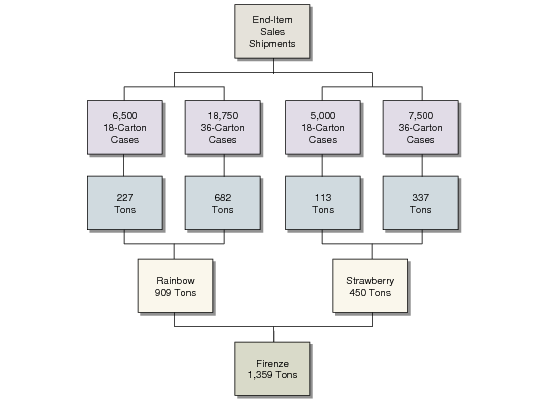
Rollup Calculation summarizes the rollup calculation, using a UM conversion of 1 case = 0.036 metric tons. The rollup updates the family projected weeks of coverage and projected quantity on hand in the family plan. For performance reporting, it also calculates the planned/actual variances and updates the actual percentage of sales in the family hierarchy.
Rollup Calculation
To ensure that the operations plan and family plan remain balanced, sites must define and enforce rigid procedures for executing the rollup.
Running Family Plan Rollup
Use Family Plan Rollup (33.7.13) to roll up changes. The rollup converts end-item quantities to family item quantities based on the percentages specified in the family hierarchy. It also converts quantities to the family unit of measure, at all subfamily levels of the hierarchy.
Be sure to select all sites and years affected by the end-item changes. The rollup includes changes for all end items in the family hierarchy.
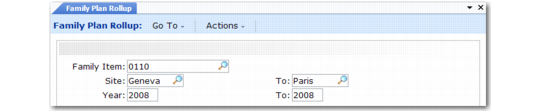
Family Plan Rollup (33.7.13)
Family Item
Enter the family item number.
Site/To
Enter the site range.
Year/To
Enter a maximum range of three calendar years, starting with the current year.