Changing Line Operations Plans
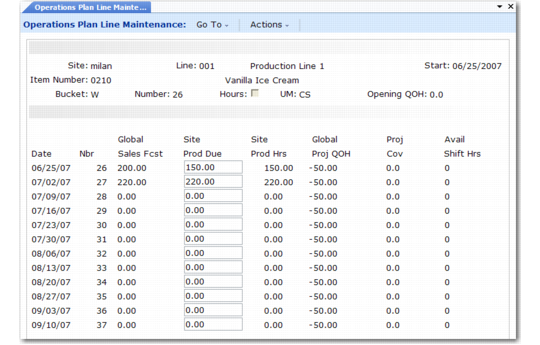
If you are a master scheduler at a supply site, use Operations Plan Line Maintenance (33.15.6) to view global sales forecasts and target inventory levels and to adjust production due quantities for production lines.
The screen can display item information either by calendar week or by general ledger period. If you normally plan in weeks, do not change production quantities in period view. If you do, the system permanently reassigns all weekly quantities to the first week of the period.
By default, the screen displays production due in item quantities, but you can switch to production hours. By default, the screen displays quantities in the inventory unit of measure, but you can change to any other unit of measure.
To delete a plan for an entire year, choose the plan and press Delete. To delete a plan for part of the year, reset the production due quantities to zero for the affected period.
Operations Plan Line Maintenance (33.15.6)
This program is very similar to Operations Plan Maintenance (33.15.1). It includes several additional fields.
Hrs
Enter Yes to update production hours. Enter No to update production quantities.
Prod Due
Production due quantity for the line. You can update this column if Hrs is No. The system calculates line production due from the site production due, based on the percentages defined in Line Allocation Maintenance (33.5.17). When you change production due, the screen recalculates global projected quantity on hand and weeks of coverage.
Prod Hrs
Projected line production hours for the production due quantity. You can update this column if Hrs is Yes. The system calculates projected production hours as:
Line Production Due Quantity ÷ Hourly Line Production Rate
Production rates are defined in Production Line Maintenance (18.1.1).
Shift Hours
Number of weekly shift hours available for production. The system calculates shift hours based on holidays from Holiday Maintenance (36.2.1) and the shift calendar from Shift Maintenance (18.1.22) or shop calendar from Calendar Maintenance (36.2.5).